


SocialScoreForever
- By
ssf_1.png
ssf_3.png
ssf_2.png
ssf_4.png
ssf_5.png
Description
Social Score
Social Score is a personal player-rating addon for World of Warcraft: Forever. Rate the players you group with (+1 / -1, notes and a blacklist), see those ratings in tooltips, group invites and the Group Finder, and keep a private Kill-on-Sight list that warns you when listed players or guilds are near you.
Recognise the great tank from last week, steer clear of the player who left your dungeon halfway through, and know who is around you in the open world.
Private by design: everything is stored on your own computer. Nothing is posted to chat or sent to other players unless you turn on sharing with your own guild, and your notes always stay private. It's your own notebook, not a public rating system.
New in 1.9
- Skill rating (optional): rate how well someone plays apart from how nice they are. Turn it on in Settings → General and the rating popup gets a Skill row (+1 / -1, click again to undo) above the Social row. The Score list shows each player's skill next to their score and can sort by it, and tooltips, the Group Finder box and the Guilds details show it too. Skill ratings are included in Export / Import and, with Guild share on, shared with guildmates.
- Simpler rating popup: the social buttons are now just +1 / -1 (hover them for the meaning).
New in 1.8
- Guilds view: a new Guilds tab in the window. Social Score remembers each player's guild, and every guild shows the total score of the players you rated from it. Click a guild to see the players you know from it. Add any guild by name (or your target's guild) and give it your own +/- and a note. Player tooltips show their guild's score too.
- Guild share (optional): turn it on in Settings → Guild share and guildmates who do the same see each other's scores, quick tags and blacklist marks. Your notes are never shared. Their ratings show in tooltips, the Group Finder box and the rating popup, and the Score list gets a Guild filter with every player they rated. Their ratings never change yours, and turning it off removes them again.
- Settings categories and search: Settings now has a category list on the left and a search box. Type a word to see only the matching settings.
- Fixed: players with Cyrillic, Chinese or accented names are now stored correctly (before, they could end up sharing one entry). Your existing list is converted automatically at the first login.
New in 1.7
- Group Finder hover box: hover a listing and a small Social Score box opens under Blizzard's tooltip with every member you know: their score, note, tags and blacklist mark, plus how many others aren't on your list yet.
- Scores in every chat: players you know now get their [+3], [BL] or [KOS] tag in Say, Yell, emotes and channels such as Trade and LFG, not only in whispers. Their quick tags follow as small symbols, the same ones as on nameplates.
- Hover and click the tag: hover a score tag (or a symbol) in chat to see the player's score, note, tags and runs together. Click it to open their rating popup and change the score, note or tags right there.
Both are in Settings → Popups & warnings: "Score tags in chat" (Public + whispers / Whispers / Off) and "Tag symbols in chat" (On / Off). Group, raid and guild chat is never tagged.
- KOS after a PvP death: when an enemy player kills you out in the world, Social Score tells you who it was (class, level, guild and the killing blow) and offers to add them to your KOS list in one click, with their guild if you like. Already on KOS? The kill is counted and shows in their KOS tooltip. Duels, dungeons and battlegrounds never ask. Turn it off in Settings → KOS alerts or with the popup's own link.
- Keep only rated players (optional): don't want a record of everyone you ever grouped with? Turn on Settings → Data → "Keep only rated players" and only the players you rated, noted, tagged, blacklisted or put on KOS are kept. Your current and last group stay until the next group starts, so you can still rate them. Dungeon history is not affected.
New in 1.6.1
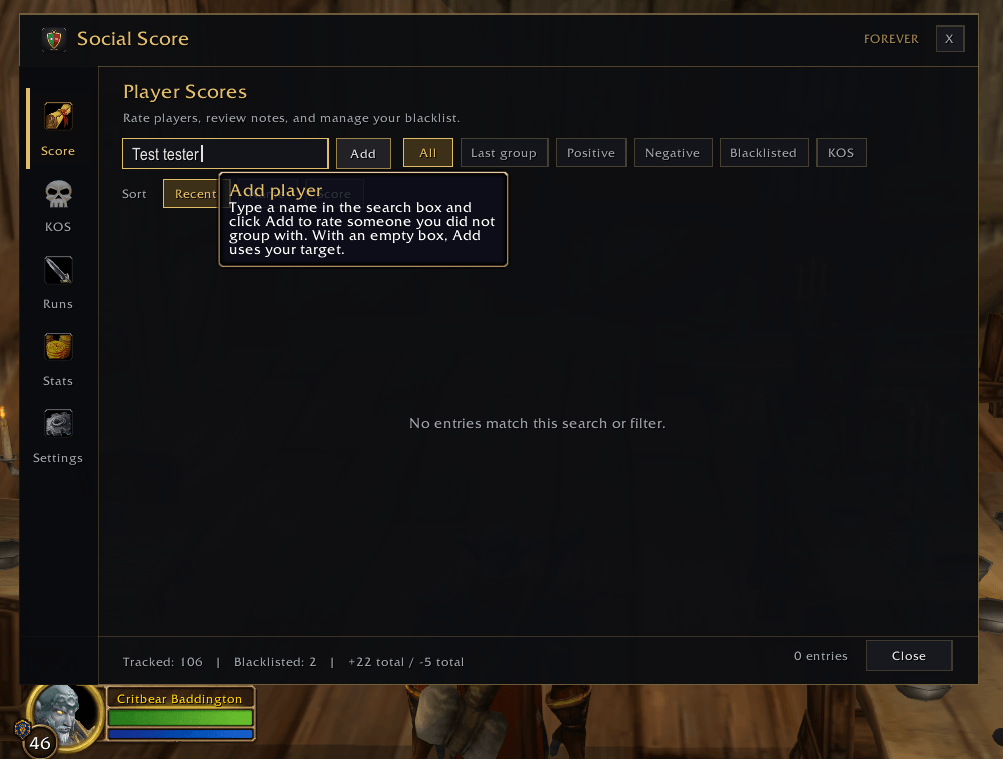
- Add players by hand: type a name in the Score search box and click Add (or
/ss add Name Surname) to rate someone you never grouped with: a scammer from Trade chat, or a helpful stranger out in the world. With an empty box, Add uses your current target. - Prefer to rate only by hand? The rating popup now has a "Don't ask me automatically" link that turns automatic popups off in one click, for every group, dungeons and open world alike. You can still rate anyone from the Score list or with Add, and turn popups back on in Settings → Popups & warnings.
New in 1.6
- Dungeon stats: a new Dungeons tab in Runs shows every dungeon you've run: runs, clears, bosses killed, average and fastest clear time, wipes, loot (and how much of it was yours) and when you were last there. Click a dungeon to see its runs.
- Search your runs by dungeon or by a player who was in the group.
- Hide chat from blacklisted players (optional): hide their say, yell, emotes and Trade / LFG messages, and optionally their whispers too. Group, raid and guild chat always shows.
- Export / Import now includes your dungeon history, so a backup keeps your runs too. Importing the same backup twice doesn't duplicate anything.
Features
Rate the players you group with
- When a group ends, or someone leaves it, a small popup lets you give each player +1 or -1, add a short note, or Skip.
- Popups are adjustable: always, only after dungeons, or off (one click on the popup's Don't ask me automatically); skip guildmates and friends; or snooze them for an hour.
- Add anyone by hand, even players you never grouped with: type a name in the Score search box and click Add, or target the player and click Add with an empty box.
- Raids are recorded but never prompt you, so a 40-player raid won't flood you with popups. Afterwards the Last group filter lists everyone from that raid, ready to rate by hand.
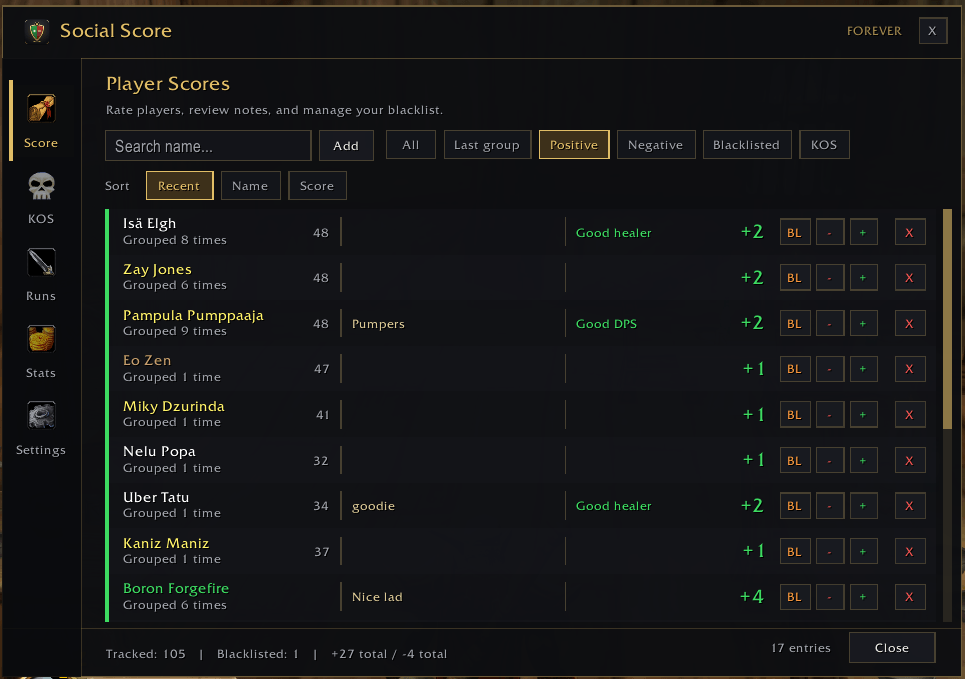
- Every player gets a running score, a group count, an optional note and quick tags: one click for Good tank, Good healer, Friendly, Ninja looter, Toxic and more.
- Skill rating (optional): a second +1 / -1 score for how well someone plays, kept apart from their social score.
- A blacklist for players you never want to group with again. Optionally hide their chat too: public chat only, or public chat and whispers.
See it when it matters
- Player tooltips: hover over any player to see your score, your note, and whether they're blacklisted or on your Kill-on-Sight list.
- Group invites: when someone you know invites you, a banner above the invite shows what you noted about them. It turns red with a sound when they're blacklisted, on your KOS list or have a negative score.
- Group joins: a chat warning when a blacklisted player, or one at -3 or lower, joins your group.
- Met before: when someone you've grouped with before joins, a quiet chat line with their score and tags.
- Chat: whispers, Say, Yell, emotes and channels like Trade from players you know are tagged with [KOS], [BL] or their score, plus symbols for their quick tags. Hover the tag for their details; click it to rate them or edit your note.
- Group Finder: listings show the combined score of the players you know, right next to the name, plus a red BL when a blacklisted player is in the group. Hover a listing to see each known member's score, note and tags.
- Nameplates (optional, turn on in Settings): a small marker above a player's nameplate shows your score, a skull for blacklisted players, a KOS mark and a symbol for each of their tags, so you spot the great tank in a crowd. Settings shows what every symbol means.
Guilds
- The Guilds tab lists every guild you know players from, with the total score of the players you rated from it. Click one to see its members on your list.
- Rate a guild yourself: add it by name (or your target's guild), give it +/- and a note.
- Guild share (optional): guildmates who turn it on see each other's scores, quick tags and blacklist marks, never notes. Their ratings stay separate from yours and show in tooltips, the Group Finder box, the rating popup and the Score list's Guild filter.
Kill on Sight (KOS) list
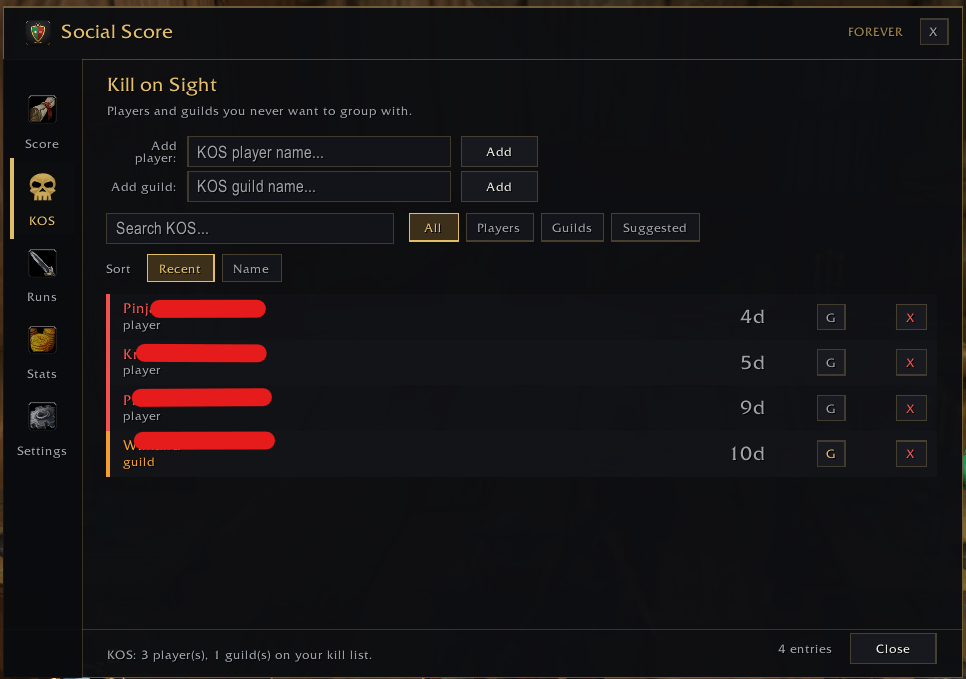
A separate list for players, and whole guilds, you want to stay aware of, for example on a PvP realm.
- Add players or guilds by name in the KOS tab or with
/ss kos. - When someone on the list shows up near you (nameplate, target, focus or mouseover), you get a big on-screen warning with their name and zone, a sound and a chat alert. The warning, the sound and how often it repeats are all adjustable in Settings.
- Each sighting records where and when they were seen. One click sets a waypoint there (uses TomTom if installed, otherwise the built-in map pin).
- Share with your guild (optional): mark an entry as shared and guildmates running Social Score get it as a suggestion they can accept or decline. Nothing is added to anyone's list without their OK, only the entries you mark are shared, and removing your entry removes it for everyone. Alerts are only ever shown to you.
Dungeon history
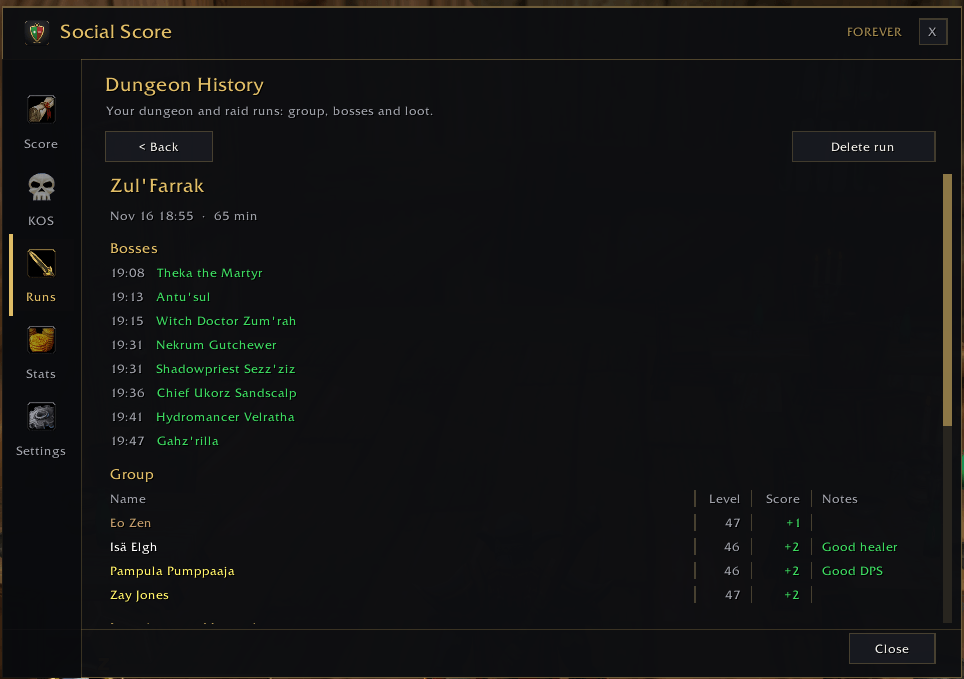
Every dungeon and raid you run with a group is recorded automatically, in the Runs view.
- Who was there: everyone in the group in a neat table, with class color, their level at the time, score and tags. Player tooltips show how many runs you've done together.
- Bosses: every kill and every wipe.
- Loot: rare (blue) and better, with who got it. Hover an item to see everyone's Need / Greed choice and roll; Shift-click it to link it in chat.
- Dungeon stats: the Dungeons tab totals every dungeon you've run: runs, clears, bosses killed, average and fastest clear, wipes and loot. A clear means the last boss died; clear times run from entering to the last boss kill.
- Search runs by dungeon or by a player who was in the group.
- Context on ratings: a rating you give after a run remembers where it happened ("Last rated +1: Stormwind Stockade, Nov 08").
- Wipes, run backs and
/reloadstay one run; a reset starts a new one. Runs are kept until you delete them (one run at a time, or all in Settings), and recording can be switched off.
A proper window
- Dark and gold design with Score, Guilds, KOS, Runs, Stats and Settings views. Settings has categories and a search box.
- Names in class color, with level, note and tags in their own columns.
- Search, filters (positive, negative, blacklisted, KOS) and sorting, plus a scroll bar to get through long lists fast.
- Quick +1 / -1 / blacklist buttons on every row.
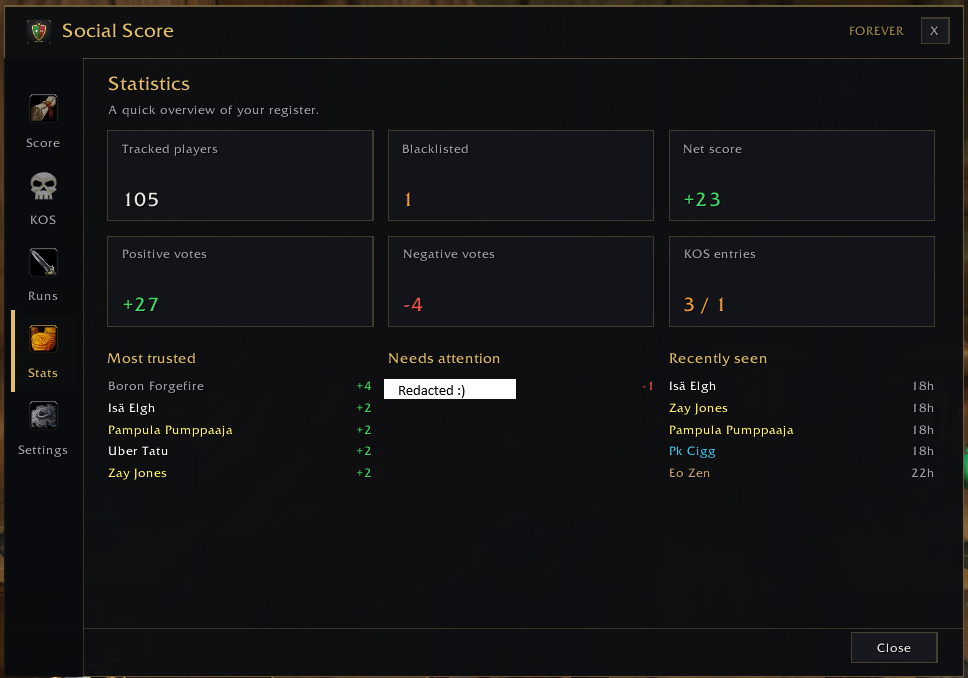
- Stats: totals, most trusted, needs attention and recently seen players.
- Minimap button (drag it around the edge, or hide it), plus an entry in the addon compartment.
- Export / Import (Settings): your whole list, players, guilds, KOS and dungeon history, as text you copy with Ctrl+C and paste back to restore.
Languages
English, Finnish, Russian and Simplified Chinese. The language follows your client, or pick one in Settings.
Commands
| Command | What it does |
|---|---|
/ss or /socialscore |
Open or close the window |
/ss add <name> |
Add a player to your list and rate them (no name: your target) |
/ss kos add <name> [note] |
Add a player to your KOS list |
/ss kos guild add "<guild name>" [note] |
Add a guild to your KOS list |
/ss kos list |
List your KOS entries in chat |
/ss minimap |
Show or hide the minimap button |
/ss export / /ss import |
Open the Export / Import window to back up or restore your list |
/ss locale <enUS, fiFI, ruRU or zhCN> |
Change the language |
/ss version |
Check the addon matches your game client |
Good to know
- KOS detection uses nameplates. Turn on enemy nameplates (and friendly ones, for players of your own faction). Settings → KOS detection shows whether they're on and lets you toggle them. The combat log can't be used: the Forever client doesn't make it available to addons.
- Nameplate markers need nameplates on, like KOS detection: friendly ones (Shift-V) for players of your own faction.
- Inside dungeons and raids the game hides the names of other players near you from addons, so KOS alerts and nameplate markers pause there. Your own group and the loot messages stay readable, so ratings and dungeon history work as normal.
- Your data is saved in the
SocialScoreDBsaved variables, with an automatic backup copy, so a bad session can't wipe your list.
Feedback
Found a bug or have an idea? Leave a comment on this page. Screenshots and the exact Lua error text help a lot.
SocialScoreForever Team
