SocialPlus
- By
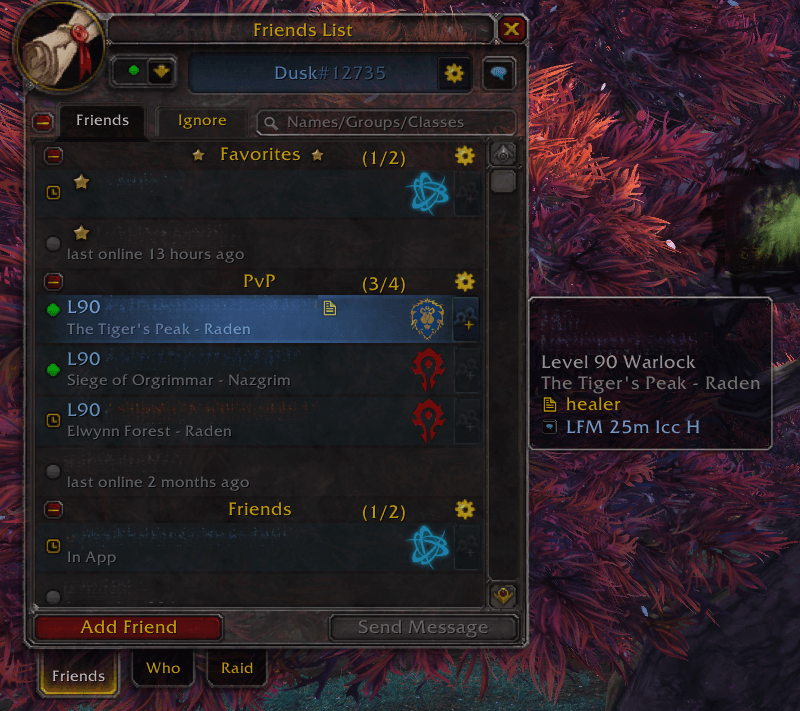
**A modern social upgrade for MoP and TBC classic** — reliable cross-realm invites, custom friend groups, smart notifications, and a cleaner UI. Available in English, French, and Spanish.
SocialPlus.png
SocialPlus-multi-invites.png
SocialPlus-multi-invites.png
Description
# SocialPlus

**The Friends List that Classic should have shipped with.** Reliable cross-realm invites, custom groups, favorites, rich clickable notifications, and instant search — all in the native Blizzard look, for both MoP Classic and TBC Classic. English, French, and Spanish.

---

## The problem

The Classic friends list is bare-bones, and cross-realm invites fail silently more often than they work. SocialPlus fixes the invites first — then rebuilds the entire social experience around them.

## What you get

### 📌 Invites that actually work
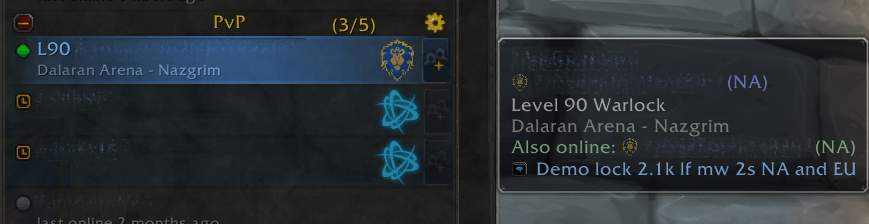
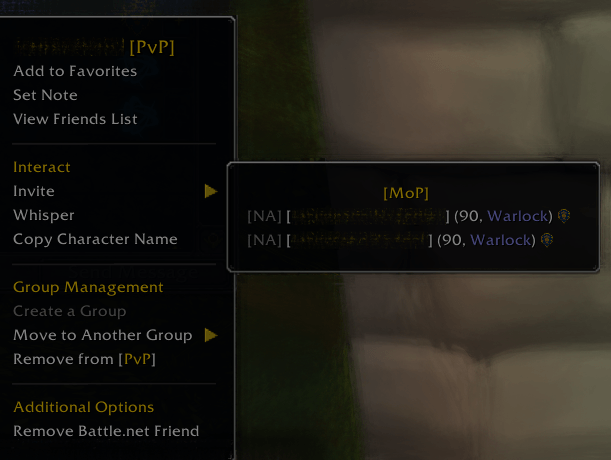
Consistent cross-realm invites. And when an invite genuinely isn't possible, SocialPlus tells you **why** — wrong region, faction, game version, or already in your group — instead of doing nothing. Friend playing on multiple linked WoW accounts under the same Battle.net? Pick exactly which one to invite from a submenu, with ineligible accounts greyed out and their level/class shown.

### 🔔 Notifications worth reading
Forget "X has come online":
- **Class-colored, clickable name** — one click opens a whisper, faction- and cross-realm-safe
- See class, level, game version (Retail → MoP), faction icon, and region at a glance
- Shows the friend's group — click it to open your friends panel already filtered
- Optional notification sound, matching Blizzard's own friend online/offline chime
- Mute noisy groups individually, or toggle master/offline notifications in settings

### 🗂️ Groups, your way
- Create, rename, delete, and drag-to-reorder groups
- Move friends between groups from the right-click menu
- Collapse/expand individually or all at once, with online/total counters
- Group-wide actions on the header: **invite everyone**, rename, delete, mute
- In-game (character) friends automatically get their own **In-game Friends** section — tag or favorite one and they move out on their own

### 📬 Friend requests
Pending Battle.net requests show up as their own section right in the list — accept or decline with one click, no digging through toasts. And if a request is broken on Blizzard's end, SocialPlus tells you instead of ignoring the click.

### ⭐ Favorites that mean something
Star the friends you actually play with. They sit at the top of your friends list — fully independent of Blizzard's Battle.net favorites.

### 🔀 Sorting that reads right
Online first, then DND, then away. Grouped by game, Battle.net-app idlers last, alphabetical within each cluster. Turn on **Prioritize [your version] friends** to float your actual raid buddies to the top, same-faction first.

### 🔍 Search that keeps up
Filters live as you type, accent-insensitive, and matches classes too — "lock" finds every Warlock you know.

### 🏆 Rated PvP at a glance
With [ArenaPlus](https://github.com/Atlas-Engine/arenaplus) installed, hovering a friend shows where they stand: rating and ladder rank for every bracket, coloured by the title the rating is worth, with their spec icon beside their name. Friends below the ladder cutoff show nothing rather than an empty section, and without ArenaPlus the block — and its settings — stay hidden entirely. Playing several characters at once? **Tab** cycles the tooltip through them.

### 🌍 Region flags
Battle.net friends actually playing WoW get their region's flag beside their name. Somebody sitting in the Battle.net app, playing another game, or on your own realm doesn't — a flag only appears where it tells you something. Switchable off.

### 🆕 Recently Added
Friends added this session gather into their own group under Favorites, so a new name doesn't vanish into a long list before you've filed it. Favoriting or grouping them takes them out; the X on the header clears it; it starts empty again next login.

### 🏷️ Names, your way
Real ID shows real names by default. Prefer BattleTags? One setting swaps every row over.

### 🎯 One right-click, everything
Invite, whisper, copy name, set note, favorite, move, remove — no digging.

### 🎨 Looks like Blizzard, only better
Class colors, faction crests, consistent game icons, a note indicator at a glance, and non-invitable friends subtly faded so you instantly see who's available. Inertia-based smooth scrolling keeps big lists fluid — and the whole addon stays lightweight, cleaning up after itself so memory usage never creeps.

### 🌍 Speaks your language
English, French, and Spanish — follows your client automatically.

## Settings
Cogwheel next to your Battle.net tag: hide offline friends, class colors, scroll speed, region flags, BattleTags instead of real names, which brackets the PvP block lists, and full notification controls (master, offline lines, same-version only, notification sound). Shows the installed version in the corner.

> 💡 **Tip:** the default **General** group starts muted. Unmute it from its header if you want notifications for ungrouped friends too.

## Feedback
Bug or idea? Comment on CurseForge or open a GitHub issue — every report helps.

## Credits

| Version | Contributor |
|---|---|
| Original | frankkkkk |
| 6.2 fixes | ClassZ |
| 7.1 fixes | Mikeprod |
| 8.2 fixes | y368413 |
| 8.2.5 fixes | Mudohir |
| 8.3 / 9.0.5 / 10.0 | Hayato2846 |
| MoP & TBC Classic modernization | Atlas-Engine |
SocialPlus Team