GuildMade – Guild Crafters, Gear & Recipes for WoW Forever
- By
Who in your guild can craft it? Guild-wide recipe search, gear finder, reagents & Auction House, auto-synced for WoW Forever.
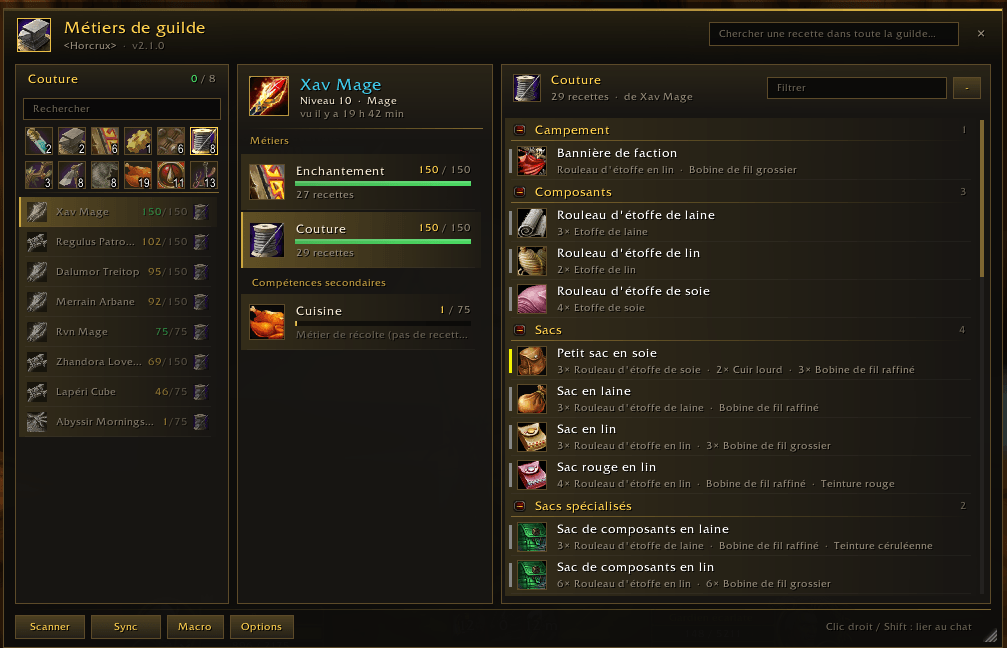
Capture d'écran 2026-11-14 204109.png
Description
# ⚒️ GuildMade — Guild Crafters, Gear & Recipes for WoW Forever
**"Can anyone craft this?"** — stop asking in guild chat and waiting.
GuildMade automatically shares the professions and recipes of every guildmate who uses the addon, so you can find the right crafter in seconds.
---
## ✨ Features
### 🔍 Guild-wide recipe search
Type an item name and instantly see **who in your guild can craft it**, online members first.
### 🛡️ Gear finder
Need a leather piece with Intellect for your level 35 alt? Filter **every craftable item in your guild** by:
- required level (or one click on *My level*)
- armor type and slot
- stats: Strength, Agility, Stamina, Intellect, Spirit, Attack Power, Spell Power, Crit, Hit, Mp5, Defense and more (all of them, or at least one)
- online crafters only
### ⚗️ Full recipe details
- Reagents, **how many you have** (bags + bank) and **how many you can craft**
- **Required skill** and orange / yellow / green / grey tiers
- **Where the recipe comes from**: trainer, vendor, drop, quest, reputation
- Sort recipes by category or by required skill
### 💰 One-click Auction House shopping
With the Auction House open, click **Buy at AH** on any recipe (or Alt+click it):
GuildMade searches **the crafted item AND all of its reagents at once**, and opens a small shopping list next to the Auction House showing how many of each reagent you need and how many you already have.
### ✉️ Ask for a craft in one click
- **Whisper** opens a message to the crafter with the recipe link already in it
- **Link** posts the recipe in chat
### 👥 Find crafters by profession
Click a profession icon to list every guildmate who has it, **online first, highest skill first**.
### 🔄 Automatic, lightweight sync
- Your professions update whenever you open them
- Each recipe list is sent **once to the whole guild** and cached, so offline crafters stay visible
- Only lists that changed are downloaded again
- Built-in rate limiting: **no lost messages, no chat spam**
### 🎨 Clean interface
Dark & gold theme, smooth animations (can be turned off), resizable window, minimap button, English and French.
---
## 🚀 Getting started
1. Install GuildMade, and ask your guildmates to install it too. The more members use it, the more complete your guild's recipe book becomes.
2. Log in and **open each of your professions once** (or click **Scan**).
3. Open the window with the minimap button or `/guildjob`.
**Commands**
- `/guildjob` — open / close the window
- `/guildjob sync` — force a sync
- `/guildjob scan` — scan your professions
- `/guildjob options` — settings
- `/guildjob reset` — re-center the window
---
## 📦 Optional dependency
**LibProfessionDB** — install it to see required skill, skill tiers and recipe sources. Everything else works without it.
## 🔒 Privacy
Data is only exchanged with **members of your own guild** who have the addon. Nothing ever leaves your guild.
## ❓ FAQ
**A guildmate's recipes don't show up?**
They need to be online with the addon and to have opened their professions at least once. Then click **Sync**.
**Some items show "loading…"?**
Your game is loading item data for the first time; the list fills in by itself.
---
💬 **Bugs, ideas, translations?** Leave a comment, feedback is very welcome!
GuildMade – Guild Crafters, Gear & Recipes for WoW Forever Team