Faire Trade - Darkmoon Faire Ticket Planner
- By
Darkmoon Faire turn-ins of the week, built-in AH scan, cheapest cost per ticket and a purchase plan that respects reputation caps. Made for WoW Forever.
4_purchase_plan.png
5_rewards_minimap.png
2_npc_panel.png
3_ah_scan.png
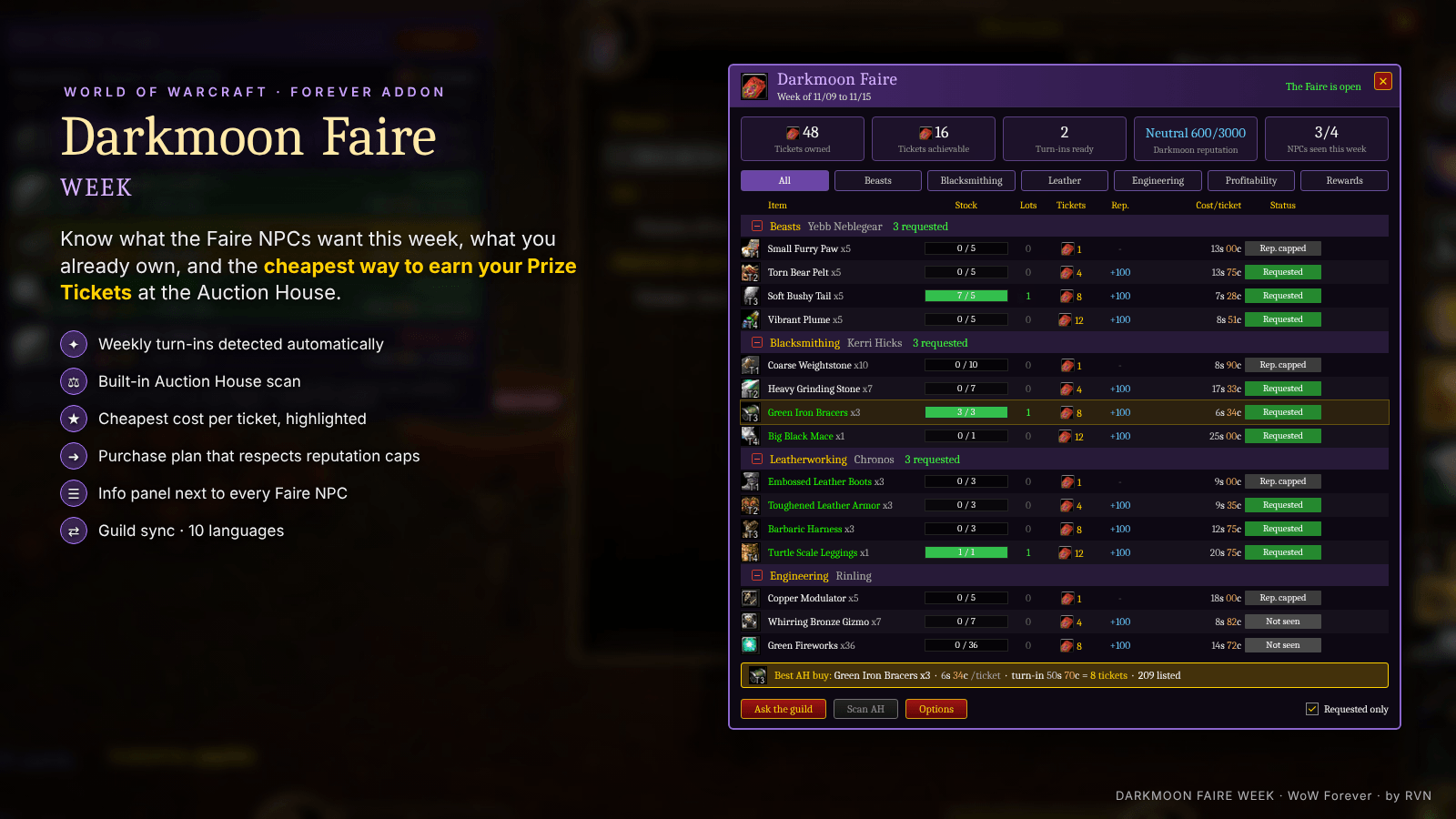
1_hero.png
Description
# Faire Trade
### Darkmoon Faire Ticket Planner for WoW Forever
Know **what the Faire NPCs want this week**, what you already own, and the **cheapest way to earn your Darkmoon Prize Tickets** at the Auction House.
---
## ✦ Features
**Weekly turn-ins, detected automatically**
Talk to Yebb Neblegear, Kerri Hicks, Chronos or Rinling once: every quest they offer this week is recorded (quest ID based, works in every language).
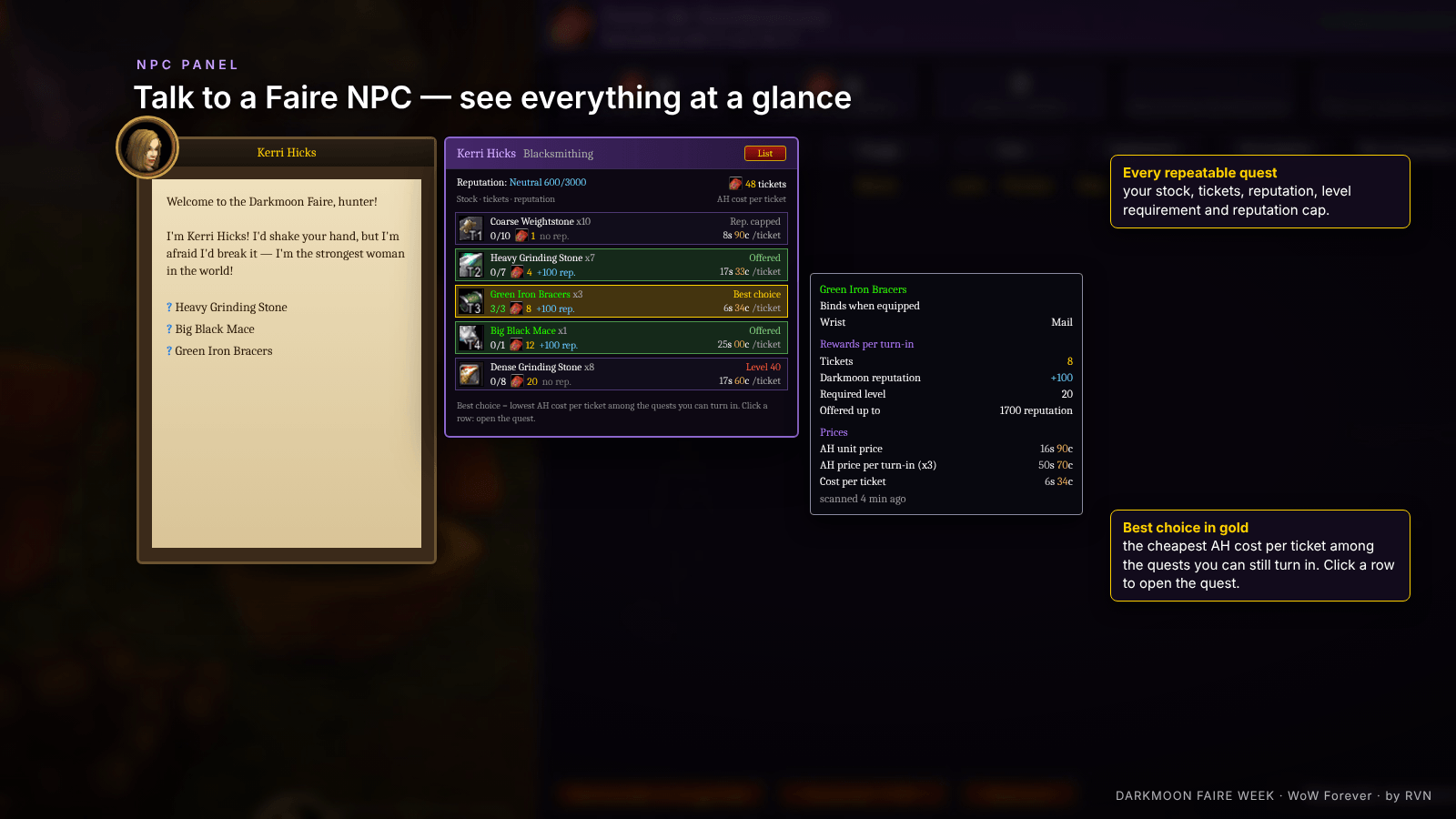
**NPC panel**
A panel docks next to the Faire NPC dialog and shows every repeatable quest: your stock, tickets, reputation gain, level requirement, reputation cap and AH cost per ticket. The **best choice** is highlighted in gold. Click a row to open the quest.
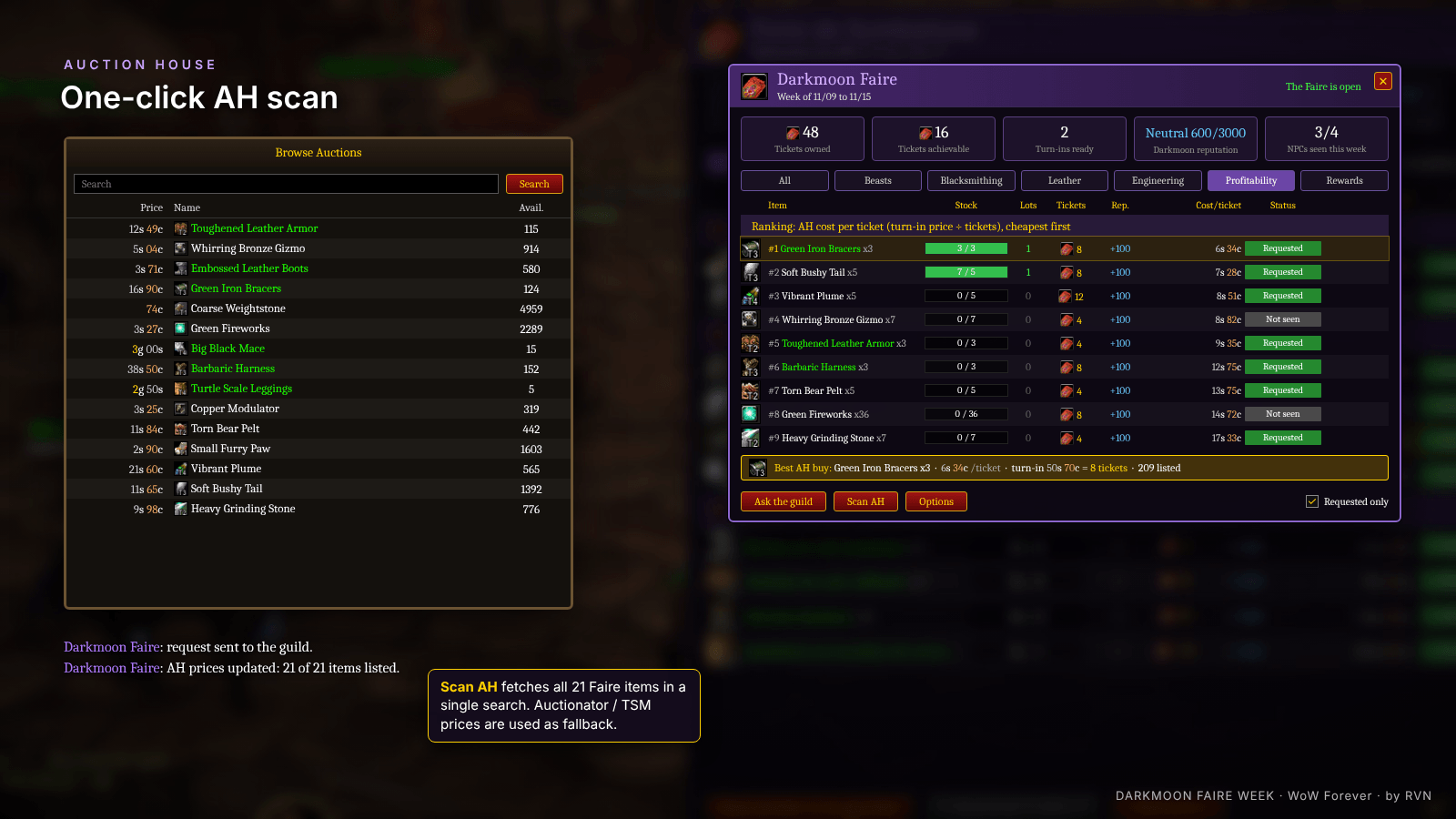
**Built-in Auction House scan**
One click on **Scan AH** fetches the price of every Faire item in a single search. No scan yet? Auctionator or TSM prices are used automatically.
**Profitability ranking**
All turn-ins ranked by **AH cost per ticket** (turn-in price ÷ tickets), only among the quests your character can still turn in.
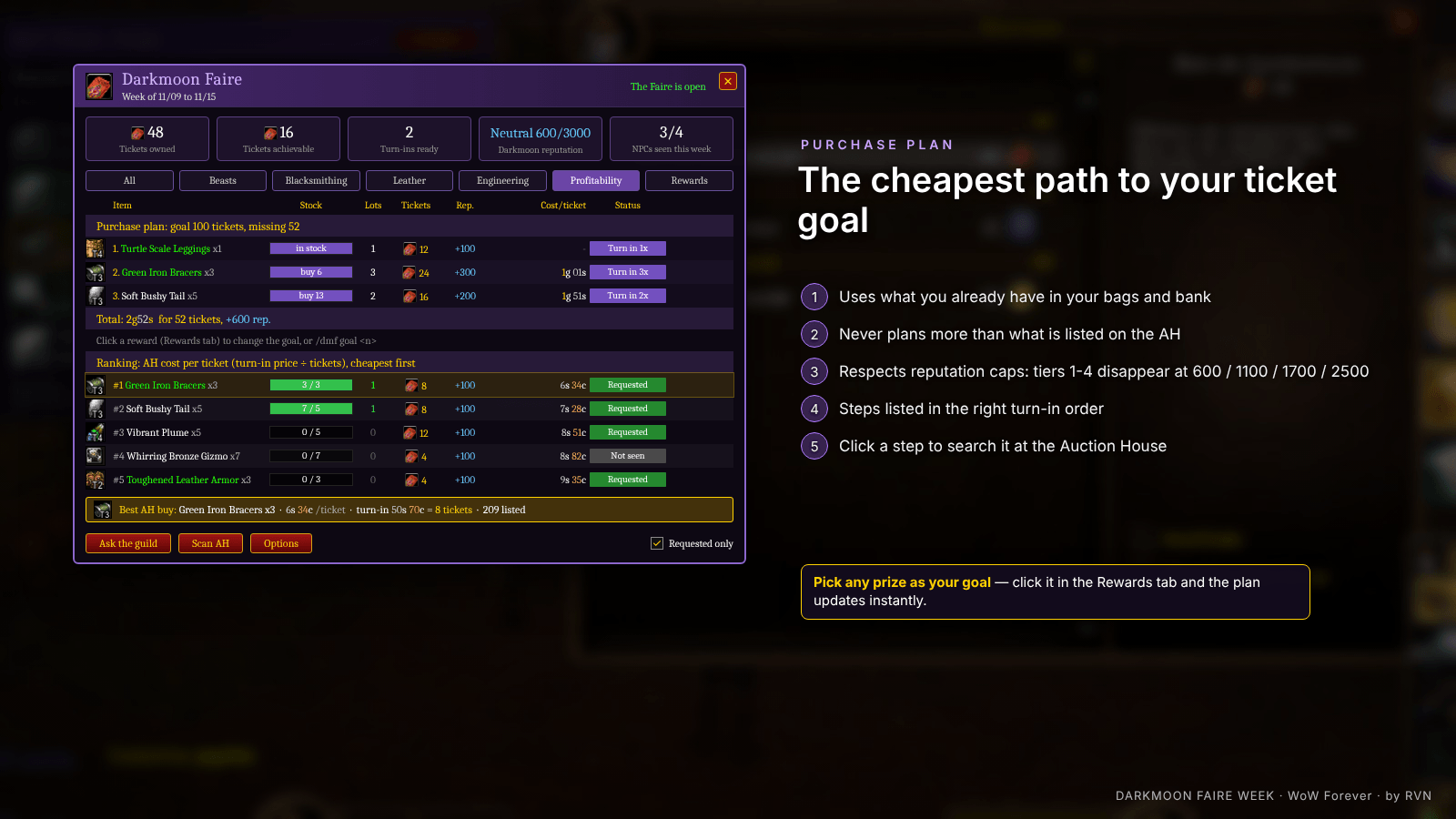
**Purchase plan**
Set a ticket goal (or click a prize) and get the cheapest shopping list to reach it:
- uses what you already have in your bags and bank
- never plans more than what is listed on the AH
- respects reputation caps (tiers 1-4 disappear at 600 / 1100 / 1700 / 2500)
- steps listed in the right turn-in order
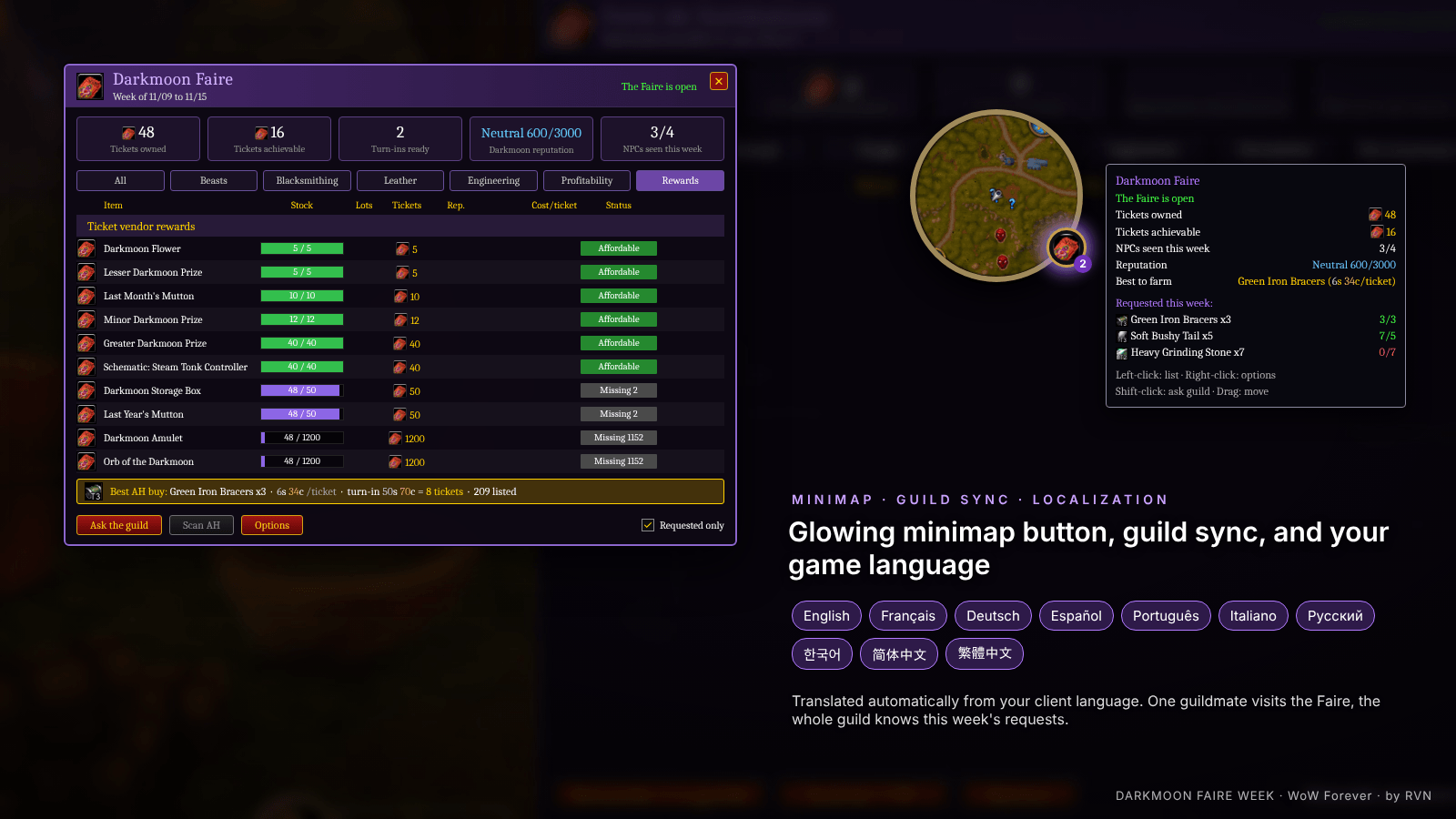
**Rewards tab**
Every prize from the ticket vendor with your progress ("Affordable" / "Missing X"). Learned automatically from the vendor.
**And more**
- Darkmoon Prize Tickets currency, reputation and turn-ins tracked live
- Item tooltips: tickets per turn-in, weekly status, stock, AH cost per ticket
- NPC tooltips: this week's requests and your stock
- Faire status: open / next date (calendar + known dates)
- Auto-open when you arrive at the Faire
- Optional auto turn-in (hold Shift to cancel)
- Guild sync: one guildmate visits the Faire, the whole guild knows the requests
- Minimap button with turn-ins badge and glow at the Faire, LibDataBroker support
- **10 languages**, picked from your client automatically: English, Français, Deutsch, Español, Português, Italiano, Русский, 한국어, 简体中文, 繁體中文
---
## ✦ How to use
1. Go to the Darkmoon Faire and talk to the turn-in NPCs.
2. Open the Auction House and click **Scan AH** in the window (`/dmf`).
3. Check the **Profitability** tab: buy the top of the list or follow the purchase plan.
4. Turn in following the plan order.
---
## ✦ Slash commands
| Command | Action |
|---|---|
| `/dmf` | Open / close the window |
| `/dmf options` | Options |
| `/dmf sync` | Ask your guild for this week's requests |
| `/dmf goal <n>` | Set the ticket goal of the purchase plan |
| `/dmf debut <day>` | Change the day the week starts |
| `/dmf reset` | Clear this week's data |
| `/dmf minimap` | Show / hide the minimap button |
| `/dmf errors` | Show the last errors (for bug reports) |
**Minimap button:** Left-click: list · Right-click: options · Shift-click: ask the guild · Drag: move
---
## ✦ Compatibility
- **WoW Forever** (1.60.1)
- Optional: **Auctionator**, **TradeSkillMaster**, any **LibDataBroker** display (Titan Panel, ElvUI…)
---
## ✦ Feedback
Bug or idea? Leave a comment. For bugs, please include the output of `/dmf errors`.
*Made by RVN*
Faire Trade - Darkmoon Faire Ticket Planner Team