SNT(SN_Totem)
The Sungnyung Totem add-on has been completely revamped.
<snt 2.2>
1. Left-clicking a slot will display a pop-up list of available spells, allowing you to simply select a spell. Right-clicking the selected skill will cast it.
2. A deselect button has been added to the slot selection mode. You can disable the corresponding attribute.
3. This feature cannot be changed during combat.
<snt 2.1>
The preset style has been replaced with a cleaner slot selection method.
Left-clicking a slot will display a pop-up list of available spells, allowing you to simply select a spell.
Right-clicking will deselect the spell.
The four slot UIs can be freely moved by dragging the mouse.
A timer is created when a totem spell is cast, and this can also be freely moved.
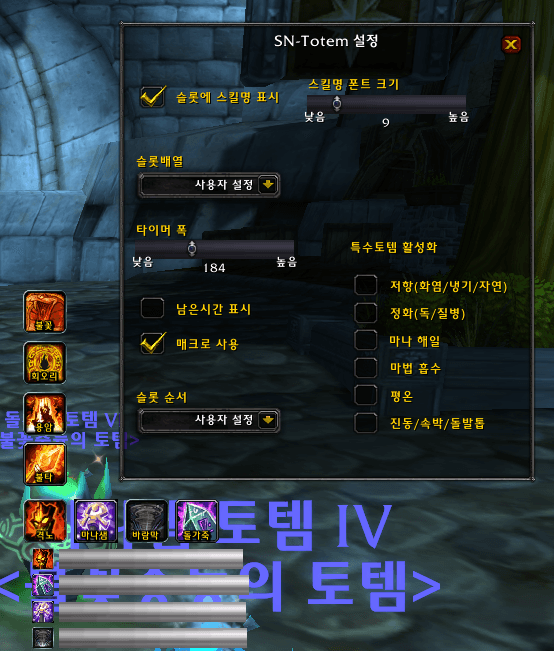
Entering the /snt command will open the settings window.
1. All slots now display simplified names. Font size can be adjusted.
2. Slot arrangement can be selected horizontally or vertically.
3. The timer UI width can be adjusted. 4. You can choose to display the remaining time.
5. Select a specialization to prioritize your preferred attribute.
6. To operate a special totem separately, uncheck "Enable Special Totem."
Enjoy the Burning Crusade Anniversary server.
<한글 사용설명>
SNT(숭늉토템)는 한국어기반으로 개발되었습니다.
SNT 기능이 완전히 개편되었습니다.
창에서 텍스트를 클릭하는 형태를 벗어던지고, 아이콘화를 하였습니다.
- 프리셋 기능은 추후 다시 제공 될 예정입니다.
- 매크로 기능과 전투 기능을 나누어 제공 될 예정입니다.
<snt 2.2>
1. 아이콘 좌클릭 시 사용 가능한 주문 목록이 팝업되며 선택할 수 있습니다.
선택된 주문은 우클릭으로 시전합니다.
2. 아이콘 하단에 해제 버튼이 생겼습니다. 해당속성 미사용시 해제할수 있습니다.
3. 이 기능은 전투 중에는 변경할 수 없습니다.
<snt 2.1>
기존의 기본 스타일이 더 깔끔한 슬롯 선택 방식으로 변경되었습니다.
슬롯을 마우스 왼쪽 버튼으로 클릭하면 사용 가능한 주문 목록이 팝업되어
주문을 간편하게 선택할 수 있습니다.
마우스 오른쪽 버튼으로 클릭하면 주문 선택이 해제됩니다.
네 개의 슬롯 UI는 마우스 드래그로 자유롭게 이동할 수 있습니다.
토템 주문 시전 시 타이머가 생성되며, 이 타이머 또한 자유롭게 이동할 수 있습니다.
/snt 명령어를 입력하면 설정 창이 열립니다.
1. 모든 슬롯의 이름이 간소화되었습니다. 글꼴 크기를 조절할 수 있습니다.
2. 슬롯 배열을 가로 또는 세로로 선택할 수 있습니다.
3. 타이머 UI 너비를 조절할 수 있습니다.
4. 남은 시간을 표시할지 여부를 선택할 수 있습니다.
5. 원하는 속성을 우선시하도록 전문화를 선택하세요.
6. 특수 토템을 별도로 운영하려면 "특수 토템 활성화"를 해제하세요.
The SNT(SN_Totem) Team