
SnabelWindFury Range
- By
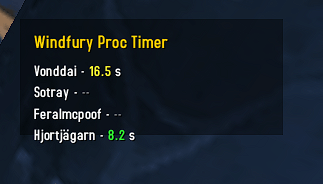
image.png
swf_red.png
swf_yellow.png
swf_green.png
Description
SnabelWindfury - Addon Description and Settings
=============================================
What this addon does
--------------------
SnabelWindfury tracks recent Windfury proc events from your party and shows a simple timer per member.
- Displays party members in a small movable window.
- For each online party member:
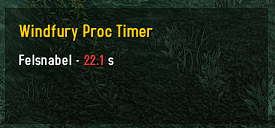
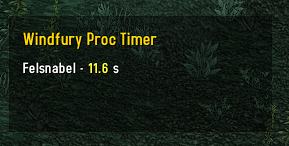
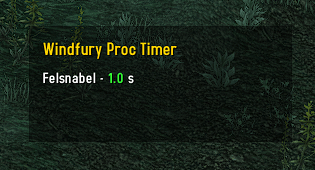
- Shows seconds since their last detected Windfury-related combat log event.
- Uses configurable age colors for the timer value.
- Default: Green < 10s, Yellow 10-19.9s, Red >= 20s
- Offline members are shown as "offline" in gray.
- Members with no detected proc yet are shown with "--".
How it works
------------
- Watches COMBAT_LOG_EVENT_UNFILTERED for Windfury-related spell events.
- Tracks only party members currently in your group.
- Updates the display continuously so timers keep counting up.
UI behavior
-----------
- Drag with left mouse button to move the frame (when unlocked).
- Locked mode prevents moving the frame.
- The frame supports show/hide state and remembers position/size.
Slash commands
--------------
/swf
Show command help.
/swf lock
Lock the frame.
/swf unlock
Unlock the frame.
/swf show
Show the frame.
/swf hide
Hide the frame.
/swf reset
Reset saved settings to defaults.
/swf onlywf <on|off|toggle>
Only show the frame when Windfury Totem is active.
/swf onlygroup <on|off|toggle>
Only show the frame while you are in a group.
/swf colors <yellowStart> <redStart>
Set color thresholds in seconds.
Rules: green is below yellowStart, yellow is yellowStart to below redStart, red is redStart and above.
Example: /swf colors 8 16
/swf colors reset
Reset color thresholds to defaults (10 and 20).
Also available:
- /snabelwindfury (same behavior as /swf)
Saved settings
--------------
The addon saves settings automatically between sessions:
- Anchor point and relative point
- X/Y position
- Frame width and height
- Lock state
- Hidden state
- onlywf state
- onlygroup state
- Color thresholds (yellowStartSeconds and redStartSeconds)
SnabelWindFury Range Team
