
2.png
1.png
Description
SmartPotion
Zone-aware mana and healing potion macros for TBC Classic. Auto-generates two macros (
SPfor mana,SHfor healing) that always pick the best potion you have for where you're standing.
What it does
Cenarion Mana Salve only works inside Coilfang, Bottled Nethergon Energy only works inside Tempest Keep and you don't want to have a bunch of macros to manage your potions. SmartPotion writes (and rewrites) two macros for you whenever you change zones, so pressing the same button always uses the highest-priority potion you actually have in your bags for the zone you're in.
Features
- Two macros, one addon —
SPfor mana potions,SHfor healing potions, each with their own priority list - Zone-aware — Coilfang complex (SSC, Underbog, Steamvaults, Slave Pens) and Tempest Keep complex (The Eye, Arcatraz, Botanica, Mechanar) auto-detected
- Inventory-aware icon — the macro icon updates to show the potion that will actually fire
- Auto-correcting item IDs — known potions resolve to the correct item by name; defaults force-corrected on every load
- Click-to-cycle zone restrictions —
[any]/[SSC]/[TK]tag in the UI is a toggle - Shift-click to add — drop any item from your bags into the input box to add it as a custom potion
- Minimap button + slash commands —
/spor/smartpotionto open options
Installation
- Download the latest release zip
- Extract the
SmartPotionfolder intoInterface\AddOns\ - Reload WoW or log in
- Open
/macro, findSPandSHunder your character tab, drag them to your action bars
Default potion priority
Mana (SP)
| Priority | Potion | Zone |
|---|---|---|
| 1 | Cenarion Mana Salve | SSC |
| 2 | Bottled Nethergon Energy | TK |
| 3 | Super Mana Potion | any |
Healing (SH)
| Priority | Potion | Zone |
|---|---|---|
| 1 | Cenarion Healing Salve | SSC |
| 2 | Bottled Nethergon Vapor | TK |
| 3 | Super Healing Potion | any |
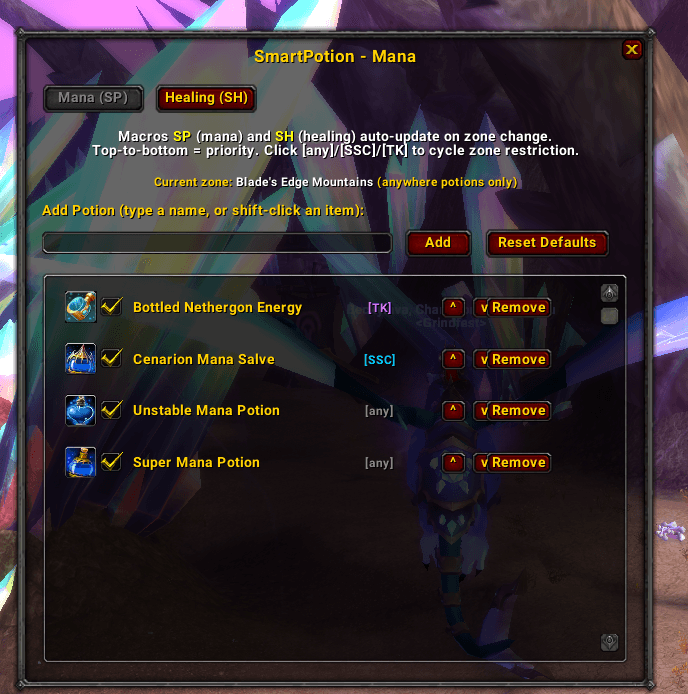
Reorder, add, or remove anything via /sp. Use the Add field to shift-click custom potions; click the zone tag on a row to cycle its restriction.
Usage
| Command | Description |
|---|---|
/sp |
Toggle the options panel |
/smartpotion |
Alias for /sp |
Inside the options:
- Mana / Healing tabs — switch which list you're editing
- Reset Defaults — wipe and repopulate the active list from the built-in defaults
- Up / Down — reorder priority
- Remove — drop a potion from the list
- Click
[any]/[SSC]/[TK]to cycle the zone restriction on a row
Author
Bennylavaa
The SmartPotion Team