


SmartLFG (The Best Auto Accept & Auto Queue)
- By
SmartLFG automates the process for sign-up and role check in Group Finder.
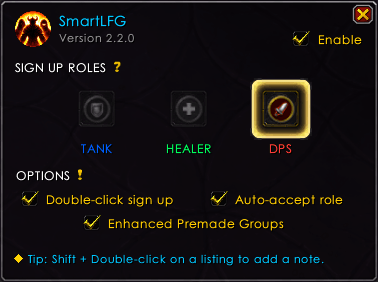
options-menu.png
Description
SmartLFG
Stop clicking through menus — double-click any Premade listing and you're signed up. SmartLFG makes applying to groups instant, native, and effortless.
Features
- Double-click any listing to sign up instantly.
- Shift + double-click to open the application and add a note before submitting.
- Auto-accept the role check popup when the leader queues the group.
- Enhanced Premade Groups: create premade groups easier and faster with less clicks.
- Conflict detection if another add-on hijacks the Premade sign-up. Mouseover on exclamation mark (
!) for details. - UI Skin support: inherit your UI skin automatically whether you use EllesmereUI, ElvUI, AddOnSkins or Aurora. Nothing to configure, no dependency: with none of them installed the window keeps its normal look.
- Open Options menu from the minimap or with the command
/slfgto: choose role & toggle features. - Multilingual support: 🇬🇧
English, 🇩🇪German, 🇫🇷French, 🇪🇸Spanish, 🇷🇺Russian, 🇧🇷Portuguese (Brazil), 🇮🇹Italian
Commands
| Command | What it does |
|---|---|
/slfg |
Open the options panel (all help & config here) |
/slfg on|off |
Turn the addon on or off |
/smartlfg is an alias for /slfg.
Check which skinning addon SmartLFG picked up (only one can skin the window at a time):
/run SmartLFG.Skin.GetProvider()Or just double-click the version number in the options window — it reports the same thing.
Share any feedback, suggestions or bug reports Github | Curse | Wago.
💬 Reach me on Discord: @omorfoskitsos
SmartLFG (The Best Auto Accept & Auto Queue) Team
