SmartHeal LindaLuna
- By
The right heal, at the right rank, on the right target. Healing assistant for Priests and Druids in WoW Forever: lights up the right heal and rank for each party member based on missing health, incoming damage and cast time. Never casts by itself.
Description
SmartHeal LindaLuna
The right heal, at the right rank, on the right target — at a glance.
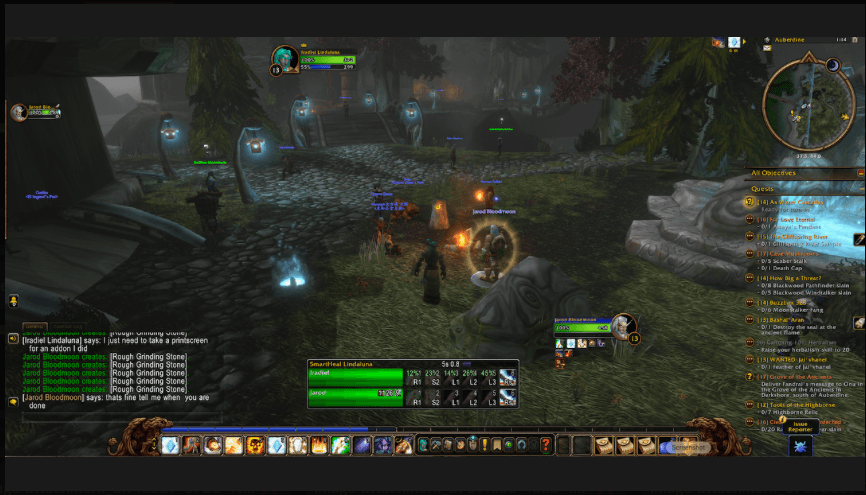
SmartHeal LindaLuna is a healing assistant for Priests and Druids in WoW Forever. For every member of your party it lights up the spell and rank that best fits the situation right now: how much health is missing, how fast damage is coming in, and how long each heal takes to cast. You stay in control: SmartHeal never casts anything by itself. You click (or press a key), it shows you what makes sense.
Available in 11 languages — the interface follows your game client's language automatically.
It is built for the modern client's secret values system: SmartHeal never does math on hidden health values. It prepares health thresholds in advance and lets the game client decide which icon to light, so it keeps working where many classic healing addons break.
The Luna addons
Three free addons for WoW Forever that never step on each other. Use one, or all three together.
- Luna's Journey – the lore. Every quest, zone by zone. Tick the gear you want and the route gets it first; tick nothing and it simply follows the story.
- Luna's Parcours – the shortest road to the gear you want, with nothing else attached.
- SmartHeal LindaLuna – keeps you and your party alive along both roads.
Website in English, Français and Italiano: https://lindalunawow.github.io · Contact: LindaLunawow@gmail.com · Support the project: PayPal
What it does
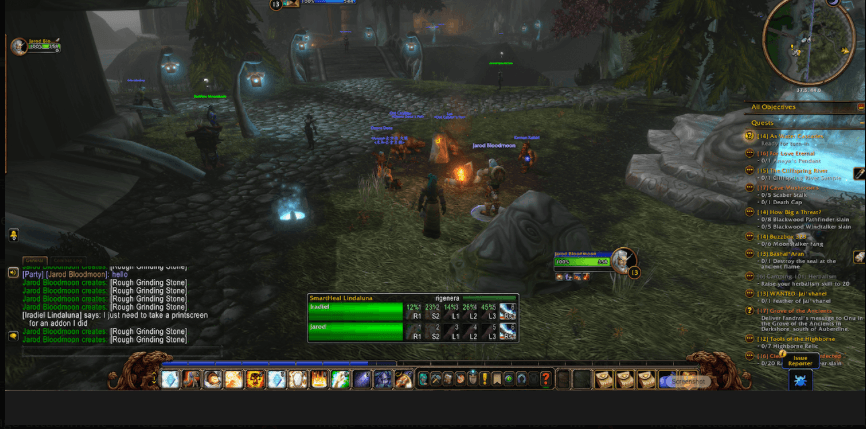
One row per party member, one icon per heal
Each row shows a health bar and your healing spells. The icon that fits the situation glows:
- Green glow – HoT (Renew / Rejuvenation)
- Gold glow – direct heal (Lesser Heal, Heal, Greater Heal / Healing Touch)
- Red glow – fast emergency heal (Flash Heal / Regrowth)
- Blue glow – Power Word: Shield
- Purple glow – Swiftmend
Click the glowing icon and the spell is cast on that player. Each icon also shows how much of that player's health it restores (e.g. 43%).
A decision engine, not just thresholds
SmartHeal measures the damage per second each player is taking and estimates time until death. Then it picks the smallest heal that will land in time and still cover the damage taken during the cast.
Examples:
| Situation | What lights up |
|---|---|
| Tank at 85%, taking steady light damage (1% HP/s) | Renew / Rejuvenation – the HoT out-heals the damage on its own, so no mana is wasted on a big heal |
| Player at 70%, no incoming damage | The smallest rank that tops them up – no overheal |
| Tank hit for 70% of their health in one blow | Flash Heal + Power Word: Shield (Priest) or Regrowth + Swiftmend (Druid) – slow heals would land too late |
| Your Renew is already ticking on the target | No HoT suggestion until it expires |
| You drop below 30% mana | Mana-saving mode: smaller ranks, emergency heals only when truly needed |
| Not enough mana for the big heal | The best heal you can still pay for lights up instead; unaffordable icons get a blue veil |
Stability controls stop icons from flickering: damage readings rise instantly but decay smoothly, and a minimum hold time keeps the advice steady — unless danger spikes, in which case it reacts immediately.
Everything on the bar
- Incoming heals (light blue) – yours and other healers', the same prediction the default UI uses
- Remaining HoT healing (green) – Renew, Rejuvenation and Regrowth, shrinking as ticks land
- Absorb shields (white-blue)
- Your buffs with timers – Renew, Shield and Weakened Soul (Priest); Rejuvenation and Regrowth (Druid)
- Damage per second in red on each bar
- Out of range – the row dims when a player is too far away
- Five-second rule – a small bar shows when your mana regeneration resumes after casting
Hover keys
Hover a row and press 1, 2, 3… to cast the matching icon on that player. Move the mouse away and your normal action bar keys are back. By default hover keys are active only while you are in a group, so solo play (Mind Blast, Wrath…) is never affected. The key list is customisable.
Automatic party messages (editable)
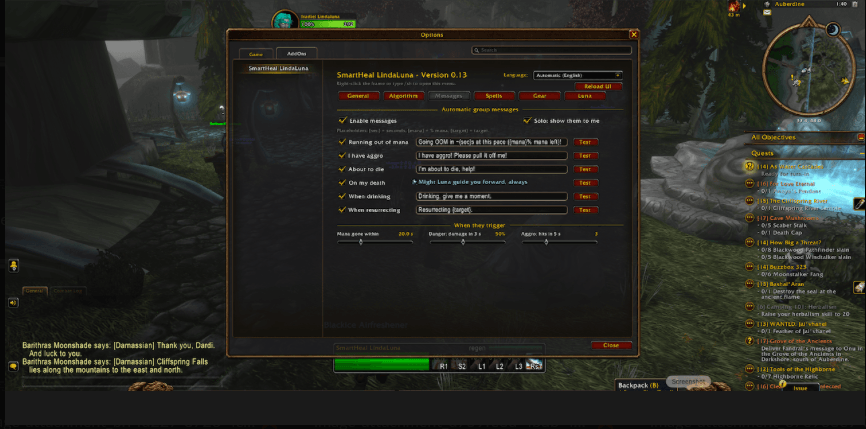
| Event | Default message |
|---|---|
| Going out of mana at the current pace | Going OOM in ~12s at this pace (18% mana left)! |
| You pulled aggro | I have aggro! Please pull it off me! |
| Burst damage on you | I'm about to die, help! |
| You die | Might Luna guide you forward, always |
| You start drinking | Drinking, give me a moment. |
| You resurrect someone | Resurrecting {target}. |
Every message can be switched off or rewritten, with a Test button that previews it only to you — with one exception: Luna's farewell. The message sent when you die, Might Luna guide you forward, always, can only be switched off, never changed. It is how Luna is remembered: either her words travel with you, or your death passes in silence.
Default messages follow your client's language. Luna's farewell is the one exception: it is always spoken in its original English words, whatever language you play in.
Gear upgrade alerts
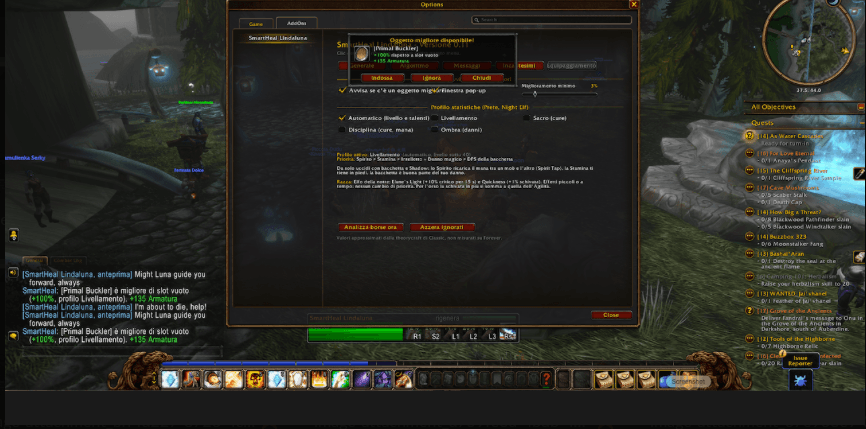
When you loot an item that beats what you're wearing, a pop-up shows the item, the percentage gain and what changes (+3 Spirit, +3 Intellect, −2 Stamina), with Equip, Ignore and Close buttons.
Only items your character can actually wear are suggested. SmartHeal checks:
- Class proficiencies – a Priest is never offered shields, leather or axes; a Druid never mail or shields
- Weapon skills you have learned – a staff or mace you haven't trained yet is not suggested (shown greyed out in the options)
- Required level and class restrictions on the item
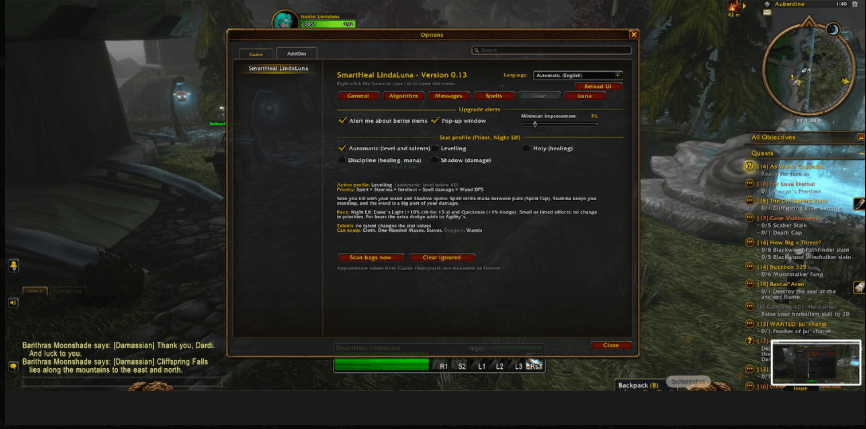
Stat weights also follow your talents: for example Spiritual Guidance makes Spirit worth more for a Holy Priest, Heart of the Wild raises Intellect, Strength or Stamina for a Druid depending on the profile. The Gear tab shows which talents are counted and which armor and weapon types you can equip.
Upgrades are scored with a stat profile for your class and spec:
| Class | Profiles |
|---|---|
| Priest | Levelling · Holy · Discipline · Shadow |
| Druid | Levelling (feral) · Restoration · Balance · Feral Cat · Feral Bear |
Automatic mode uses the Levelling profile below level 40, then follows your talent tree. Each profile shows its stat priority and the reasoning behind it, plus notes for Night Elf and Skyborne.
Every client language, automatically
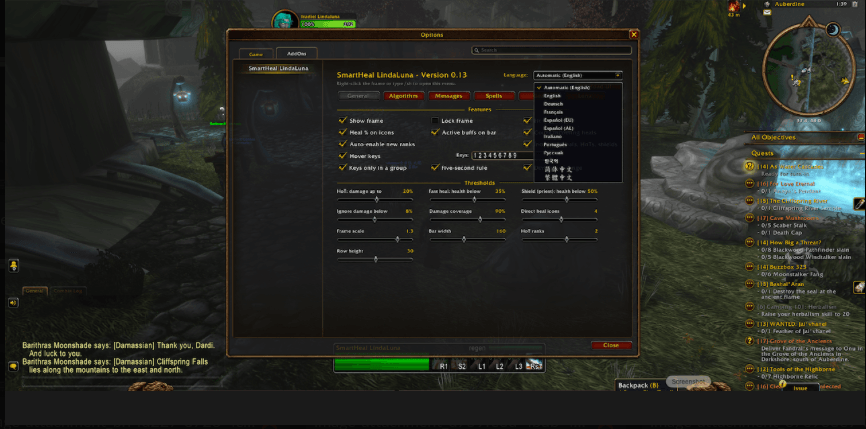
SmartHeal LindaLuna speaks the language of your game client — no setup needed:
| English | Deutsch | Français |
| Español (EU) | Español (AL) | Italiano |
| Português (Brasil) | Русский | 한국어 |
| 简体中文 | 繁體中文 |
Everything is translated: frame, options, tooltips, chat output, the gear pop-up and the default party messages. Spell names are taken straight from your client, so Renew, Erneuerung, Rénovation or 恢复 always match what you see in your spellbook. Prefer another language? Choose it from the language menu at the top of the options window and reload the interface.
Spell values are read from the game's own tooltips in any language, so the healing amounts shown on the icons are always your real numbers.
Smart spell ladder
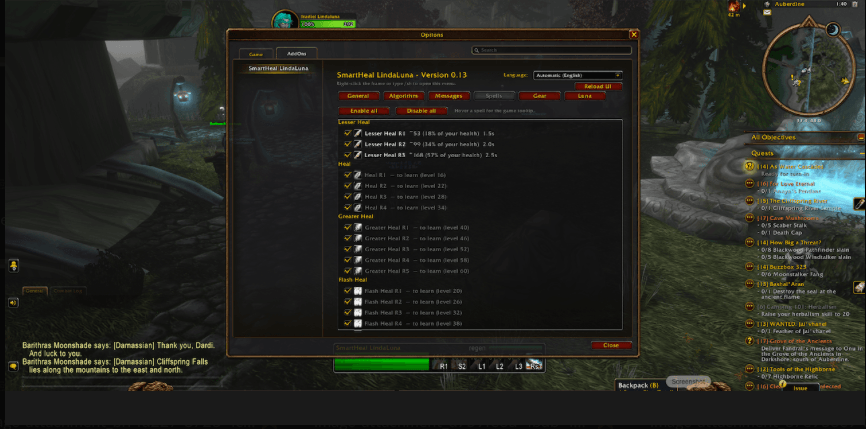
SmartHeal reads your spellbook, finds every rank you know and reads its real healing value from the tooltip — so talents and gear are included. New ranks appear automatically when you learn them, or you can enable each rank by hand.
Options
Open with /sh, right-click the frame, or click the minimap button (the moon of Elune: left-click for options, right-click to show or hide the frame, drag to move it around the minimap). Also under Options → AddOns → SmartHeal LindaLuna. The language menu at the top right lets you choose the interface language (automatic by default).
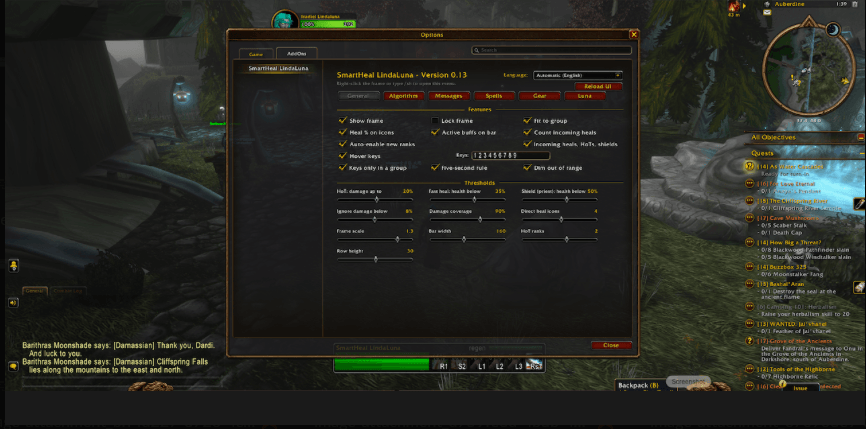
- General – frame, bar width, row height, scale, buff timers, incoming heals, hover keys, five-second rule, range check, thresholds
- Algorithm – damage windows, recalculation speed, safety margin, reaction time, stability, mana-saving mode
- Messages – enable, edit and test each party message
- Spells – every healing rank with a checkbox, value, cast time and % of your health
- Gear – upgrade alerts, minimum gain, stat profile and priority
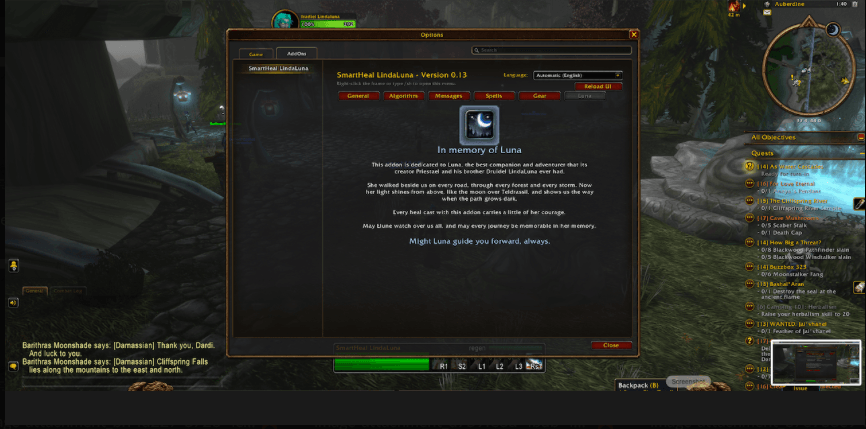
- Luna – a dedication (see below)
Slash commands
| Command | What it does |
|---|---|
/sh or /smartheal |
Open the options |
/shstatus |
Show mode, damage source, mana state and the current thresholds |
/shdebug |
List the spells in use with values and cast times |
/shgear |
List every equippable item in your bags and why it is suggested or skipped |
Good to know
- SmartHeal never casts on its own. Every heal is your click or key press.
- Secret values. Health is hidden from addons on the modern client, so SmartHeal works with thresholds the client evaluates. Some data (auras, distance, threat) may also be hidden; when it is, SmartHeal falls back to tracking your own casts and tells you in
/shstatus. - Languages. All 11 client languages are included. Base item stats are read in every language; a few Classic-style Equip: bonuses (such as +Healing or mp5) are recognised from the tooltip text on English clients and from the game's own stat data on others. Translations were written with care — native speakers are welcome to suggest improvements in the comments.
- Stat weights come from Classic theorycrafting consensus and are approximate; they will be revisited as WoW Forever balance becomes known.
- Party up to 5. Raid frames are planned.
Installation
- Download and extract into
World of Warcraft/<your Forever folder>/Interface/AddOns/. - The folder must be named SmartHeal and contain
SmartHeal.toc,SmartHeal.lua,Gear.lua,Options.luaand theLocalesfolder. - Restart the game and type /sh.
Feedback
Found a bug? Post the error text or a screenshot of /shstatus in the comments — it usually pinpoints the problem quickly.
In memory of Luna
SmartHeal LindaLuna is dedicated to Luna, the best companion and adventurer that its creator Priestael and his brother Druidel LindaLuna ever had.
She walked beside us on every road, through every forest and every storm. Now her light shines from above, like the moon over Teldrassil, and shows us the way when the path grows dark. Every heal cast with this addon carries a little of her courage.
May Elune watch over us all, and may every journey be memorable in her memory.
You'll find her page in the addon's options, in every language.
Might Luna guide you forward, always.
SmartHeal LindaLuna Team