character #1.png
tooltip-damaged-overview.png
menu!.png
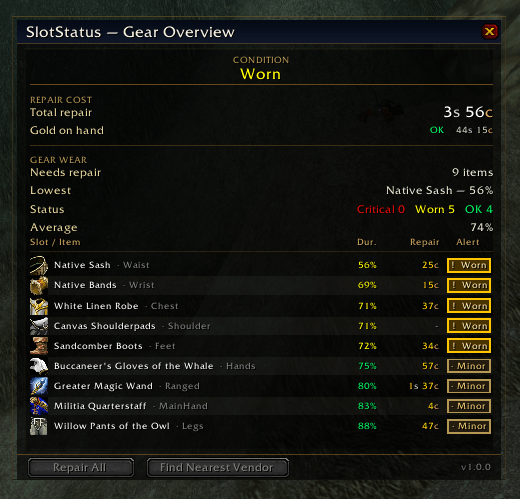
Screenshot 2026-04-23 061604.png
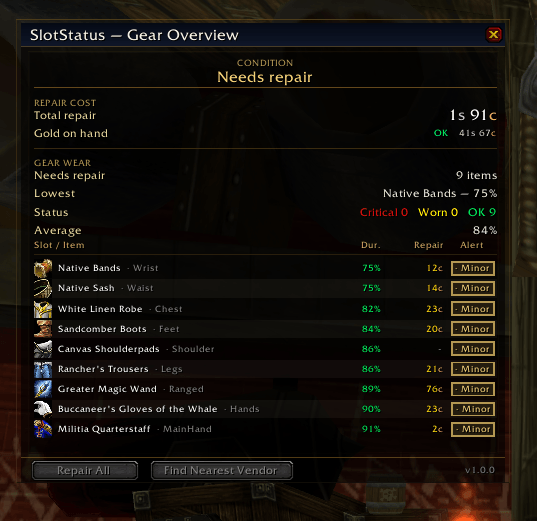
gear-repair-overview-damaged.png
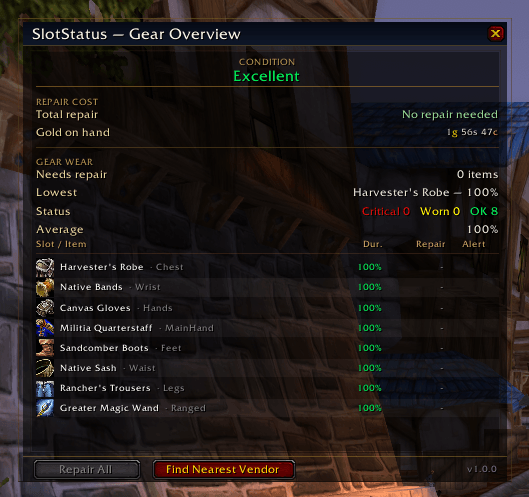
gear overview!.png
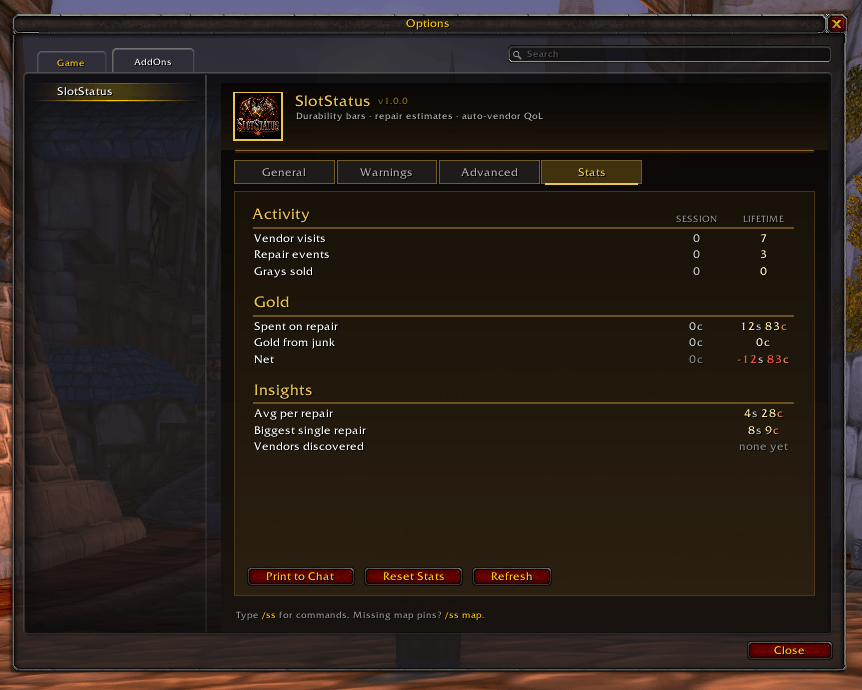
Screenshot 2026-04-23 030126.png
Description
SlotStatus
SlotStatus is a lightweight but complete gear-maintenance addon for World of Warcraft Burning Crusade Classic (Anniversary). It started as a simple idea — show durability bars directly on the Character Frame so you don't have to hover every slot to check your gear — and grew into a full suite for tracking, repairing, and maintaining your equipment without ever leaving the game.
Everything is per-character, stored locally, and works out of the box. No libraries, no dependencies, no setup required.
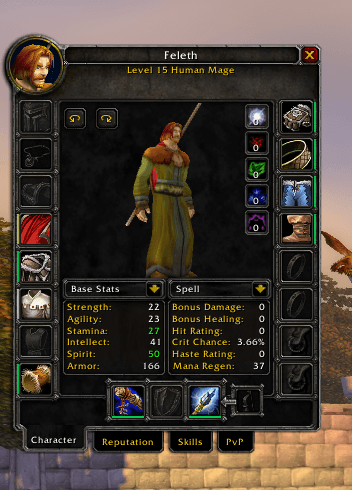
Durability bars on the Character Frame
Slim, color-coded bars sit flush against every equipment slot on the paperdoll. A single glance tells you which pieces are fine, which are worn, and which are about to break.
- Healthy, Worn, and Critical color tiers
- Special tints for Accessory and Utility slots
- Live updates when durability changes, gear swaps, or repairs happen
- Fully customizable colors, thresholds, alpha, thickness, and position
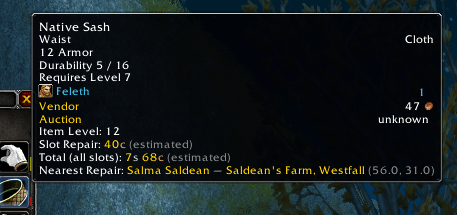
Rich tooltips
Hover any equipped item to see:
- Item Level
- Slot Repair — estimated cost to repair just that one piece
- Total Repair Cost — all slots combined
- Nearest Repair vendor — name, subzone, zone, and coordinates
- A green Repair here callout when you're standing on one
World map vendor pins
Anvil icons appear on the world map marking every known repair vendor in the zone you're viewing. Pins refresh automatically as you open and resize the map.
Vendor auto-discovery
SlotStatus ships with a built-in repair-vendor database and also learns new vendors on its own. The first time you open any merchant that can repair, SlotStatus records their name, zone, subzone, and exact coordinates. Over time you build a personal atlas of every repair vendor you've met. View the full list at any time with /ss vendors.
Automation at the merchant
Open any repair vendor and SlotStatus handles the boring parts for you — all toggleable:
- Auto-repair — repairs everything the moment the merchant window opens
- Guild bank first — if you have the withdraw cap, pulls repair costs from guild funds before touching your own gold
- Auto-sell grays — clears Poor-quality junk from your bags and reports the gold earned
Every transaction is tracked in the Stats tab so you know exactly how much you've spent and earned.
Warning system
Three levels of heads-up so you never get caught with broken gear:
- Low-durability warnings — off, chat-only, or chat + on-screen flash + sound
- Pre-combat warning — fires the moment you enter combat with any slot below a configurable threshold
- Animated bar pulse highlights the exact slot that's in trouble
Default thresholds are 25% for the standard warning and 35% for the pre-combat check, both adjustable.
Gear Overview window
A custom-styled dialog you can open from the minimap button, a broker panel (Titan / Bazooka / ElvUI), or a slash command. It shows:
- Condition verdict — at-a-glance summary of your overall gear state
- Repair Cost block — total repair due vs gold on hand
- Gear Wear stat sheet — slots needing repair, your lowest-durability piece, a status verdict, and average durability
- Slot table — every equipment slot with its current durability, color-coded to match the bars on your paperdoll
Minimap button and broker support
- Draggable minimap button, position remembered per character
- Left-click opens the Gear Overview window
- Right-click opens the options panel
- Also exposes a LibDataBroker-1.1 data source so Titan Panel, Bazooka, ElvUI DataBars, and other display addons can show your average durability on their bar
- No dependency — if no broker addon is loaded, SlotStatus silently does nothing and moves on
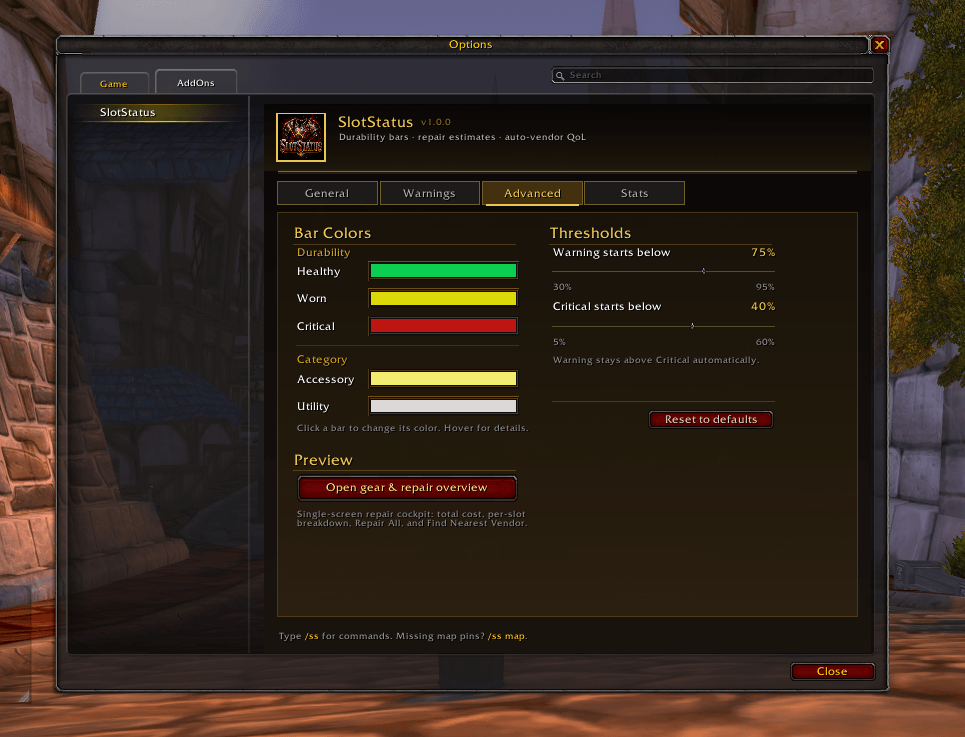
Full options panel
Accessible from Interface Options or /ss options. Four tabs:
- General — display toggles, all three merchant automations, debug prints
- Warnings — warning mode, sound and flash, pre-combat warning, threshold sliders
- Advanced — five color pickers (Healthy, Worn, Critical, Accessory, Utility), live bar preview, G→Y and Y→R threshold sliders, bar alpha, thickness, left and right offset sliders
- Stats — session and lifetime gold in/out, with a Reset button
Every setting is saved per character.
Slash commands
| Command | What it does |
|---|---|
/ss or /slotstatus |
Show help |
/ss options |
Open the options panel |
/ss advanced |
Panel → Advanced tab |
/ss stats |
Session gold in/out |
/ss reset |
Reset session stats |
/ss autorepair |
Toggle auto-repair |
/ss autosell |
Toggle auto-sell grays |
/ss guild |
Toggle "guild bank first" |
/ss warn [N|off|chat|full] |
Warning mode and threshold |
/ss pins |
Toggle map pins |
/ss mm |
Toggle minimap button |
/ss vendors [clear] |
List or clear discovered vendors |
/ss discover |
Toggle vendor auto-discovery |
/ss welcome |
Re-open the welcome popup |
/ss debug |
Toggle debug prints |
First-run welcome
New characters see a one-time welcome popup two seconds after login that explains how to open the addon and lists the main features. It appears once per character, then never again — re-openable anytime with /ss welcome if you want to see it later.
Design philosophy
SlotStatus is designed to stay out of your way. It doesn't modify the Blizzard UI, doesn't add third-party frames you didn't ask for, and doesn't nag. It sits quietly on the Character Frame showing you what you need to know, and steps in only at the merchant window to save you a few clicks.
- No library dependencies
- No taint on the default UI
- Per-character saved variables
- Lightweight — minimal CPU and memory footprint
Compatibility
- Interface: 20505 (Burning Crusade Classic / Anniversary)
- Saved variables: per character
- Dependencies: none
Feedback and issues
If you spot a bug, have a feature request, or find a repair vendor that should be in the built-in database, please leave a comment on the CurseForge project page.
SlotStatus Team