Slot Filler
- By
Save your action bar slot assignments as named profiles and switch between them instantly — account-wide, across any character, class, or spec.
Screenshot_20260627_170424-1.png
Description
Slot Filler solves a problem that Blizzard's built-in action bar layouts do not address: saving and restoring exactly which spells, macros, mounts, items, pet abilities, Click Bindings, and Transmog Outfits are assigned to each slot, separately from how your bars are arranged.
Create as many named profiles as you like, then switch between them from the profile manager, the minimap button, or a short slash command. Because profiles save account-wide the moment you save them, there is no export string to copy, no import step, and no manual transfer between characters — a profile saved on one character is simply already there on every other one.
Each profile captures all action bar slots — your main bars, class bonus bars (stealth, druid forms, and similar), the Skyriding bar, and extra bars — so switching roles or experimenting with layouts is fully reversible.
It is designed for players who play multiple specs or roles and want to return to a known bar state in seconds, without rebuilding slots by hand.
Highlights
- Saves and restores all action bar slots (main bars, class bars, Skyriding bar, and extra bars).
- Supports spells, macros, items, mounts (including Summon Random Favorite Mount and individual mounts), flyout menus, equipment sets, Transmog Outfits, battle pets, and the Rotation Assistant (SBA) button.
- Saves and restores pet abilities on the pet action bar (pet command tokens like Attack/Follow/Stay are left untouched — see Notes).
- Saves and restores Click Bindings (click-cast spells, items, and macros), recreating a referenced character macro automatically if needed, the same way action-bar macro slots already do.
- Normalizes a talent-overridden spell to its base spell ID when saving, so loading the profile after a talent or spec change still finds the spell.
- Automatically recreates a character-specific macro on whichever character loads the profile if that character doesn't already have a matching macro — copying the original's name, icon, and macro body so account-wide profiles work even when a per-character macro doesn't exist yet on the destination character.
- Stores profiles account-wide — one profile list shared across all characters on the account.
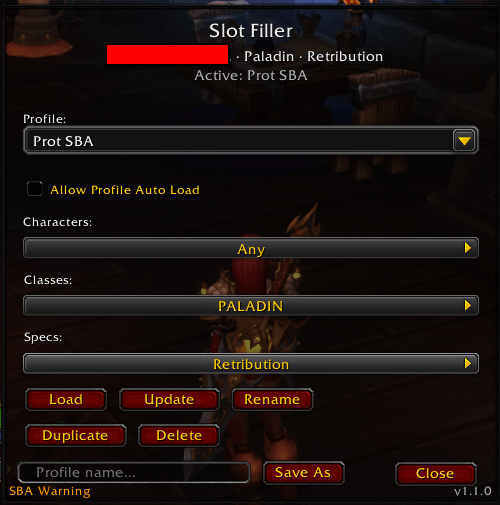
- Provides a profile management panel with a dropdown to select, load, update, rename, duplicate, and delete profiles.
- Lets you assign auto-load rules per profile using multi-select dropdowns for character, class, and spec — a profile loads automatically on login, reload, or spec change when its rules match.
- Resolves auto-load conflicts by preferring the most specific match, with character matches taking priority over class and spec.
- Includes an opt-in Allow Profile Auto Load checkbox per profile so only explicitly enabled profiles are ever auto-loaded.
- Skips any slot whose spell is not available for the current spec without clearing that slot or logging an error.
- Provides built-in diagnostics:
/sfill scanlists the raw action type and ID for every occupied slot, and/sfill errorsreviews any issues from the most recent profile load. - Opens the profile manager from
/sfillor the minimap button. - Includes a packaged addon icon for the addon list and minimap button.
How It Works
Slot Filler reads your current action bar assignments using Blizzard's action-slot APIs and stores a snapshot under a profile name. When you load a profile, it places each saved action back into its original slot using the appropriate pickup API for each action type: spells via the spellbook, macros by ID, mounts via the Mount Journal, and so on.
On login, reload, or spec change, the addon checks whether any auto-load enabled profile matches the current character, class, and spec. If one qualifies, it loads silently. If none qualify, nothing is changed.
Slash Commands
/sfill: Open the profile manager./sfill <name>: Load a profile by name directly./sfill save <name>: Save current bar assignments as a new profile./sfill load <name>: Load a saved profile./sfill list: List all saved profiles./sfill delete <name>: Delete a profile./sfill rename <old> <new>: Rename a profile./sfill duplicate <source> <new>: Copy a profile under a new name./sfill minimap: Show or hide the minimap button./sfill scan: Print the raw action type and ID for every occupied action bar slot (diagnostic)./sfill errors: Review any issues recorded during the most recent profile load./sfill help: Show all available commands.
Notes
- The addon uses the saved-variable name
SlotFillerDB. - The Rotation Assistant (SBA) button is saved and restored using the spell it is currently suggesting, so it restores like any other spell on the action bar — no spare SBA button is needed elsewhere on your bars.
- Character-specific macros are saved with their full definition (name, icon,
and macro body), not just a reference. When a profile is loaded on a
character that doesn't already have a matching macro, Slot Filler creates
one automatically on that character. A few limitations apply:
- Each character can only hold 18 character-specific macros (a Blizzard
limit). If a character is already at that limit, the macro cannot be
created, the slot is left empty, and the issue is listed in
/sfill errors. - The recreated macro is an independent copy with its own macro ID — editing it afterward does not update the original on the other character.
- This auto-recreation only applies to character-specific macros. Account-wide (global) macros are never created automatically; if one was deleted, re-save the profile after recreating it manually.
- Each character can only hold 18 character-specific macros (a Blizzard
limit). If a character is already at that limit, the macro cannot be
created, the slot is left empty, and the issue is listed in
- Pet command tokens (Attack, Follow, Stay, and similar) are never relocated on load — only pet abilities are restored. Reordering tokens risks losing one permanently with no way to recover it.
- Click Bindings restore additively: a profile saved with none never clears bindings already set on the character loading it.
- Click the minimap button to open the profile manager.
The Slot Filler Team