Slim Friend List
Class-colored character names and a search box for the default friends list. Nothing else - no replacement UI, no extra windows.
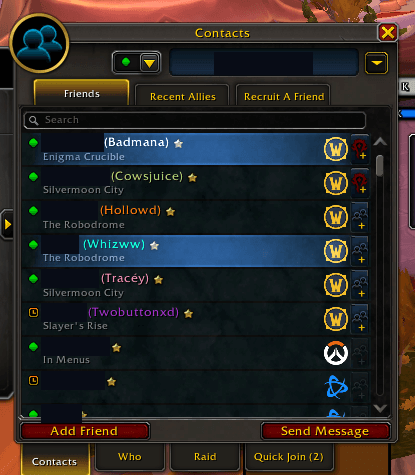
screenshot-friendslist-redacted.png
Description
Slim Friend List adds exactly two things to Blizzard's default friends list and leaves everything else alone:
- Class-colored character names - the character name next to a Battle.net friend, and the name of WoW friends, is tinted in their class color. Offline friends and friends playing other games stay untouched.
- Search box - a search field above the list that filters as you type. It matches the Battle.net name, BattleTag, your note and the character name, ignoring upper/lower case. Clear the box and the full list is back.
Why another friends addon?
Full replacements of the friends frame touch a lot of Blizzard UI, which tends to cause taint errors with the Midnight addon restrictions. Slim Friend List does not replace anything: it only recolors the text of existing rows and, while you are searching, swaps the list data for a filtered copy. With an empty search box it does not touch the list data at all.
Commands
/slf colors on|off- toggle the class colors/slf search on|off- toggle the search box (needs/reload)
Compatibility
- Retail (Midnight 12.1.5) and WoW: Forever beta (1.60.1)
- Works with Blizzard's default friends list. Do not combine it with addons that replace the friends frame (e.g. BetterFriendlist).
- Supports custom class color addons that provide
CUSTOM_CLASS_COLORS.
Feedback
If you see an error, please include the full error text (BugSack / BugGrabber) in your report.
Slim Friend List Team