Sadly, there's no way to do this using only builtin game controls.
Description
This addon makes two small changes to the default tradeskill window system:
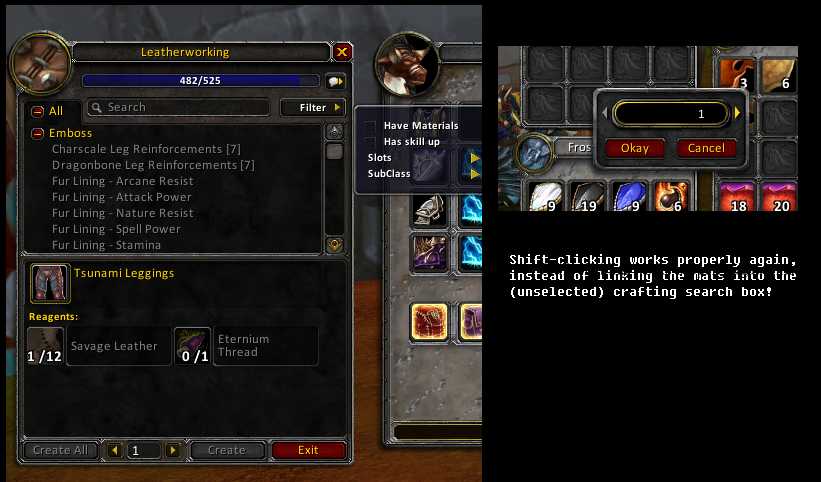
- The "Have Materials" and "Has Skill Up" checkboxes are awesome, but I'm tired of constantly clicking the filter button over and over and over. CHANGE: The "Filter" menu is always shown, all the time.
- Ever have a crafting window open while at the bank, and shift-click to try to split a stack of materials? NOOOOOO, you don't get to split the stack, instead it pastes the item you clicked into the crafting window "Search" box. It does this regardless of whether the Search box has the blinking cursor focus or not! CHANGE: Shift-clicking to split a stack works like it should. Use shift-RIGHT-click to paste an item into the Search field instead. (Technically, it may not be the "right" button; it's actually "button #2" and works out to be the same button you shift-click to open the gem socketing window on a socketed item.)
Be aware that opening any other dropdown menu will close the "Filter" menu. That's simply how the WoW UI works; only one dropdown menu tree can be open at any time.
See the Proper Fix page for a writeup of the real solution.
The Slightly Smarter TradeSkill Team


Owner