


SleepingBagTimer
- By
A Cozy Sleeping Bag countdown for WoW Forever, with automatic own-bag detection and confirmed XP buff stacks.
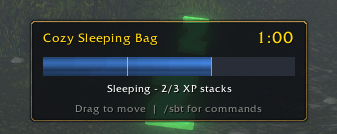
image.png
screenshot-2026-11-16_13-55-38-steam-app-battlenet.png
screenshot-2026-11-16_13-54-39-steam-app-battlenet.png
Description
Sleeping Bag Timer
Know when your Cozy Sleeping Bag XP buff is ready—and when it needs renewing. A lightweight, draggable timer for WoW Forever.
Deploy, enter, relax
- Deploy a bag. When your own or a party/raid member's bag deployment is detected, the window opens with Bag deployed - enter it to start. The countdown does not start yet.
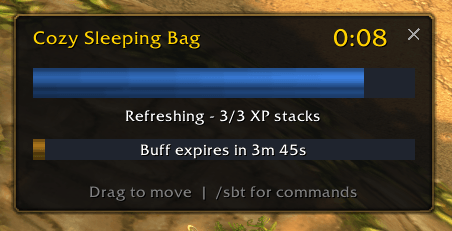
- Enter the bag within 30 seconds. Becoming rested starts the countdown. Existing XP stacks shorten the wait; refreshing a full three-stack buff uses a dedicated one-minute progress bar.
- Wait for confirmation. The timer corrects itself as actual Well-Rested stacks arrive. Ready! or Refreshed! and the completion sound appear only after three stacks or their refresh are confirmed.
Using an already-deployed bag? An observed XP-stack increase while resting can start the remaining countdown, even if the deployment was missed. Teammates do not need the addon installed.
Keep your XP buff active
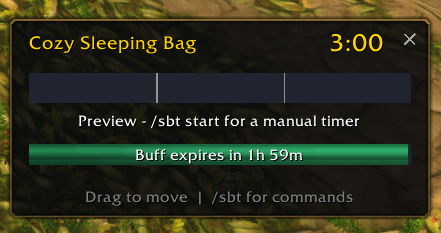
- Buff lifetime at a glance: a separate bar shows remaining time with clear units, such as 1h 59m, 4m 45s, or 59s.
- Five-minute warning: the window opens at five minutes remaining and plays a warning sound once per buff cycle. Refreshing the buff re-arms the warning.
- Missing or expired buff: an Expired! / No buff reminder is enabled by default, including when the buff is already missing on login. Dismissing the five-minute warning does not suppress this later reminder.
- Your choice: toggle Show window when the XP buff expires under Options → AddOns → Sleeping Bag Timer, or use
/sbt expired on|off.
Small window, simple controls
- Drag to move; the window remembers its position.
- Click the small custom × to dismiss it.
- Use
/sbt showto reopen a dismissed missing, expired, or five-minute reminder—not just a test timer. Reopening does not repeat the warning sound. - Sleeping progress stops when resting ends or combat starts. Moving within the bag while still resting does not stop it.
- An unused deployment window expires after 30 seconds; closing it cancels its pending entry detection. Other due buff reminders can remain visible.
Commands
| Command | What it does |
|---|---|
/sbt show |
Reopen the current reminder or show a pending deployment; preview otherwise |
/sbt test |
Force a preview and drag to reposition |
/sbt start |
Start/restart manually while resting |
/sbt stop or /sbt hide |
Stop, hide, and dismiss this buff's reminder |
/sbt expired on or /sbt expired off |
Enable/disable the missing/expired-buff popup (default on) |
/sbt reset |
Reset the window position |
/sbt debug |
Print resting state, XP stacks, and bag-detection status |
Important notes
- Group deployment detection depends on events visible to your client; range and game restrictions can hide them. A detected deployment does not prove you are near the bag.
- WoW reports inns and cities as rested too. Entering one shortly after a detected bag deployment can still start the countdown.
- Already resting when a bag is deployed? The next real XP-stack gain can synchronize the timer. Use
/sbt startwhile resting for an immediate manual countdown, including a three-stack refresh. - Existing buffs on login and buffs restored after loading screens do not count as new sleeping progress.
- Reminder sound/dismissal state is saved per character across reloads. Reopen a dismissed reminder with
/sbt show; turning the missing/expired option off and back on also re-arms that reminder. - Forever can hide aura data. Hidden readings are not treated as buff loss, though a previously known expiration can still drive a reminder. If completion cannot be confirmed, the timer asks you to check your buff rather than claiming it is ready.
SleepingBagTimer Team
