Skinner's Swap
- By
Puts your skinning gloves and knife on at a skinnable corpse and your gear back after. Built for WoW Forever.
Screen
Description
Skinner's Swap
At 300+ skinning, many boss corpses need more skill than you have, and the only way to reach it is skinning-bonus gear: gloves, a knife. Swapping them on and off by hand at every boss gets old fast. Skinner's Swap does it for you.
How it works
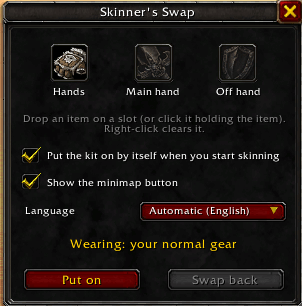
- Click the minimap button (or type /skinswap) and drop your skinning items on the window's slots: hands, main hand, off hand.
- Skin as usual. When a corpse needs more skill than you have and your kit's bonus is enough, the kit goes on and chat asks you to skin again (the game lets only you start a cast). Not enough even with the kit? It says so and swaps nothing. Corpses you can already skin: no swap at all.
- A second after the last skinning ends, the gear you wore before comes back. Skinning several corpses in a row keeps the kit on until the last one.
- Put on and Swap back buttons, a right-click on the minimap button, and
/skinswap equip//skinswap backfor macros. - Swap back always returns the gear you wore before the kit, even after a /reload.
- Combat safe: no swaps in combat. If a fight starts while the kit is on, your gear comes back the moment it ends.
- Kit on and you don't skin again? It comes off by itself after a few seconds.
- "Put the kit on by itself" can be turned off in the window if you only want the buttons.
- No libraries, tiny, one window.
Supported languages
The game's language by default; pick another in the window's language list (it switches at once).
English, Português (Brasil), Español, Deutsch, Français, Italiano, Русский, 한국어, 简体中文, 繁體中文.
Skinner's Swap Team