SkillSprocket
- By
A floating, customisable bar that shows every primary and secondary profession's current skill and cap, flashes on skill-ups, and alerts you when you're capped or ready to train — built for Classic Era and Hardcore.
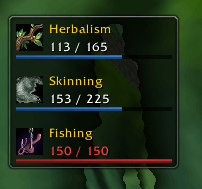
image.png

image (1).png
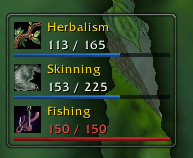
image (2).png
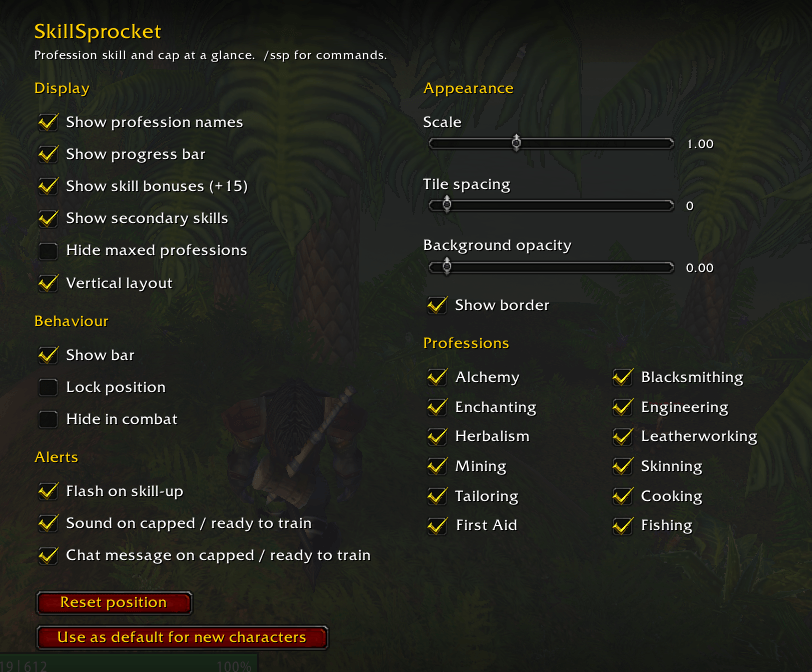
image (3).png
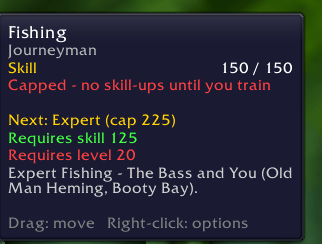
image (4).png
Description
SkillSprocket
Know at a glance when it's time to visit a trainer.
SkillSprocket puts every profession you've learned on one small, movable bar, showing your current skill and your current cap side by side. In Classic, the real blocker isn't your skill level. It's hitting 75, 150 or 225 without having trained the next rank. SkillSprocket makes that impossible to miss.
Features
- All your professions in one place. Primary professions plus Cooking, First Aid and Fishing.
- Live updates. Skill-ups, training, learning and unlearning are reflected instantly.
- Colour-coded states:
- White: levelling normally
- Amber: ready to train the next rank
- Red: capped, no more skill-ups until you train
- Gold: maxed at 300
- Skill bonuses shown. Racial and gear bonuses appear alongside your base skill, e.g.
142 (+15) / 150. - Detailed tooltips. Hover a profession to see its rank, points to cap, skill gained this session, and the skill and level needed for the next rank.
- Secondary skill guidance. Tooltips tell you where to get Expert and Artisan Cooking, First Aid and Fishing, since these come from books and quests, not trainers.
- Alerts. Optional tile flash on skill-up, plus a sound and chat message when you become capped or ready to train.
- Fully customisable. Horizontal or vertical layout, scale, spacing, background opacity, border, names, progress bars, and per-profession visibility.
- Stays out of your way. Lock the position, hide in combat, or hide professions you've maxed.
- Lightweight. No libraries or dependencies.
Usage
Drag the bar to move it and right-click it to open the options. You can also find the settings under Options → AddOns → SkillSprocket.
Slash commands
| Command | Action |
|---|---|
/ssp |
Open options |
/ssp lock / /ssp unlock |
Lock or unlock the bar's position |
/ssp show / /ssp hide |
Show or hide the bar |
/ssp reset |
Reset the bar's position |
/ssp scan |
Force a rescan of your skills |
/ssp dump |
Print all skill lines to chat (useful for bug reports) |
/ssp savedefault |
Use this character's settings for new characters |
Settings
Settings are saved per character. Use /ssp savedefault (or the button in the options panel) to make your current layout the starting point for any new character.
Language support
Profession names are included for English, German, French, Spanish, Portuguese, Russian, Chinese and Korean clients. If your professions don't appear on a non-English client, please run /ssp dump and include the output in a bug report.
Feedback and bug reports
Found a bug or have a feature request? Please leave a comment or open an issue. Including the output of /ssp dump helps enormously.
The SkillSprocket Team