

![SimpleNotepad [Forever / Retail / Classic / SoD] logo](https://media.forgecdn.net/avatars/thumbnails/2141/755/64/64/639283438316501564.png)
SimpleNotepad [Forever / Retail / Classic / SoD]
- By
An in-game notepad for notes, reminders, and useful links.
 SimpleNotepad
An in-game notepad for notes, reminders, and useful links.
Clients: Retail, Classic Era (Hardcore/SoD), TBC Anniversary, Mists Classic, and Forever.
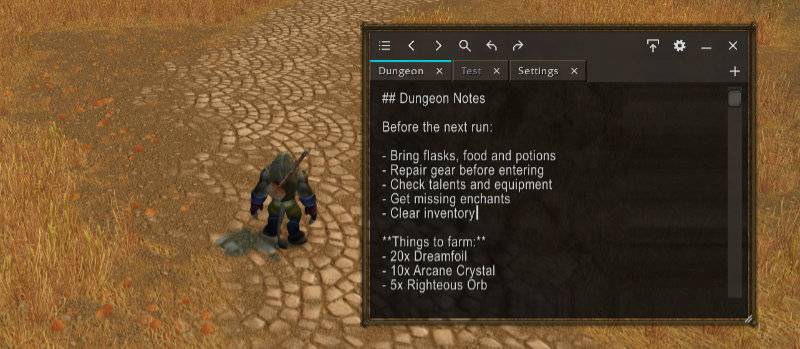
- Named notes with tabs and previous/next navigation.
- Reopen, rename, or delete notes through the all-notes list.
- Close tabs without deleting notes; new and reopened tabs appear last.
- Long-press and drag tabs to sort them.
- Search titles and text; press Enter to cycle through matches.
- Undo/redo, copy/paste, and clickable WoW links.
- Shift-click inventory or chat item links into the focused note.
- Movable, resizable window down to one text line, with saved layout.
- Minimize to a draggable icon button.
- Optional draggable minimap icon and configurable key bindings.
- Languages: English, German, French, Spanish, Portuguese, Italian, Russian, Korean, and Chinese.
- Style: Modern or WoW.
- Colors: Custom background and accent colors; reset available.
- Opacity: 10-100%; default 90%.
- Scale: 65-150%.
- Window lock: Lock window position, size, and minimized button.
- Auto-hide: Hide toolbar and tabs; hover at the top to reveal them.
- Minimap icon: Show/hide.
- Minimized button: Addon icon or SNP text.
/snp,/sn,/simplenotepad: Show/hide./snp search: Toggle search.- Ctrl+F / Ctrl+N: Search / new note.
- Ctrl+Z / Ctrl+Y: Undo / redo.
- Tab: Insert four spaces.
- Enter: Next search match / save note name.
- Escape: Close search / cancel dialog / release text focus.
- +: Create a named note.
- Notes are shared across characters on the same account and client.
- Saved on logout or
/reload; undo/redo lasts for the current session.
SimpleNotepad [Forever / Retail / Classic / SoD] Team

![TargetCharms [Forever / Retail / Classic / SoD] project image](https://media.forgecdn.net/avatars/thumbnails/1217/403/256/256/638796329419188857.jpg)
![Examiner (SuperInspect) [Forever / Retail / Classic / SoD] project image](https://media.forgecdn.net/avatars/thumbnails/939/555/256/256/638419504727472775.jpeg)