
SimpleEquipSets
- By
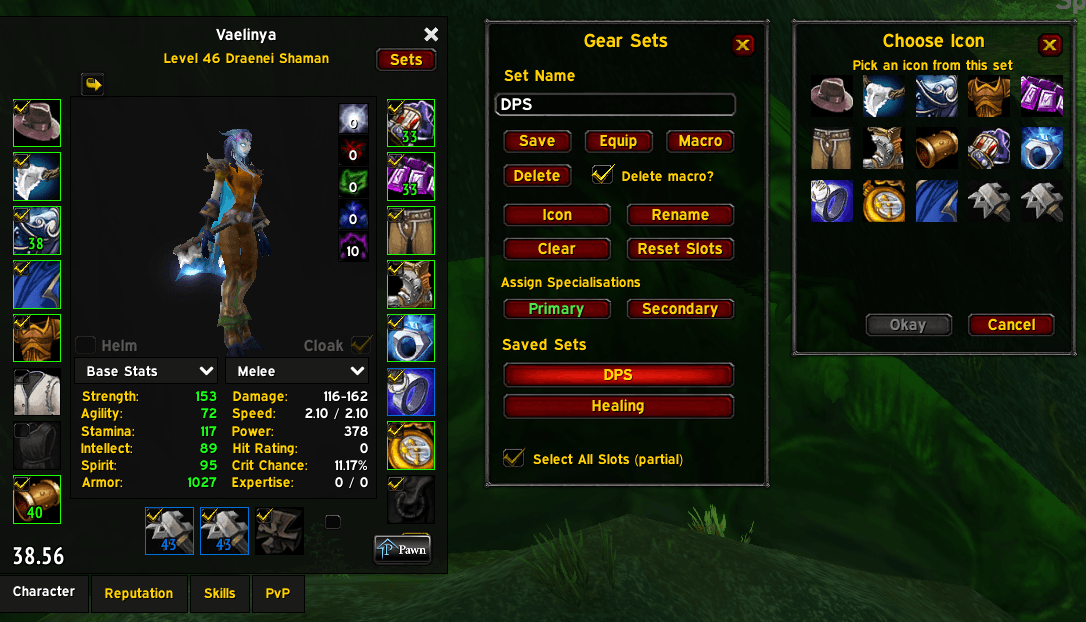
SS_Sets_Icon_Picker.png
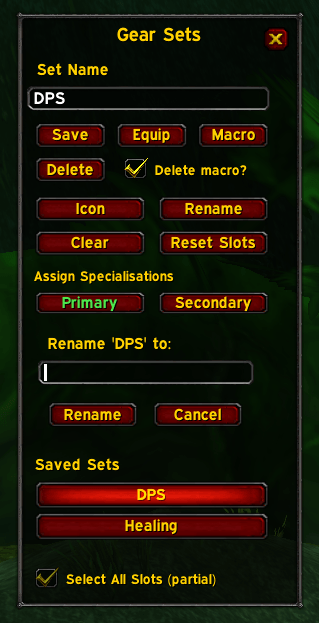
SS_Sets_Rename.png
Description
A clean, Classic-friendly gear set addon for TBC Anniversary with a fixed UI, visual macro icon picker, dual spec auto-equip, and per-slot checkboxes—designed to be simple, stable and predictable.
Why use SimpleEquipSets?
I created SimpleEquipSets for players who want reliable gear swapping without a bloated UI or complicated configuration. It functions similar to the gear set manager that was added in Mists of Pandaria.
The addon focuses on a stable, fixed layout, clear controls and features that integrate naturally with the character window, making it easy to add, edit and delete gear sets.
Description
SimpleEquipSets is a lightweight gear set addon for The Burning Crusade Classic (Anniversary realms) that focuses on simplicity, reliability and a stable UI.
It integrates directly into the character window and avoids scrollframes, complex layouts and unnecessary automation—everything is designed to behave predictably.
Key Features
Gear Sets
- Name and save up to six gear sets
- Store equipped item links per slot
- Respects ignored slots (e.g. Shirt, Tabard)
- Equip via UI (macros + keybinds) or slash commands
Character Window Side Panel
- Clean, fixed layout (up to 6 sets)
- Quick access to saved sets
- Selected set highlight
Macro Integration
- Create a macro for each set
- Macro icon updates automatically
- Choose a macro icon from items in the set
Item-Based Icon Picker
- Pick icons from items actually in the selected set
- No massive icon lists or dropdowns
- Preview the item name and slot
- Separate, movable icon picker window
Dual Spec Support
- Bind sets to Primary and Secondary specs
- Automatically equips the correct set when switching specs
- Visual indication of bindings (green)
- Right-click to clear a spec binding
Riding Set Automation (v 1.1 update)
- Create a gear set named 'Riding'
- Save the slots you want to swap to while mounted
- The Riding set will automatically equip when you mount up
- Your previous set will be restored when you dismount (out of combat)
Mount swap limitations
Due to limitations in the WoW Classic client, certain actions performed while mounted (such as casting spells, using items or interacting with NPCs) may auto-dismount without reliably triggering a swap back to your previous set. For best results, manually dismount before performing an action.
Slot Inclusion Controls
- Per-slot include/exclude checkboxes on the character slots
- "Select All Slots” with a tri-state indicator (all, partial, none)
- Reset ignored slots to default
Set Management
- Rename sets and macros safely
- Delete sets with optional macro deletion
- Clear current selection without deleting anything
Dual wield limitation
When dual-wielding two identical one-handed weapons (same item ID), WoW Classic’s equip system may keep one copy in your bags instead of placing it specifically into the off-hand slot.
- This is a limitation of the Classic/TBC client rather than the addon.
- The end result may still be correct, but slot placement cannot always be forced when the weapons are identical.
Slash Commands
You can skip the UI and use slash commands straight from the chat window:
- /ses save <name>
- /ses equip <name>
- /ses list
Compatibility
- Designed for The Burning Crusade Classic (Anniversary)
- No external libraries required
- Does not modify Blizzard UI files
- Localised and safe to use alongside other UI addons
Changelog
Public Release (v1.0)
- Added gear set save and equip functionality
- Character window side panel with fixed layout
- Visual item-based macro icon picker
- Per-set macro generation with automatic icon updates
- Dual spec auto-equip support with UI feedback
- Per-slot include/exclude controls on the paper doll
- Rename and delete tools with optional macro handling
- Stable layout and anchoring to avoid UI corruption
- Designed specifically for TBC Anniversary realms
Version 1.1
- Automated Riding set
Version 1.2
- Refined slot checkbox system for improved reliability
- Resolved intermittent interaction issues with the Ammo slot
Version 1.2.1
- Fixed a bug with naming sets with more than one word
- Fixed a bug that prevented deleting a set
- Fixed a bug where the macro was saving with a random " at the end
- Increased the size of the icon selection panel to prevent overlap of the icon select box
Version 1.3
- Added empty slots for instant gear removal
- Improved empty slots so multiple items can be simultaneously removed
- Added SES to tooltips so you can see which sets an item belongs to
- Added Shift+Right-click gear removal functionality
SimpleEquipSets Team
