SimpleEquipmentManager
- By
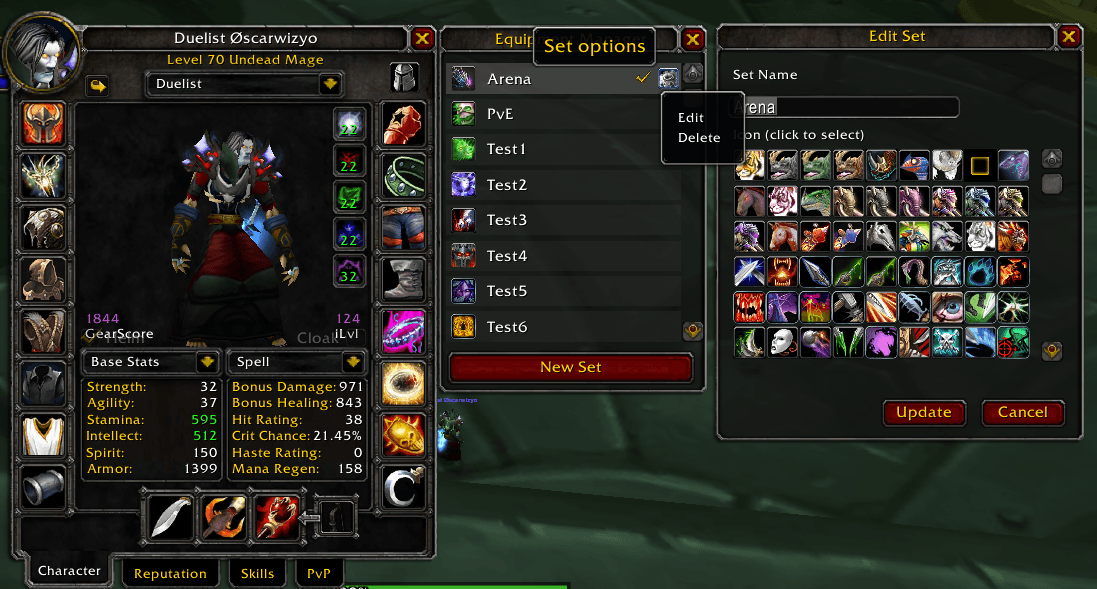
Lightweight equipment sets for WoW Classic Anniversary—save, swap, and track gear from the Character panel with one-click equip and equipped checkmarks.
599137384-1c64f83d-c00f-484f-8deb-cd4a5f31bbf8.png
Description
Simple Equipment Manager adds named gear sets to the Character window: a helmet button opens a side panel with Blizzard-style chrome. Create sets from your current gear, pick an icon from a scrollable grid, equip with one click, and see a checkmark when a set is fully worn. Edit updates name, icon, and saved gear together; delete uses a confirmation dialog. Sets persist in SimpleEquipmentManagerDB. Items must be in your bags to equip (not pulled from the bank).
How to use: Character window → helmet button → New Set / left-click to equip / right-click or gear menu to edit or delete.
SimpleEquipmentManager Team