
SimpleClock
ì¤í¬ë¦°ì· 2026-02-17 082916.png
ì¤í¬ë¦°ì· 2026-02-17 102407.png
Description
Simple Clock & Info (헤르창그's Edition)
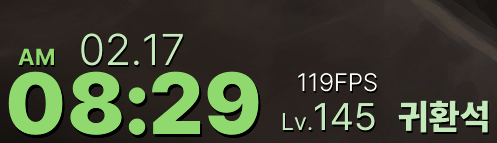
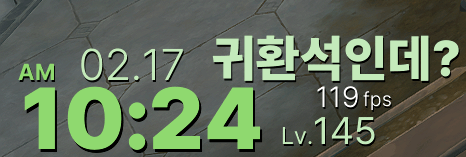
SimpleClock is a lightweight addon that neatly displays essential information on your game screen. You can view all your information at a glance and freely arrange it as you like.
● Digital Clock: Displays current time (HH:MM), date, and AM/PM in a sophisticated font.
● Character Info: Shows the current character's average Item Level in real-time.
● Durability Warning: Displays the durability of currently equipped gear as a percentage, and the color changes when it falls below the threshold.
● Hearthstone Button: Provides a dedicated Hearthstone button that can be placed anywhere on the screen. ● Account-wide Settings: Settings configured on one character are applied identically to all characters on the account.
💡Settings
· Size and Color: The size and color of all text can be changed to suit the user's preference.
· Font Change: You can change the style by selecting the name of the font you are using, such as 2002 or 2002B.
-Recommended fonts are included for your use. Please move them to the 'Fonts' folder to apply the recommended style.
· Durability Alarm: You can directly set the point (%) at which equipment repair is needed and select the color that will appear during the warning.
· Visibility: You can hide unnecessary information from the screen by unchecking the checkboxes.
· Can be used by entering the Hearthstone toy ID.
· Slash commands do not work. All settings can be configured in 'Options → AddOns → SimpleClock'.
💡 Tips for Custom Fonts
➊ After downloading from CurseForge, navigate to your World of Warcraft Addons folder.
➋ You can find the recommended fonts in the SimpleClock > fonts folder.
➌ Copy these font files to your World of Warcraft > retail > Fonts folder. (If the folder doesn't exist, create one.)
➍ Fully exit and restart the game > Settings > SimpleClock > Font Selection.
SimpleClock은 게임 화면에 꼭 필요한 정보들을 미니멀하고 깔끔하게 표시해 주는 경량 UI 애드온입니다. 시계, 아이템 레벨, 내구도 등을 한눈에 확인하고 자유롭게 배치해 보세요.
● 디지털 시계: 현재 시간(시:분)과 날짜, AM/PM을 세련된 폰트로 표시합니다.
● 캐릭터 정보: 현재 캐릭터의 평균 아이템 레벨을 실시간으로 보여줍니다.
● 내구도 경고: 착용중인 장비의 내구도를 %로 표시하며, 임계값보다 낮아지면 색상이 변합니다.
● 귀환석 버튼: 화면 어디든 배치할 수 있는 전용 귀환석 버튼을 제공합니다.
● 계정 공유 설정: 한 캐릭터에서 설정한 값이 모든 캐릭터에 동일하게 적용됩니다.
💡설정
· 크기 및 색상: 모든 텍스트의 크기와 색상을 사용자 취향에 맞게 변경 가능합니다.
· 폰트 변경: 2002, 2002B 등 사용 중인 폰트 이름을 선택하여 스타일을 바꿀 수 있습니다.
-제작자가 사용중인 폰트를 첨부 했습니다. 깔끔한 사용을 원하시면 Fonts 폴더에 넣어서 사용하세요.
· 내구도 경보: 장비 수리가 필요한 시점(%)을 직접 정하고, 경고 시 나타날 색상도 선택할 수 있습니다.
· 표시 여부: 필요 없는 정보는 체크박스를 해제하여 화면에서 숨길 수 있습니다.
· 귀환석 장난감 id를 입력하여 사용 할 수 있습니다.
· /명령어는 작동하지 않습니다. 모든 설정은 "설정 → 애드온 → SimpleClock" 에서 할 수 있습니다.
💡폰트 사용을 위한 팁(tip)
➊커스포지에서 다운로드 후 내 컴퓨터 > 와우 애드온 폴더를 찾아가야 합니다.
➋애드온 폴더 안 SimpleClock > fonts 폴더에 제작자 추천 폰트가 있습니다.
➌이 폰트를 world of warcraft > retail > fonts 폴더 안에 넣고
➍게임 완전종료, 재접속 후 설정 > SimpleClock > 글꼴 선택
SimpleClock Team
