Simple CurseTracker Forever
Clean curses tracking for multiple targets
2.png
1.png
Description
A lightweight, customizable multi-target Curse & DoT tracker built for World of Warcraft: Forever
Track your active Warlock Curses and DoTs across multiple enemies at once, switch between Textured Bars and Timer Icons, and fine-tune the look with a Live Preview directly in Blizzard Settings.
Features
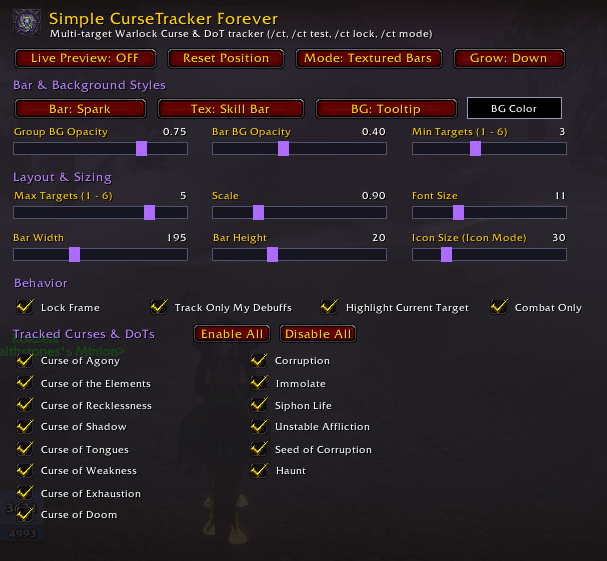
Multi-Target Tracking (Min & Max 1–6 Targets)
Set both Min Targets (e.g., 2 so it stays hidden on single-target trash) and Max Targets (1–6).
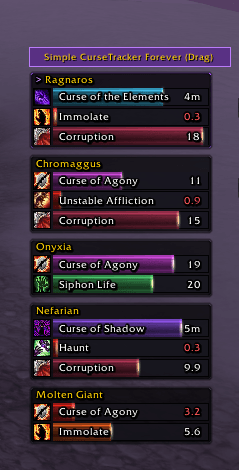
Automatically prioritizes and highlights your current target at the top of the list.
Two Display Modes
Textured Bars: Color-coded duration bars with spell icons, names, countdowns, and low-duration (<= 4s) pulse warnings.
Timer Icons: Compact cooldown-swipe icons with large countdown numbers and category color stripes.
Customizable Bar & Background Styles
Bar Styles: Classic, Minimal, Thin, and Spark.
Bar Textures: Smooth, Blizzard Raid, Flat, Skill Bar, Cast Bar, and Bar Fill.
Backgrounds: Dark Glass, Tooltip, Solid Dark, or Transparent, plus a BG Color picker and separate Group BG Opacity / Bar BG Opacity sliders.
Per-Spell Filtering
Toggle individual Curses (Curse of Agony, Elements, Recklessness, Shadow, Tongues, Weakness, Exhaustion, Doom) and DoTs (Corruption, Immolate, Siphon Life, Unstable Affliction, Seed of Corruption, Haunt), with Enable All / Disable All quick buttons.
Automatic Dead-Target Removal
Immediately clears defeated mobs via UNIT_HEALTH, NAME_PLATE_UNIT_REMOVED, UnitIsDeadOrGhost, and combat log events.
Live Preview & Drag-to-Move
Toggle Live Preview in Settings (or /ct test) to preview 1–6 mock targets and adjust sizing, scale, font size, and grow direction (Up / Down) in real time.
WoW: Forever Compatible
Guards C_UnitAuras.GetAuraDataByIndex with C_Secrets.ShouldAurasBeSecret(), issecretvalue, and pcall, seamlessly falling back to UNIT_SPELLCAST_SENT / UNIT_SPELLCAST_SUCCEEDED cast tracking when aura data is restricted.
Slash Commands
/ct or /cursetracker — Open Options → AddOns → Simple CurseTracker Forever/ct test — Toggle Live Preview mode/ct mode — Switch between Textured Bars and Timer Icons/ct lock — Lock or unlock the anchor frame/ct clear — Clear currently tracked targets
Simple CurseTracker Forever Team