


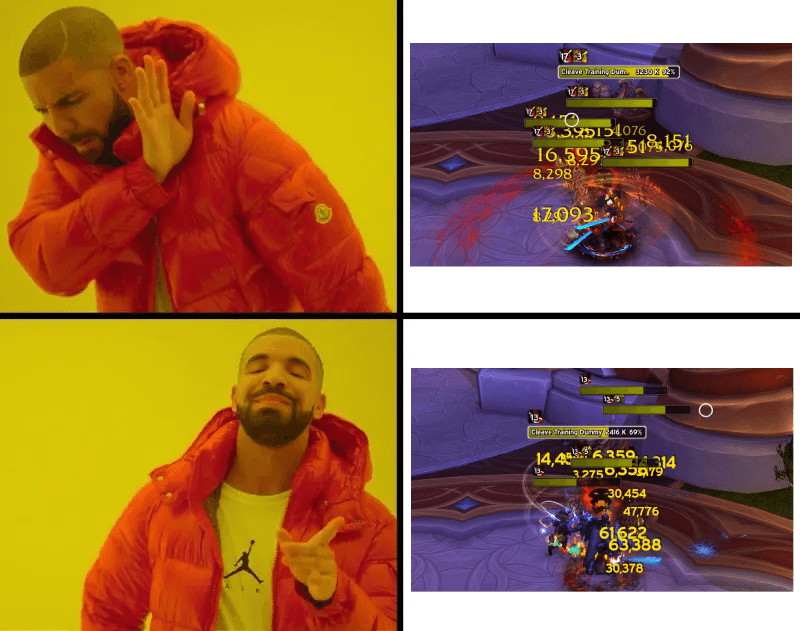
readme.png
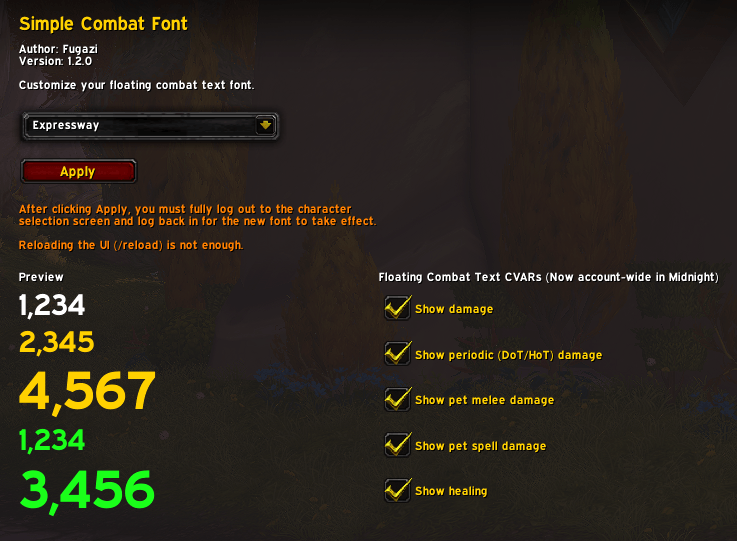
readme-settingsui.png
Description
Simple Combat Font
Swaps your floating combat text to the font of your choice.
This addon does not change the behaviour of the floating combat text.
It only changes the font. It cannot change the position, scroll direction, etc.
Currently supports:
- Blizzard default fonts
- LibSharedMedia fonts (fonts registered by other addons such as ElvUI, EQOL, BetterBlizzPlates, etc)
- If you use Shared Media, those fonts will already be available
Installation
Extract SimpleCombatFont folder to Interface\AddOns\ folder
Usage
Use
/scfor open the Simple Combat Font panel in Game Menu > Options > AddonsSelect a font from the drop-down list and click Apply
Log out to character select screen and log back in
I've also included some toggles for the floating combat text CVars (Turn off healing, pet damage, etc). These are seemingly account-wide in Midnight.
Note
Your selection will be saved and applied each login (account-wide). You only need to log out and log in when changing the font in the settings panel.
Due to the way WoW handles 3D font changes, you must log out to the character select screen, and log back in to apply this font change.
I'm punting on adding a custom font system. I don't want to bog this addon down too much. Most players are already using addons that are registering many custom font options. If you'd like to include a font of your own, please use SharedMedia to get your custom font registered using the SharedMedia_MyMedia folder (Follow the instructions for SharedMedia to properly register them). My addon will then pick it up.
Simple Combat Font Team
