
SigilArt
- By
Screenshot 2026-11-19 224611.png
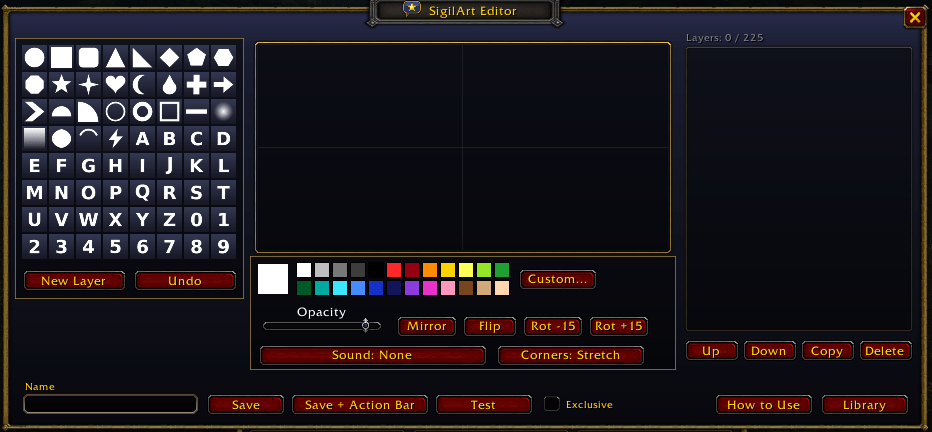
image_2026-11-19_225107830.png
Description
SigilArt
Make your own emotes and show them over your head. Build art from layered shapes, give it a short sound, put it on your action bar, and press it. Everyone nearby who has SigilArt sees it pop up over your character and hears the sound. Created as a clever way for players to be more expressive and for players to create their own art and memes to share with other players.
Inspired by the Symbol Art system from Phantasy Star Online 2.
Features
- Emote editor: up to 225 layers from 64 shapes (stars, hearts, letters, numbers and more). Drag corners to stretch or skew, resize, mirror, flip and colour each layer.
- Sounds: pick from over 120 short funny, money, celebration and murloc sounds. Volume fades with distance.
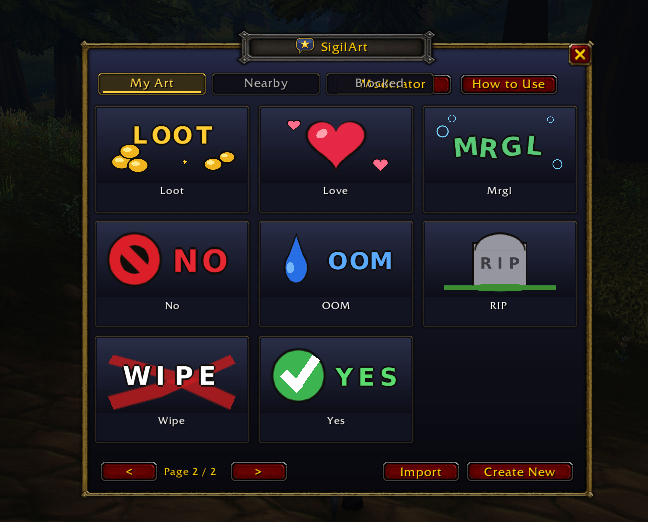
- Action bar ready: drag any emote from My Art onto your bars.
- 16 starter emotes: GG, LOL, RIP, Ding, Gz, Love, OOM, AFK, Wipe, Loot, Hype, Mrgl, No, Yes, LFG, BRB.
- Nearby log: see who used which emote near you, and save a copy of ones you like.
- Exclusive emotes: mark your art Exclusive so nobody can copy it.
- Share codes: export an emote as a code and import it in game.
- Nothing in chat: emotes only appear over heads, and only to nearby players.
Getting started
- Install, log in, and click the star-in-a-bubble button on your minimap.
- Press a starter emote, or click New to make your own.
- Drag it to your action bar and press it.
Shift+V turns emotes on and off. SigilArt shows emotes above friendly player nameplates, so it turns those on for you the first time. Press Shift+V any time to hide nameplates and emotes, and again to bring them back.
Safety
- Each player can use an emote once every 10 seconds, enforced by everyone's addon.
- Click any emote to Block it, block its creator, or Report it.
- Reports go to the SigilArt moderators, who can remove art for everyone and warn or ban players from SigilArt. Moderator actions are digitally signed, so they can't be faked.
- You're responsible for what you create. Follow Blizzard's rules: art that breaks them can lead to a SigilArt ban and a Blizzard report.
Commands
/sig opens SigilArt · /sig new new emote · /sig howto guide · /sig log nearby log · /sig import import a code · /sig strangers off hide emotes from strangers · /sig sound off mute emote sounds · /sig help all commands
Only download SigilArt from this page. Copies from anywhere else may be modified.
SigilArt Team
