sieve.png
Description
💬 Sieve
Your whispers, kept safe through boss fights and Mythic+ keys.
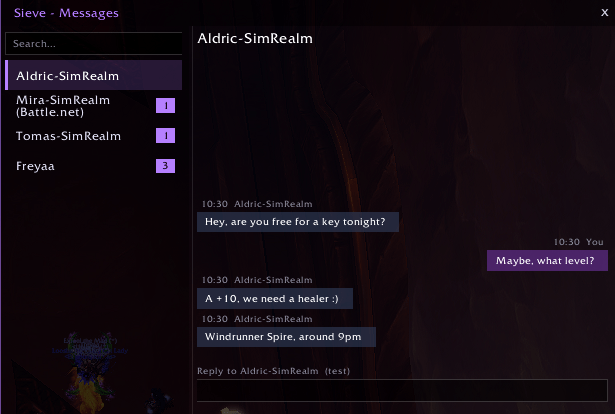
Sieve is a modern whisper messenger for World of Warcraft: Midnight. Clean chat bubbles, unread badges, instant search, and a smart quiet system that never gets in your way during combat.
📩 Features
- Instant Messaging Interface — Modern chat window with conversation lists on the left, chat bubbles on the right, and an intuitive reply box (press Enter to send).
- Smart Auto-Open — Automatically pops up when you receive a whisper, but strictly stays out of your way during combat, boss fights, and Mythic+ keys.
- Quiet Mode & Auto-Quiet — Holds whispers back automatically during raids and keys, and restores them when you're done.
- Interactive Minimap Icon — Pulses with an unread badge counter. Click to open, right-click for options, drag to position.
- Full Customization — Custom accent colors, font sizes, opacity controls, moving toasts in Edit Mode, and 3 custom sound effects (plus full LibSharedMedia support).
- Built-in Test Mode — Use
/sieve simto test combat transitions, whispers, and alerts without needing another player. - Multi-Language Support — EN, DE, ES, FR, IT, PT-BR, RU, KR, CN (Simp. & Trad.).
⌨️ Commands
| Command | Action |
|---|---|
/sieve |
Open or close the messages window |
/sieve config |
Open options & customization menu |
/sieve quiet on|off |
Manually toggle Quiet Mode |
/sieve autoquiet raid|key on|off |
Toggle automatic Quiet Mode for raids or Mythic+ keys |
/sieve autoopen on|off |
Toggle auto-opening the window on new whispers |
/sieve minimap [on|off] |
Show, hide, or configure the minimap button |
/sieve sim [fight|clear] |
Simulate incoming whispers and combat to test features |
/sieve help |
Display the full list of available commands |
Sieve Team