


shupaz ForeverQuestLog
- By
Decouples your Quest Log from the World Map into a classic dual-pane window with a zone-grouped, collapsible Objective Tracker.
screenshot_01.png
screenshot_02.png
screenshot_03.png
screenshot_04.png
screenshot_05.png
Description
shupaz ForeverQuestLog





shupaz ForeverQuestLog is a lightweight, modular World of Warcraft addon designed for Classic and Forever clients. It restores the beloved standalone Classic dual-pane Quest Log window, completely decoupling it from the full-screen World Map while introducing modern conveniences like Wowhead quest link cards, real-time objective tracking, collapsible zone grouping in the Objective Tracker, and smooth custom scrolling.
✨ Features
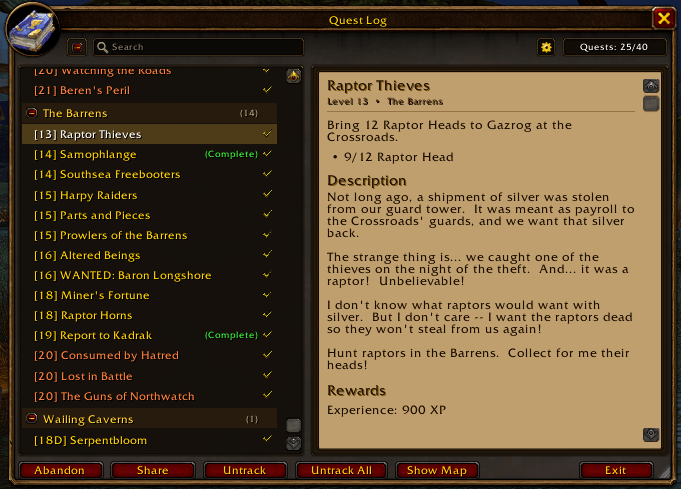
📜 Classic Dual-Pane Quest Log
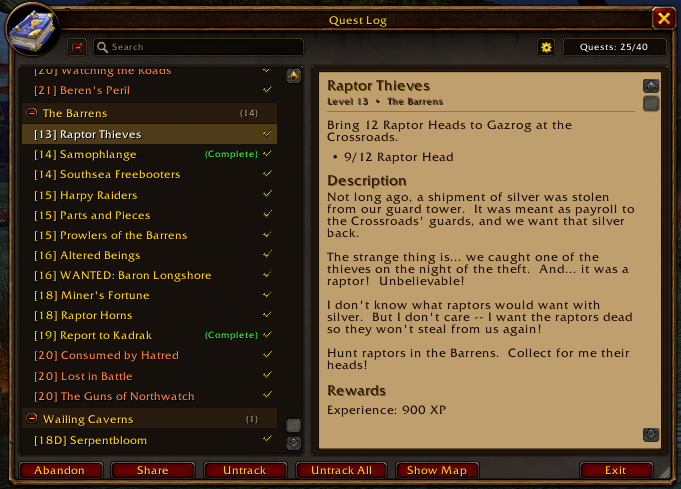
- Standalone & Movable: Sits cleanly on your screen without obstructing the World Map. Drag anywhere or let it intelligently dock side-by-side with Blizzard windows (Character Info, Spellbook, Professions, etc.).
- Dual-Pane Layout:
- Left Pane: Collapsible zone headers with quest counts, colored difficulty levels (
[Level] Quest Title), and completion statuses. - Right Pane: Rich quest descriptions, objectives, material requirements, XP, gold, and reward item previews.
- Left Pane: Collapsible zone headers with quest counts, colored difficulty levels (
- Track All / Untrack All: One-click header button that dynamically tracks all active quests or clears all tracking.
- Wowhead Quest Link Integration: Hover over the
[Wowhead]badge next to any quest title for a quick copy card, or click to open an instant copy dialog linking directly towowhead.com/forever/quest=<id>. - Full ESC Key Support: Easily close the window with the
Escapekey just like native Blizzard panels. - Quick Action Bar: Dedicated buttons for Track All, Abandon Quest, Share Quest, and Show on Map.
- Right-Click Context Menu: Right-click any quest to track/untrack, super-track (map arrow), paste into chat, view Wowhead URL, share, or abandon.
🎯 Enhanced Objective Tracker
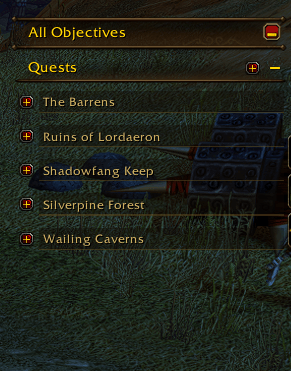
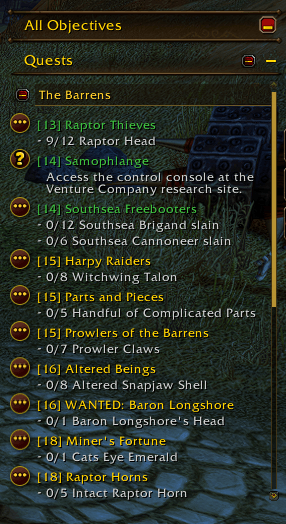
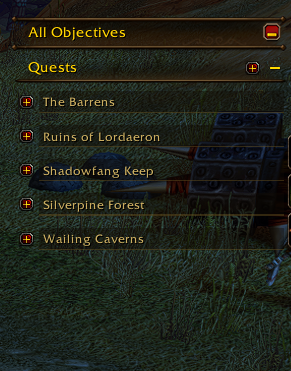
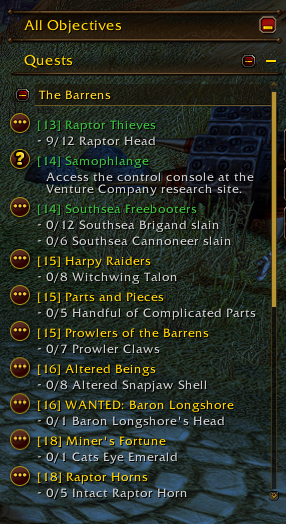
- Zone Grouping: Quests in your Blizzard Objective Tracker are automatically categorized under distinct, handsome Zone Headers.
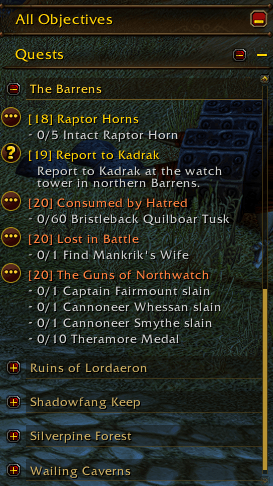
- Collapsible Sections: Click any zone header to collapse or expand its quests on the fly.
- Master Toggle: One-click button on the Objective Tracker header to collapse or expand all tracked zones at once.
- Current Zone Priority: Automatically floats quests in your current zone to the very top of your tracker.
- Progress Badges: Zone headers display real-time completion status (e.g.
(3/5)). - Instant Real-Time Updates: Quest kills, item pickups, and criteria updates refresh the tracker immediately.
- Smart Custom Scrollbar: A sleek, non-intrusive scrollbar automatically appears whenever your tracked quests exceed screen bounds. Scroll smoothly using your mouse wheel or drag the scrollbar thumb.
🎨 Customization & Modern Integration
- Custom Fonts: Choose from 10 built-in classic fonts (Friz Quadrata, Arial Narrow, Morpheus, Skurri, 2002, Nimrod, MoK, and more) plus full support for any font registered via LibSharedMedia-3.0.
- Independent Scaling: Configure Quest Log scale and Objective Tracker scale separately (60% to 160%).
- World Map Decoupling: Completely suppresses the embedded World Map quest panel and redirects the Micro Menu Quest button directly to the standalone Quest Log.
- Minimap Addon Compartment: Left-click to toggle the Quest Log, right-click to instantly open settings.
- Configurable Keybinding: Default bound to L (configurable in Game Options > Keybindings > AddOns).
📸 Screenshots
| Standalone Quest Log | Objective Tracker Grouping |
|---|---|
 |
 |
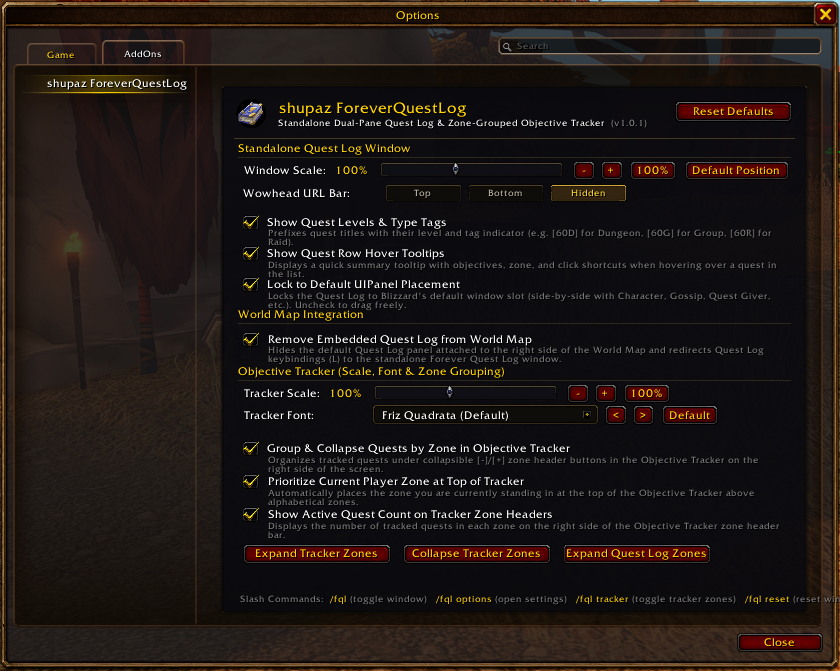
| Tracker Scrollbar | Settings Panel |
|---|---|
 |
 |
⌨️ Slash Commands
| Command | Description |
|---|---|
/fql or /questlog |
Toggle the standalone Quest Log window. |
/fql opt or /fql config |
Open the AddOn Settings panel. |
/fql tracker |
Toggle Objective Tracker zone grouping on or off. |
/fql reset |
Reset the Quest Log window position and scale back to defaults. |
/fql scale <number> |
Set window scale directly (e.g. /fql scale 1.1). |
/fql fixmenu |
Re-register Micro Menu button hooks if overridden by other addons. |
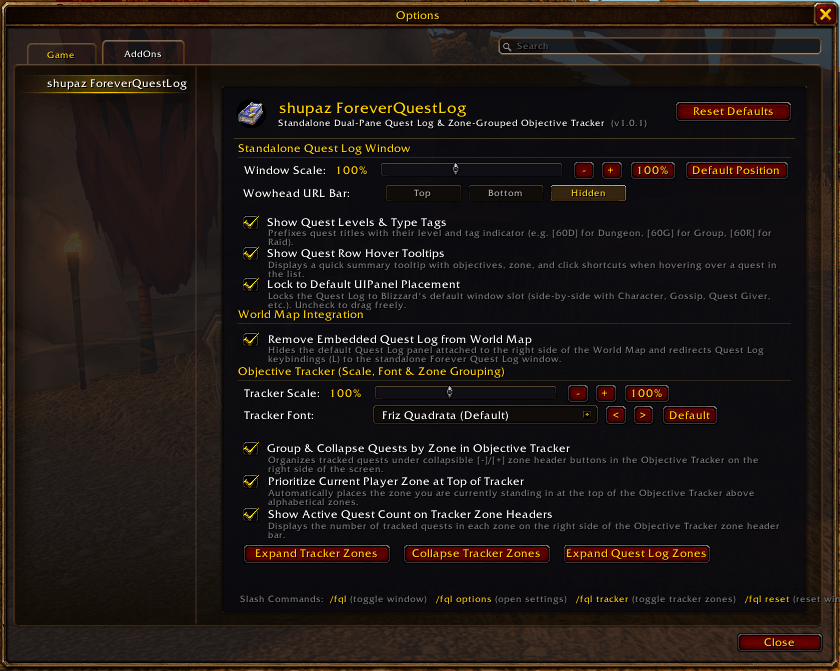
⚙️ Configuration & Options
Access the settings panel via:
- Game Menu (
ESC) > Options > AddOns > shupaz ForeverQuestLog - Or type
/fql optin chat.
Settings Include:
- Quest Log Window:
- Scale slider (60% to 160%).
- Lock Window (prevent dragging).
- Use Default Screen Position (auto-dock beside character/spellbook windows).
- Show Quest Levels in quest list.
- Show Detailed Tooltips on hover.
- Suppress Embedded World Map Quest Log.
- Objective Tracker:
- Group Tracked Quests by Zone.
- Prioritize Current Zone (floats current zone to top).
- Show Zone Quest Count Badges (
(x/y)). - Objective Tracker Scale slider (60% to 160%).
- Objective Tracker Font dropdown (10 built-in fonts + LibSharedMedia).
📦 Directory Structure & Architecture
Forever-Quest-Log/
│
├── assets/
│   ├── logo.png
│   ├── screenshot_01.png
│   ├── screenshot_02.png
│   ├── screenshot_03.png
│   └── screenshot_05.png
│
├── src/
│   ├── Init.lua            # Global namespace, DB defaults, event dispatcher & slash commands (/fql)
│   ├── Utils.lua           # Helpers, fonts, Quest API wrappers, link helpers & action utilities
│   ├── Hooks.lua           # World Map quest suppression, CVars, keybindings & menu hooks
│   ├── QuestLog.lua        # Dual-pane Quest Log window, headers, detail pane, Wowhead card & action buttons
│   ├── Tracker.lua         # Blizzard Objective Tracker zone grouping, collapsible headers & custom scrollbar
│   └── Options.lua         # Settings panel in Game Options > AddOns, sliders, checkboxes, font dropdown
│
├── Bindings.xml            # Keybinding definitions
├── shupaz_ForeverQuestLog.toc # Addon manifest loading modules in strict dependency order
├── .pkgmeta                # BigWigs Packager configuration
├── LICENSE                 # MIT License
└── README.md               # Documentation
💻 Manual Installation
- Download the latest release
.zipfrom Releases, CurseForge, or Wago. - Extract the
shupaz_ForeverQuestLogfolder into your World of Warcraft AddOns directory:
World of Warcraft\_forever_\Interface\AddOns\- Ensure the folder structure appears as:
   Interface\AddOns\shupaz_ForeverQuestLog\
       ├── Bindings.xml
       ├── shupaz_ForeverQuestLog.toc
       └── src\
           ├── Init.lua
           ├── Utils.lua
           ├── Hooks.lua
           ├── QuestLog.lua
           ├── Tracker.lua
└── Options.lua- Start World of Warcraft and verify shupaz ForeverQuestLog is enabled in your AddOn list.
🤝 Acknowledgements
Developed by shupaz, built, refined, and modularized in pair programming with Antigravity (Google DeepMind).
📄 License
This project is licensed under the MIT License.
shupaz ForeverQuestLog Team
