WowB_3vIhSd4EfK.png
WowB_qAs0iNK1Pp.png
WowB_p5pg5Fofth.png
Description
Shopping Forever
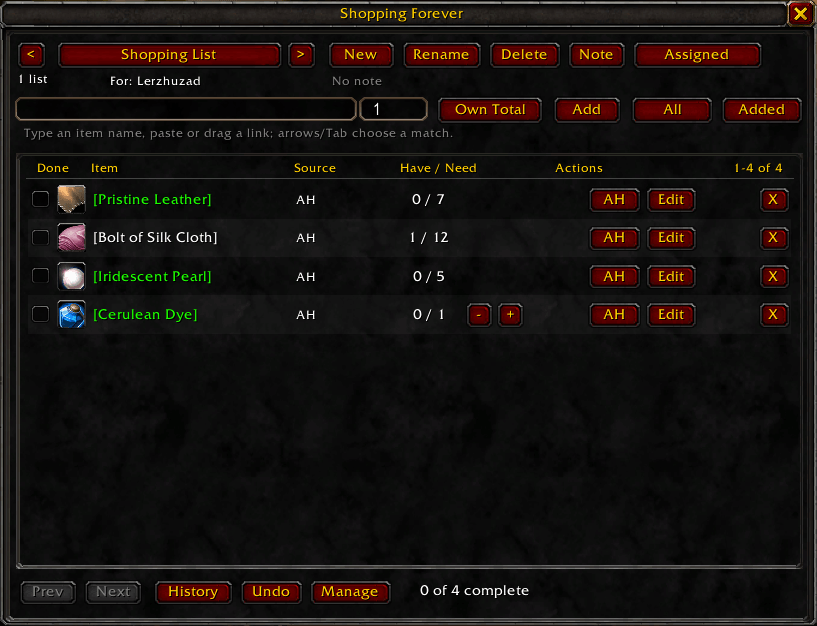
Account-wide shopping lists for World of Warcraft: Forever.
Shopping Forever keeps Auction House purchases, vendor items, and profession materials together in persistent, easy to manage lists. Plan what you need, track what you already own, and quickly reach the right acquisition source without automating purchases or crafting confirmations.
Features
- Multiple named account-wide shopping lists
- Item name autocomplete powered by ItemDB
- Direct support for item links and item IDs
- Own Total goals based on live inventory counts
- Buy More goals for tracking additional acquisitions
- Auction House search actions and purchase progress
- Learned vendor sources from merchants you visit
- Current character and cached alternate character profession knowledge
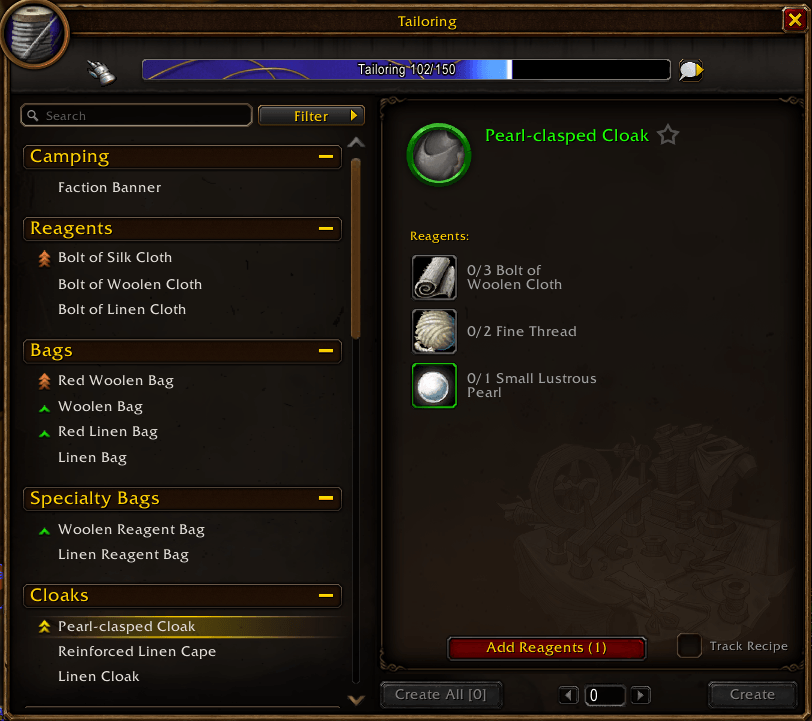
- Direct Add Reagents button in the profession window
- Multi-level crafting plans for fixed recipes and intermediate materials
- Source suggestions for crafting, known vendors, and the Auction House
- Filters, sorting, list notes, and character assignments
- Acquisition history with safe undo
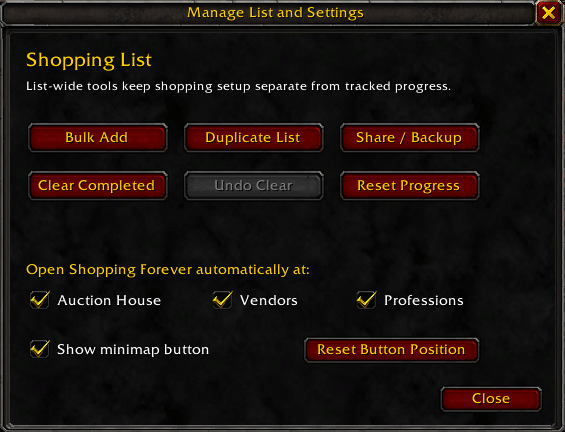
- Bulk item entry and list duplication
- Portable list sharing and full data backups
- Movable minimap button with saved position and visibility
Profession integration
Select a recipe and use Add Reagents to add its missing materials directly to your active shopping list. Shopping Forever reads the selected craft quantity, subtracts materials already owned, and avoids duplicating quantities already outstanding on the list.
For items on a shopping list, Shopping Forever can also identify known crafters, open recipes, add missing reagents, and expand fixed intermediate recipes into a complete material plan.
Recipes with unresolved selectable or optional reagents are left to the player so the addon never chooses materials on your behalf.
Two ways to track a goal
Own Total answers: "How many do I want to have?"
It uses the inventory counts exposed by the client across supported bags and bank stores.
Buy More answers: "How many more do I want to acquire?"
It tracks manual progress and successful Auction House, vendor, and crafting results reported by the client.
Minimap controls
- Left click: Open or close Shopping Forever
- Right click: Open Manage List and Settings
- Drag: Reposition the button around the minimap
Use /sf minimap show or /sf minimap reset if the button has been hidden.
Main commands
/sf                          Open or close Shopping Forever
/sf add ITEM_LINK [QUANTITY] Add an item
/sf new NAME                 Create a list
/sf lists                    Choose a list
/sf history                  View acquisition history
/sf manage                   Open list tools and settings
/sf bulk                     Add multiple item goals
/sf share                    Open sharing and backup tools
/sf minimap [show|hide|reset]
/sf help
Requirement
ItemDB is required. Install and enable it alongside Shopping Forever. ItemDB is not bundled with the addon.
Installation
- Install ItemDB.
- Extract
ShoppingForeverinto your WoWInterface/AddOnsdirectory. - Enable both addons at character selection.
- Open Shopping Forever with
/sfor its minimap button.
Important notes
- Shopping Forever never automatically purchases an item or confirms a craft.
- Vendor information is learned when you visit merchants.
- Alternate character recipe information is cached after the addon observes that character's profession data.
- Lists, settings, history, vendor observations, and profession caches are stored account-wide.
I originally created this addon for Elder Scrolls Online. I did utilize AI to help me convert it to WoW as I already had the foundation built. I also used AI to make the icon/logo, I code, not draw.
Shopping Forever Team