Shadowless Bam! Crit Sound Alert Addon
- By
Play a satisfying BAM! every time you land a critical hit – with full control.
1.png
2.png
3.png
4.png
5.png
6.png
heal_effects.png
damage_effects.png
Spell_Rules.png
Description

ShadowlessBamCrit – Turn Every Crit into a Moment
🎯 Feel every critical hit. Hear the BAM. See the impact.
ShadowlessBamCrit transforms critical hits into memorable moments with configurable sounds, cinematic visual effects, detailed crit tracking and fast in-game controls.
The addon is lightweight, performance-friendly and designed for modern World of Warcraft Retail / Midnight.
💥 Why You’ll Love It
- Hear your power – Play dedicated sounds for damage crits, healing crits and defensive combat events.
- See every impact – Add customizable full-screen effects for damage and healing crits.
- Build your own sound setup – Select one sound, rotate through several or choose one randomly.
- Avoid unnecessary spam – Set a minimum damage threshold.
- Track your records – Review crit history, totals, highest hits and detailed combat statistics.
- Control when it activates – Configure separate behavior for PvP, Arenas, Raids, Dungeons and the Open World.
- Mute everything instantly – Use the minimap Quick Toggle without losing your saved configuration.
- Configure everything in-game – No Lua editing required.
🎵 Advanced Sound Effects
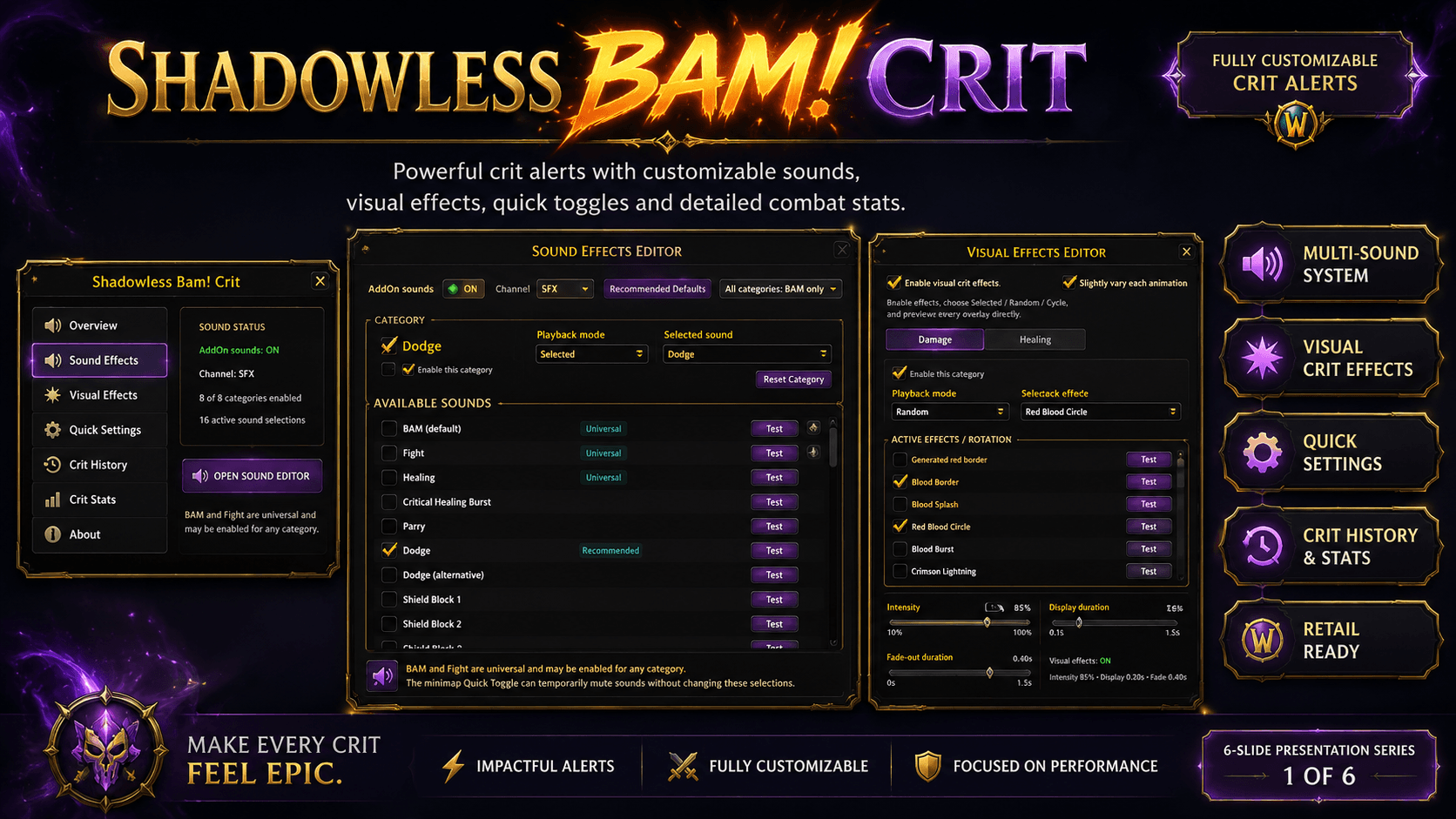
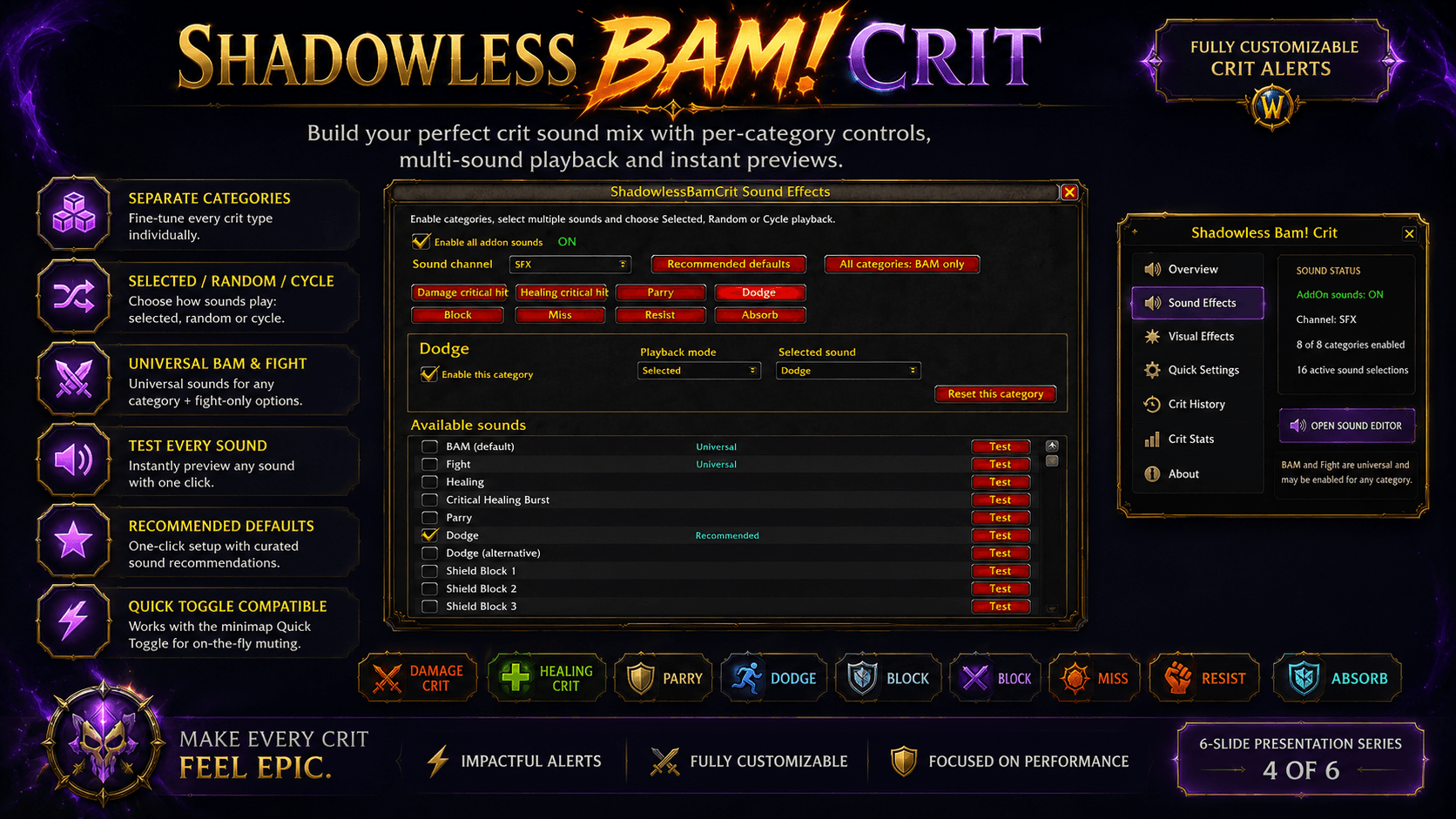
ShadowlessBamCrit includes a dedicated Sound Effects editor with separate categories for:
- Damage Critical Hits
- Healing Critical Hits
- Parry
- Dodge
- Block
- Miss
- Resist
- Absorb
Each category supports three playback modes:
Selected
Always plays one chosen sound.
Random
Randomly chooses one of the enabled sounds.
Cycle
Plays enabled sounds one after another in sequence.
Every sound can be previewed instantly using its own Test button.
Universal Sounds
The following sounds can be enabled for any category:
- BAM
- Fight
This means you can use BAM only for critical damage, or also assign it to healing, blocking, dodging or any other supported action.
Included Sound Variations
The addon includes dedicated sounds for:
- Damage crits
- Healing and Critical Healing Burst
- Parry
- Dodge and alternative Dodge
- Multiple shield and block effects
- Multiple miss effects
- Multiple resistance effects
- Multiple absorb effects
Missing optional sound files automatically fall back to the default BAM sound.
🌟 Visual Crit Effects
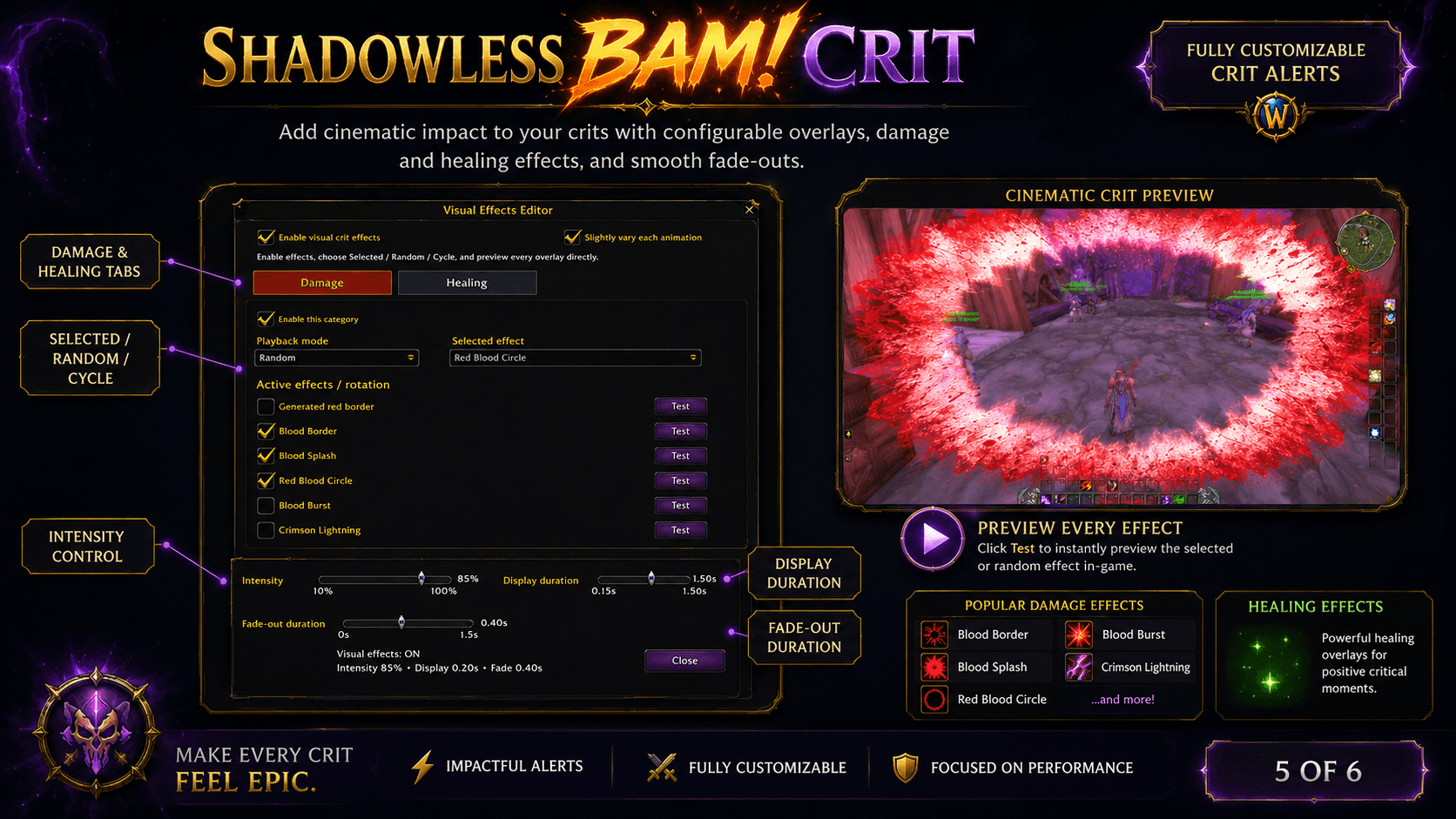
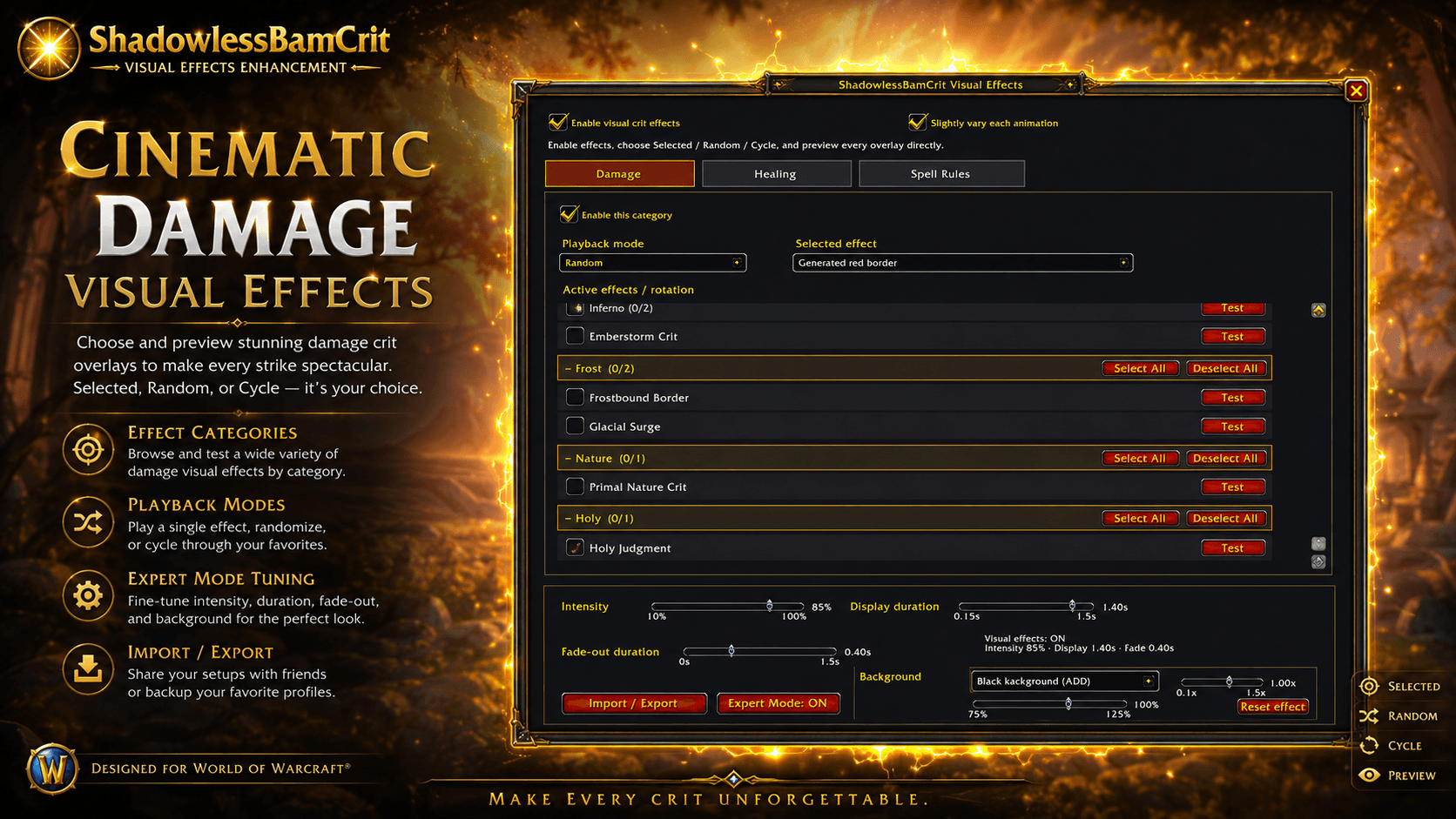
Add cinematic full-screen effects whenever you land a critical hit.
Damage and healing effects are configured independently and support:
- Selected
- Random
- Cycle
Damage Effects
Included effects currently feature:
- Generated Red Border
- Blood Border
- Blood Splash
- Red Blood Circle
- Blood Burst
- Crimson Lightning
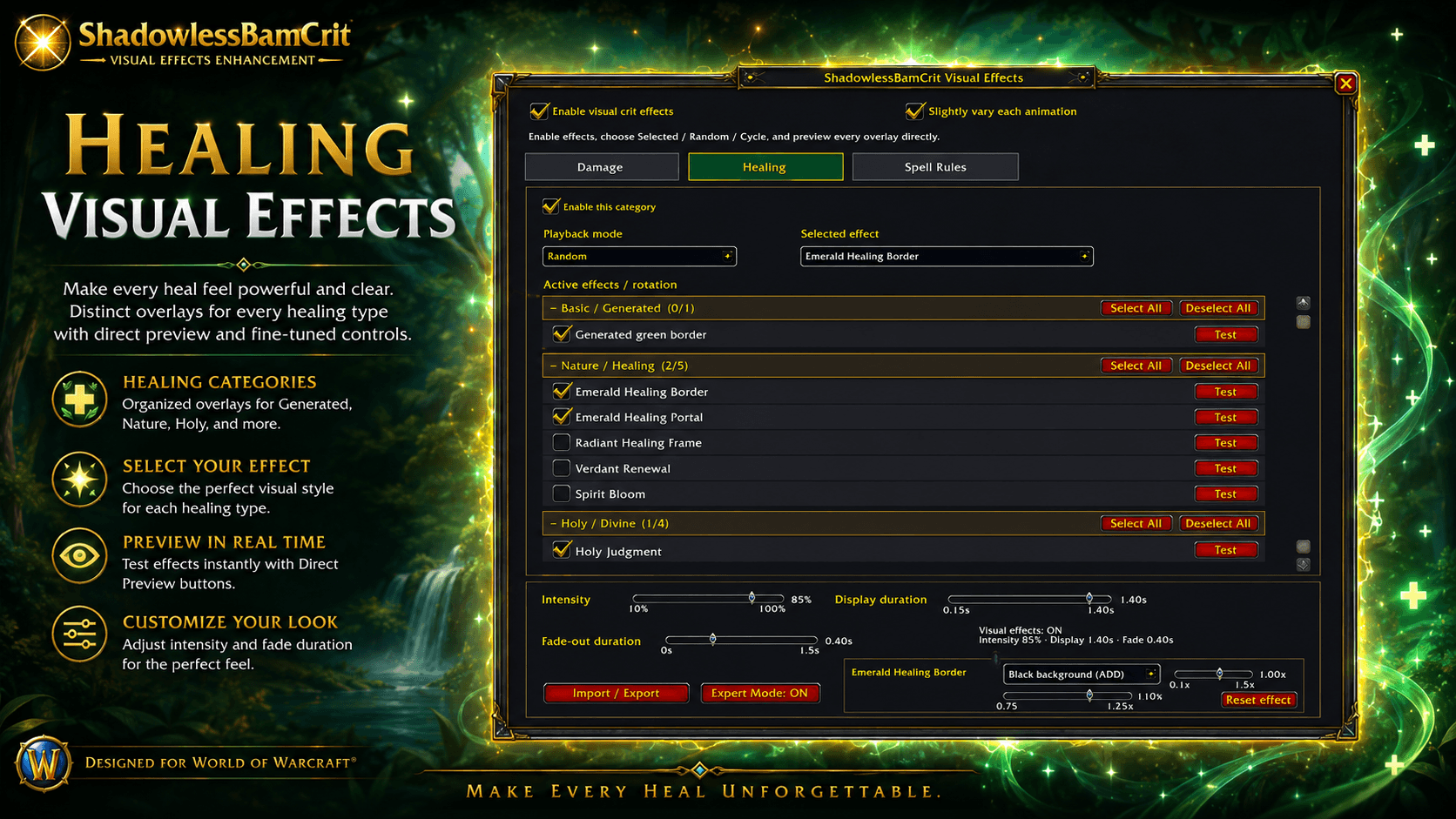
Healing Effects
Included healing visuals feature:
- Generated Green Border
- Emerald Healing Border
- Emerald Healing Circle
- Holy Healing Lightning
Each effect can be enabled individually and previewed instantly.
Animation Controls
Customize:
- Effect intensity
- Display duration
- Fade-out duration
- Slight animation variation
- Active effects used for Random or Cycle mode
The effect remains visible at the configured intensity for the complete display duration and then fades smoothly to zero over the selected fade-out duration.
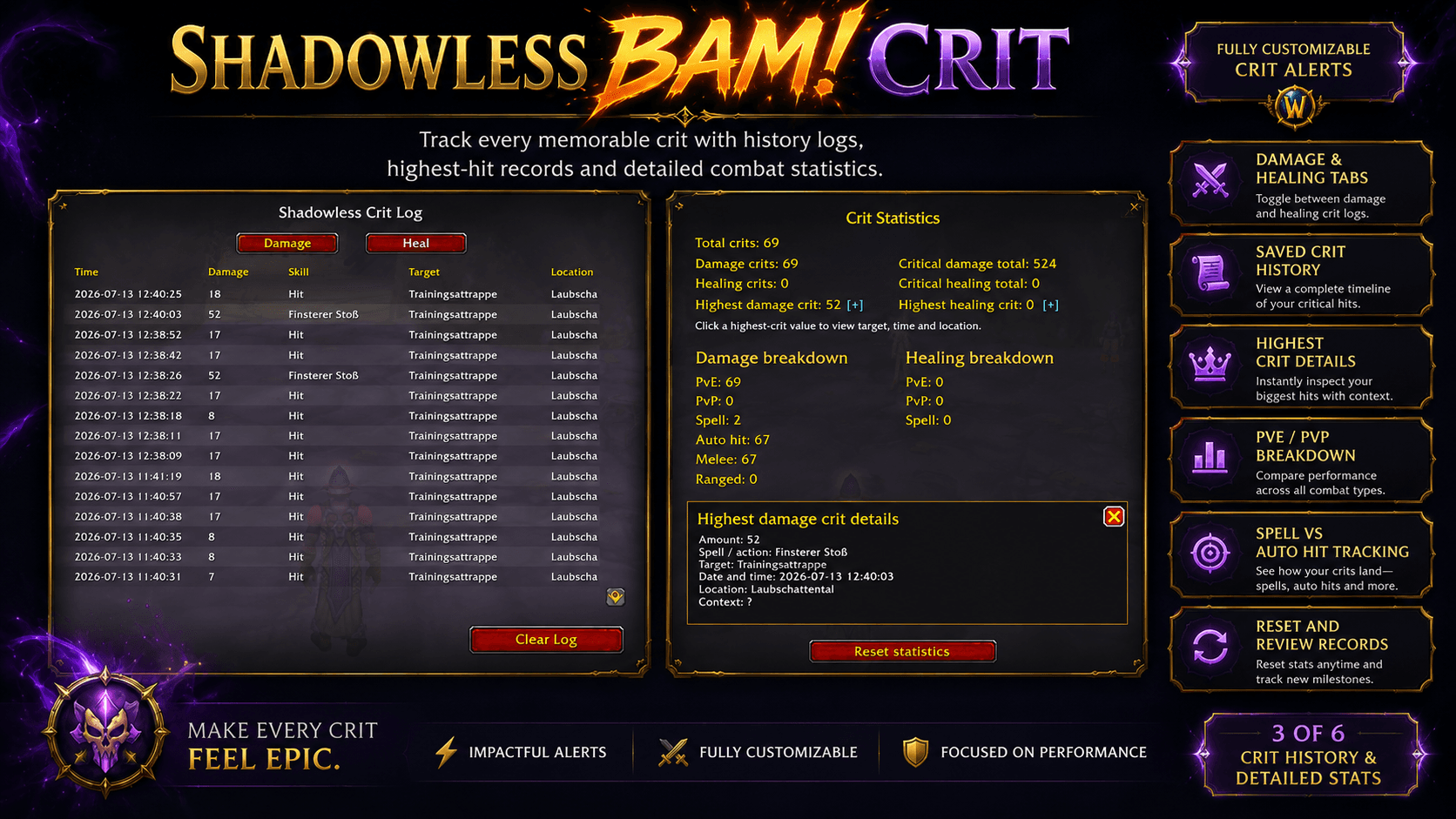
📈 Crit History
ShadowlessBamCrit records detected damage and healing critical hits in a searchable, scrollable history window.
The history includes:
- Date and time
- Damage or healing amount
- Spell or action
- Target
- Zone or location
- Separate Damage and Healing tabs
- Personal-record indicators
Crit history can be cleared whenever you want without resetting the rest of your configuration.
📊 Detailed Crit Statistics
Track your performance through an expanded statistics panel.
Statistics include:
- Total crits
- Damage crits
- Healing crits
- Total critical damage
- Total critical healing
- Highest damage crit
- Highest healing crit
- PvE and PvP breakdown
- Spell crits
- Automatic attacks
- Melee attacks
- Ranged attacks
The highest damage and healing values are clickable.
Their detail view can show:
- Amount
- Spell or action
- Target
- Date and time
- Location
- PvE or PvP context
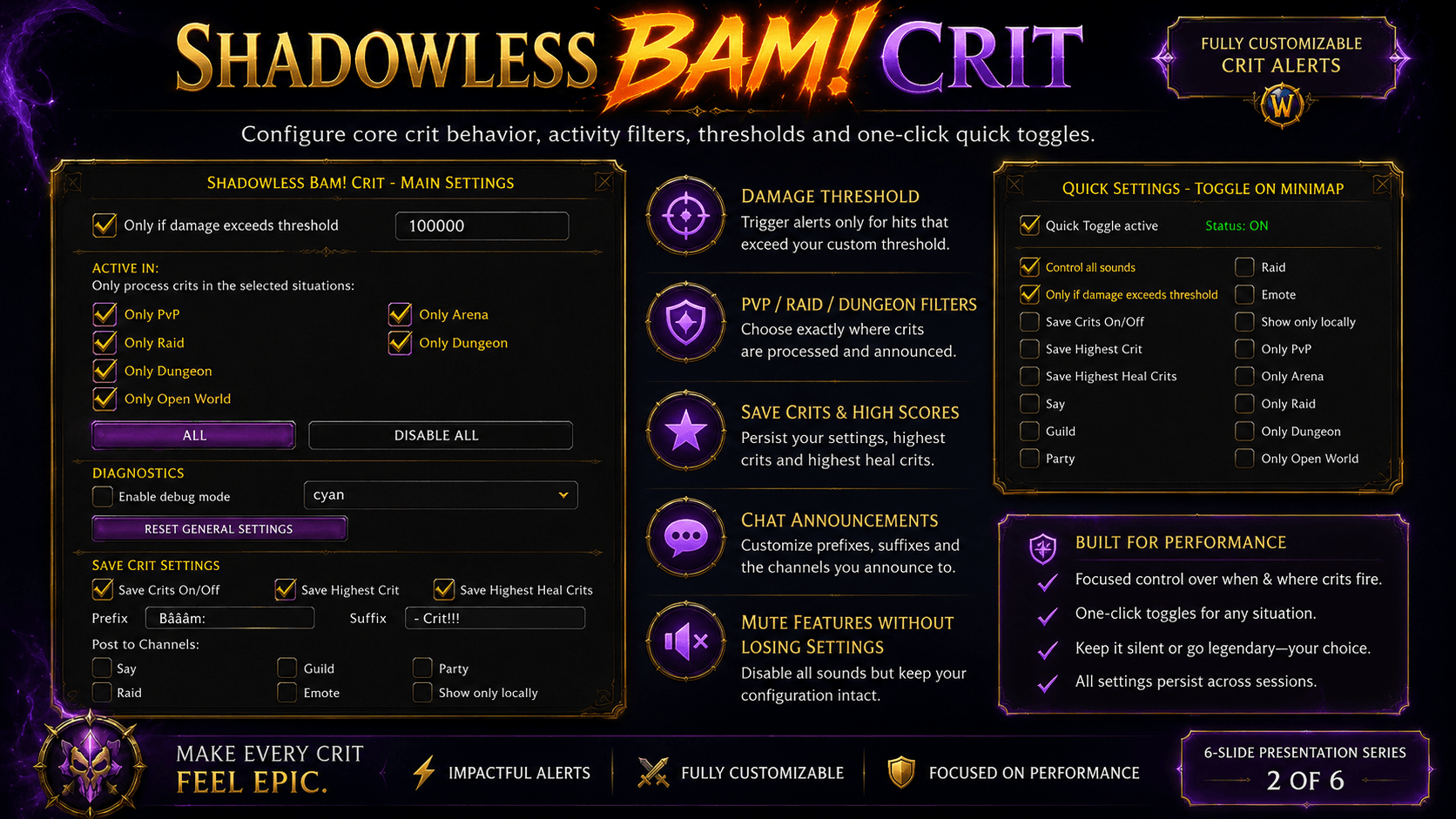
⚡ Quick Toggle
Right-click the minimap icon to temporarily disable selected addon functions.
The Quick Toggle can control:
- All addon sounds
- Damage threshold
- Crit history saving
- Highest-crit saving
- Chat announcements
- PvP, Arena, Raid, Dungeon and Open World filters
Your saved settings are never overwritten.
Right-click again to restore the previous behavior immediately.
The current Quick Toggle status is shown directly in the minimap tooltip.
⚙️ Main Settings
The in-game settings allow you to configure:
- Minimum critical-damage threshold
- PvP activity
- Arena activity
- Raid activity
- Dungeon activity
- Open World activity
- Crit-history saving
- Highest damage crit saving
- Highest healing crit saving
- Chat prefix and suffix
- Chat announcement channels
- Local-only messages
- Debug mode and debug color
- General settings reset
💬 Chat Announcements
Optionally announce critical hits through:
- SAY
- PARTY
- RAID
- GUILD
- EMOTE
- Local addon output
Prefixes and suffixes are fully configurable.
Example:
BAM CRIT!: 186,700 – In Your FACE!🛡️ Retail / Midnight Compatibility
ShadowlessBamCrit is designed for modern World of Warcraft Retail and the combat-data restrictions introduced with Midnight.
Modern Retail no longer exposes every combat-log value safely to addons. ShadowlessBamCrit therefore avoids relying on the restricted COMBAT_LOG_EVENT_UNFILTERED route.
Instead, it uses a protected best-effort detection system based on:
UNIT_COMBAT- Recent player spell casts
- Accessible unit information
- Duplicate-event protection
- Protected handling of inaccessible values
This avoids the taint and secret-value errors caused by restricted combat-log data.
Normal damage and healing crit detection works well during regular gameplay. Extremely dense AoE situations, delayed effects and certain automatic attacks may remain inherently ambiguous because Blizzard does not expose every attribution detail to addons.
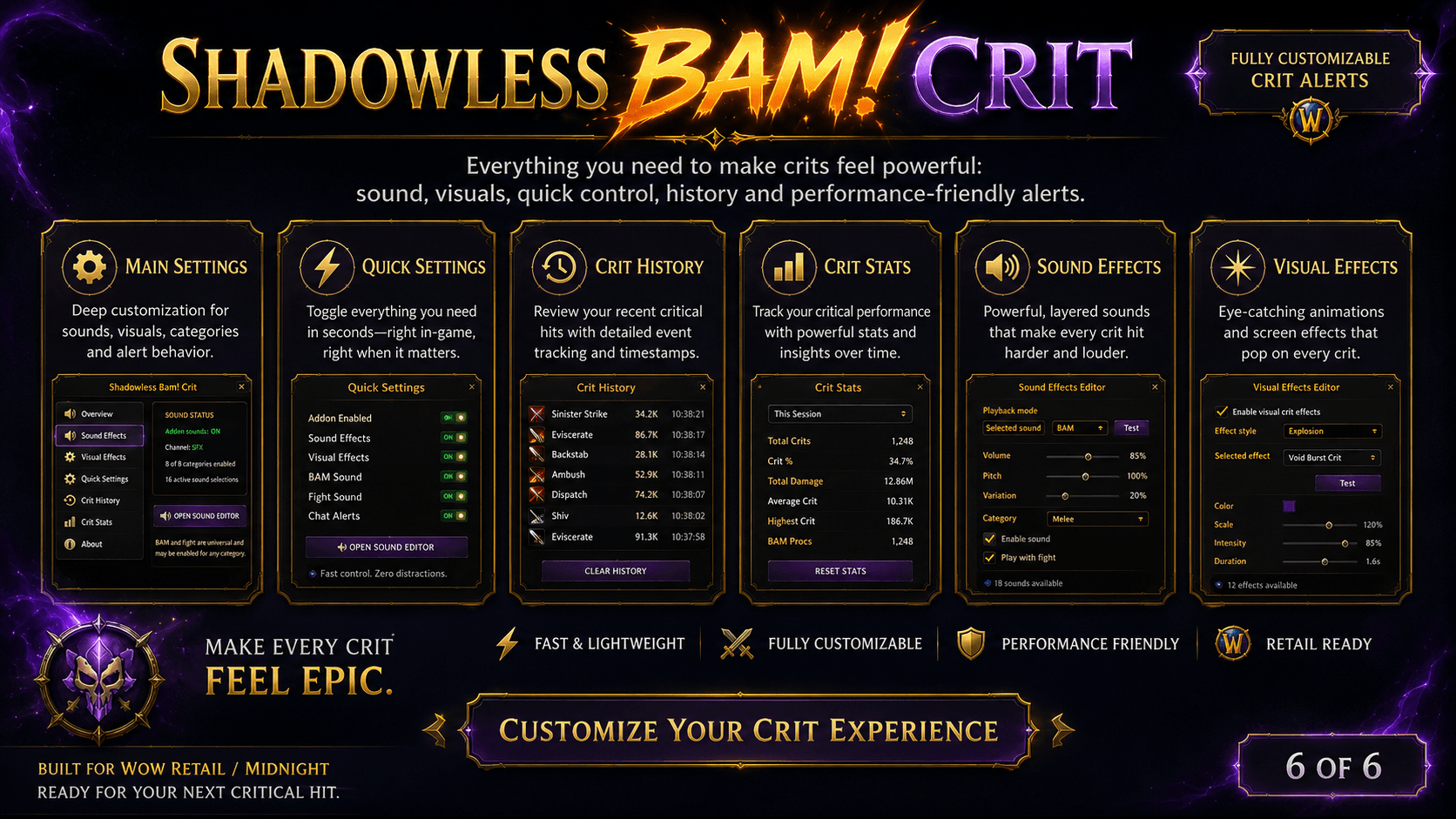
🛠️ Fully Configurable In-Game
No Lua editing is required.
The addon includes dedicated interfaces for:
- Main Settings
- Quick Settings
- Crit History
- Crit Statistics
- Sound Effects
- Visual Effects
The normal WoW AddOns menu provides compact status summaries and buttons that open the larger Sound Effects and Visual Effects editors.
📦 Installation
- Download the latest Retail release.
- Extract the archive into:
World of Warcraft/_retail_/Interface/AddOns/- Make sure the final folder is named exactly:
ShadowlessBamCrit- Enable the addon on the World of Warcraft character-selection screen.
- Open the settings through:
- The minimap icon, or
- Options → AddOns → ShadowlessBamCrit
- Enjoy your BAMs.
🗣️ Supported Languages
- 🇬🇧 English
- 🇩🇪 Deutsch
- 🇫🇷 Français
- 🇪🇸 Español
- 🇲🇽 Español latinoamericano
- 🇮🇹 Italiano
- 🇧🇷 Português do Brasil
- 🇷🇺 Русский
- 🇰🇷 한국어
- 🇨🇳 简体中文
- 🇹🇼 繁體中文
Want to improve or contribute a translation? Get in touch.
❤️ Support the Developer
Created by Tamer Gölgesiz / Shadowless Studios
📧 Email: shadowless.studios.eu@gmail.com
🌐 Website: shadowless.studios.eu
☕ Support development: paypal.me/ShadowlessGT
⚠️ License
Free for personal use.
Redistribution, modification or commercial use without explicit permission is prohibited.
See LICENSE.txt for complete licensing details.
Shadowless Bam! Crit Sound Alert Addon Team