SG Waypoints
- By
On-screen quest, NPC, party and travel waypoints, with dungeon and class guides, quest and equipment finders, checkpoints and a customizable sidebar for WoW Forever.
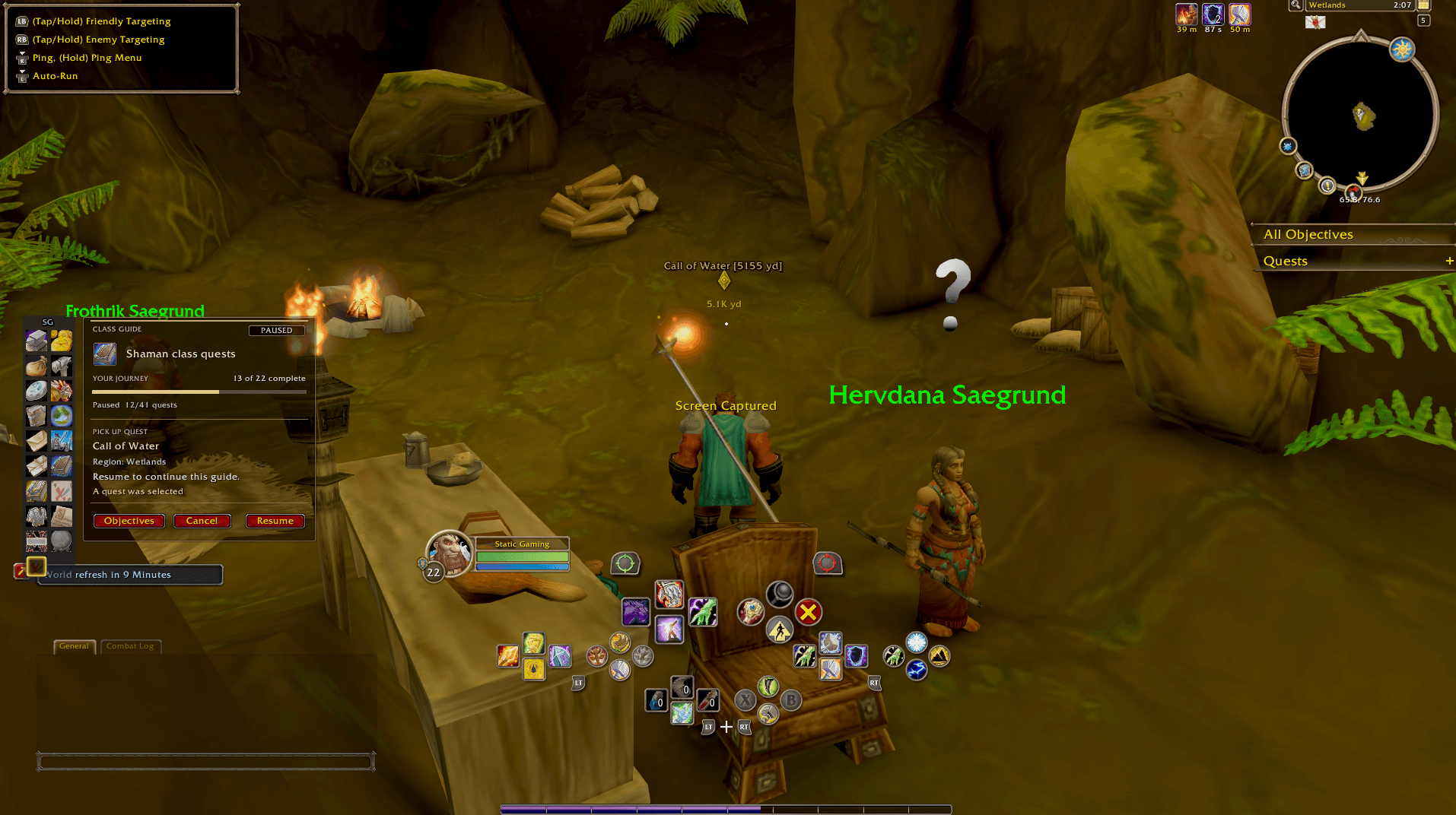
Keep quest and travel directions on your screen in WoW Forever 1.60.1.
Description
Put your map down, turn your brain off, and play the game how its meant to be played.
SG Waypoints is an all-in-one addon guiding you to items for your class, quests, class quests, speed leveling quests, dungeon quests, nearby NPCs, flight master, etc, all via a waypoint on your screen in WoW Forever 1.60.1. We also highlight your party members so you can pick them out in a crowd or locate them from a distance without ever pulling out your map.
Navigation is intelligent, utilizing flight masters, ship travel, portals, and understanding whether or not you have unlocked certain areas.
Most features inherently consider your level and class, so if, for example, you are searching for an item, it will be tailored to you.
Features
- Bundled database: quest, NPC, dungeon, leveling and terrain data are included. No extra addons are needed for these features.
- Quest directions: gold destination markers, names and distance labels; cyan quest-creature labels with available kill or collection counts; recorded quest-object locations and turn-in directions. Nearest Quest checks nearby objectives and turn-ins, including local objective areas for quests that can also be completed elsewhere.
- Find a Quest: browse available quests in your region or continent by objective type, including kill-only quests. Check requirements, chain and dungeon labels, item rewards, money and available XP before choosing a pickup.
- Dungeon and class guides: Open Objectives if you want to choose the next pickup, quest objective or turn-in yourself. Otherwise the guide follows your quest log and inventory. Before you leave a region, it looks for a local hand-in from the same guide. A class quest in the dungeon list has a blue label explaining where it leads. If your class guide runs out of quests, check the card for the next recorded level, skill or prerequisite.
- Speed Level: Pick a level bracket and a way to play. In Circuit Mode, a turn-in around the corner can go ahead of the objective you were working on. Sequential Mode follows the quests in guide order, including recorded prerequisites. Either way, the guide checks for local hand-ins before a long trip. The card shows XP when the reward is known. Open Objectives for eligible unfinished steps, or pause and pick up where you left off on this character.
- Skip without abandoning: Use Skip Quest to pass on the current leveling quest. It stays in your log. Skipping a prerequisite can also take its follow-ups out of the route. If you want a prompt before a skip, turn it on in settings. Next is for a manual instruction.
- Quest interaction: automatically accept eligible NPC quests and turn in finished quests. Both settings are on by default and can be disabled separately. Hold Shift to interact manually. Multiple reward choices and special exchanges stay manual. Newly accepted quests can also become your active destination.
- Find Equipment: choose your role, slot, minimum bonuses and an optional effect keyword. Rank known usable gear and choose recorded reward quests, vendors, dungeon drops, enemy or object areas, or an auction-house option for tradable items.
- Quest Manager: review active quests by XP or level before confirming removal. Optional protections cover class, profession and dungeon quest chains. Missing chain information or data required by your filters keeps a quest out of the drop selection.
- NPCs and services: locate recorded repair vendors, banks, auction houses, inns, flight masters, trainers, mailboxes and other NPCs. Guard directions and custom map pins can become screen waypoints.
- Checkpoints, flights and transport: Walk to the next checkpoint or catch a ride. SG weighs the route on foot or by mount against your unlocked flights and the boats, zeppelins, trams and portals it knows about. That includes boarding time and how far you’ll have to go after you land. City routes use recorded flight-master elevations where available. A ready Hearthstone can save you a boat ride or take you straight to the continent you're headed to. SG checks the time before offering either shortcut. If you know a flight across the water, the boat is optional. Your waypoint returns after a manual hearth, too.
- Completion alerts: Look above your character for solo objective completions or a class requirement you just met. In a group, look for the purple diamond in party chat when an objective is complete or you reach your destination.
- Party progress and teammate markers: Who still needs that mob? Hover it or its corpse, or use controller targeting, to see the party’s available counts in one translucent box. Nearby teammates have a red marker. Farther out, SG uses the position the game can report and any available camera reference. A friend on another continent gets a marker at your end of the trip, such as the dock. You can move the party list and the progress box separately. Location sharing with other addon users is optional.
- Waypoint sharing: Send a clickable map pin to party chat or open a draft to edit it first. Other SG Waypoints users can see whose pin it is. To offer the quest itself, click Share quest on the Speed Level, dungeon, class or Nearest Quest card.
- Sidebar and guide cards: drag the sidebar, choose vertical, horizontal or grid layouts, hide buttons and add your own addon-command buttons. Guide-card arrows choose which side opens, with automatic placement and adjustable size.
- Settings and help: grouped settings control markers, labels, party features, quest interaction, checkpoints and notices. The command reference can copy or run supported commands. The Discord button opens the community invite for copying into your browser.
Quests and guides
/sgquest nearest
/sgquest find
/sgquest findquests
/sgquest class
/sgquest classquests
/sgquest items
/sgquest guides
/sgquest list
/sgquest start <guide>
/sgquest <dungeon or class name>
/sgquest guide start <dungeon or class>
/sgquest guide status
/sgquest guide next
/sgquest next
/sgquest pause
/sgquest resume
/sgquest stop
Find and findquests open the quest finder. Class opens your current class guide. Supported classes are warrior, paladin, hunter, rogue, priest, shaman, mage, warlock and druid. Plain next, pause, resume and stop control dungeon or class guides.
Speed Level
/sgquest speed
/sgquest speed start [guide ID]
/sgquest speed pause
/sgquest speed resume
/sgquest speed next
/sgquest speed skip
/sgquest speed skipquest
/sgquest speed status
/sgquest speed stop
/sgquest speed off
/sgquest speedlevel
Speedlevel is an alias for speed. Use speed next for a manual instruction and speed skip for the current quest. These are separate from travel checkpoint controls.
Quest management
/sgquest manage
/sgquest manager
/sgquest reset
Manage and manager open the review window. Quest removal requires selection and confirmation. Reset clears navigation, deselects the active quest and pauses guidance. It keeps your quests, saved progress and preferences.
NPCs and services
/sgnpc help
/sgnpc <service, profession, class or NPC name>
/sgnpc trainer <class, profession or weapons>
/sgnpc item <item ID or item link>
/sgquest npc <search>
/sgquest mailbox
/sgquest mail
Services include repair, vendor, bank, auction, inn, flight, stable, trainer, class, weapons, spirithealer, spiritguide, guild, tabard, battleground, barber, transmog, reforger, questgiver, gossip and mailbox. Vendor searches also accept food, drink, reagents, poisons, tradegoods, bags, potions, ammo and petfood. Profession names work where recorded. /sgnpc item finds recorded item vendors; /sgquest items opens the equipment finder.
These short aliases work when another addon hasn't claimed them:
/repair
/vendor
/bank
/auction
/inn
/flight
/stable
/trainer [class, profession or weapons]
/barber
/transmog
Party and sharing
/sgquest party
/sgquest party list
/sgquest party on
/sgquest party locate
/sgquest party <name or roster number>
/sgquest party stop
/sgquest party off
/sgshare
/sgquest share
/sgquest share draft
Party enables teammate location exchange. Stop ends focused teammate navigation; off hides party markers. Share sends to PARTY chat. Share draft prepares an editable link without sending it.
Navigation and display
/sgquest checkpoints
/sgquest checkpoint
/sgquest checkpoints on
/sgquest checkpoints off
/sgquest checkpoints status
/sgquest checkpoints skip
/sgquest skip
/sgquest bar
/sgquest bar show
/sgquest bar hide
/sgquest bar toggle
/sgquest on
/sgquest off
/sgquest distance
/sgquest objectives
/sgquest test
Distance and objectives toggle their displays. Test toggles a labeled preview. /sgquest skip skips a travel checkpoint; /sgquest speed skip skips a leveling quest.
Help and community
/sgquest options
/sgquest settings
/sgquest commands
/sgquest discord
/sgquest version
/sgquest status
/reload
Options and settings open the same panel. Commands opens the command reference. Discord shows the invite. Status saves and shows diagnostics. Version notices compare with the release recorded in the build.
Limits and troubleshooting
If a waypoint disappears, use /reload.
Guide and route coverage follows the included data. Some chapters have gaps, and some quests lack coordinates. Missing terrain, caves or overlapping floors can prevent a walking route; move to open ground to retry. Creature markers follow the game's supported nameplate range. Party tracking needs readable game or shared data, especially across instances.
Flight guidance doesn't unlock routes or promise unrecorded connections. Estimated XP is labeled. Unknown item details remain unrated. Gear rankings reflect your selected role and requested bonuses; auction stock, prices and random drops aren't guaranteed.
Original SG code retains its MIT notice.
SG Waypoints Team