SexyLoot
- By
SexyLoot is an XLoot-style loot addon for WoW: Forever that shows every player's roll right on the item, replaces the loot window, adds a group loot feed and a list of your recent finds, and lets you configure everything through Edit Mode.
Screenshot 2026-11-11 205036.png
Screenshot 2026-11-11 205055.png
Screenshot 2026-11-11 205129.png
Screenshot 2026-11-11 205013.png
Screenshot 2026-11-11 205146.png
Description
🎲 SexyLoot
Loot, rolls and drops at a glance. A roll window that shows every player's roll right on the item, an XLoot-style loot window, a group loot feed and a list of your recent finds. Everything is adjustable in Edit Mode.



undefined
🎨 One consistent look
All eight windows look alike and match SexyQuestHelper: dark brown surface, 2-pixel gold frame, a title band with a badge (for example the item count), cards with fine divider lines, colored labels for states (green, amber, grey, red, blue) and a green action button. Fonts: Marcellus for titles, Inter for all other text (bundled, SIL Open Font License). Russian, Korean and Chinese clients keep the game font.
Background and border color are adjustable per window in Edit Mode, "Reset colors" restores the quest look.
✨ What SexyLoot does
🎲 Roll window: Need, Greed, Pass
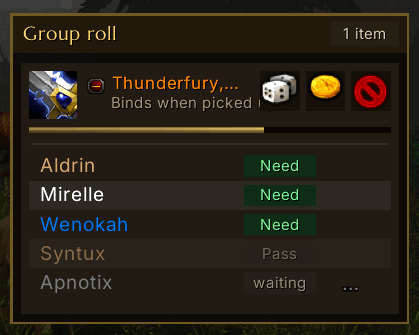
No more guessing who rolled what. One "Group roll" window with the count in its badge and a card for every item.
- 🎯 Rolls on the item: each player's choice and roll appear directly under the item, in class colors.
- 🏆 Winner at a glance: the winner gets a check mark, Need beats Greed.
- ⏱️ Timer bar: it turns red when time is running out.
- 🔍 Tooltips: hover the item to see the game's normal item tooltip.
- 🔒 Honest buttons: they only lock once your choice has actually gone through. If you cancel the confirmation on a Bind-on-Pickup item, you can still choose again.
- ⬆️ Growth direction up or down, with adjustable spacing.
- 📋 Rolls as a table: every player gets their own line with class-colored name, a label for the choice (Need green, Greed amber, Pass grey, "waiting" grey) and the roll on the right. Best result on top, passes dimmed, the winner in gold with a check mark. Font size adjustable.
- 📦 Many items at once: if the list gets taller than the adjustable maximum height, older rows collapse to item, buttons and a short line ("2 of 5 have chosen"). Hover the short line to see every roll. Rows where you still have to choose stay open where possible.
- ➖ Collapsible: clicking the header of a roll row (plus/minus icon) collapses or expands the player list. Shift or Ctrl click still links the item.
- ⏳ Stays after the roll: the window only disappears after an adjustable time (3 to 30 seconds). A countdown ("Closes in 7s") and the draining bar show when.
- 🔄 Survives a reload: a running roll is restored afterwards.
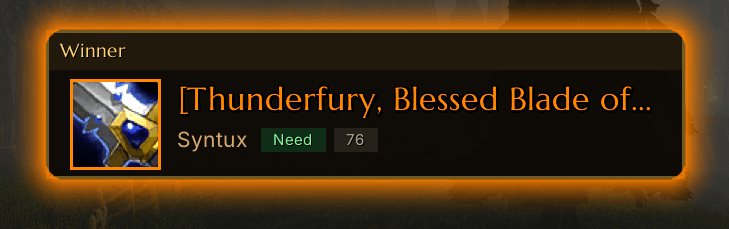
🏆 Winner announcement
Whoever wins a roll appears large in the middle of the screen.
- 🖼️ Item with icon, icon frame and name in quality color. The winner stands next to it in class color, the roll type (need, greed, pass) and the result as labels.
- 🙋 "Du gewinnst!" when it is you.
- ✨ Eye-catching: a pulsing glow in quality color (green for you) and a soft fade in and out.
- 📚 Several winners: if several win in quick succession, the cards stack, each with its own timer (1 to 5 at once). The badge shows the stack position ("1/2").
- 📏 Font size and display time adjustable.
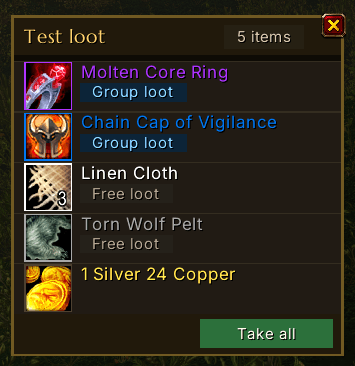
🎁 Loot window
Replaces the default loot window.
- 🌈 Quality colors for icon frame and name, stack count on the icon. The title band shows the name of the target and the number of items.
- 🏷️ Labels: "Group loot" (blue) or "Free loot" (grey) below every name.
- 🖱️ Click to loot, Shift-click links the item in chat.
- ✅ "Loot all" as a green button in the footer, with one click or by hotkey, which you set in Edit Mode (modifiers like Ctrl, Alt or Shift work too).
- 🪙 Auto loot is supported.
- 🩶 Auto-loot grey items (optional).
- 💰 Money is looted automatically (can be turned off).
- 🏷️ Group loot label: you choose from which quality an item is labeled as group loot.
- 🔎 Icon size from 24 to 48 pixels.
📜 Group feed
Who got what?
- 👥 Everything the group looted, with item link and the player's class color.
- 🎲 Roll details in the tooltip: hover the item link of a line to see every choice and roll, sorted by result or by player order.
- 🕐 Timestamps (optional), mouse wheel to scroll.
- 🌫️ Fades out: messages disappear after an adjustable time (5 to 120 seconds, can be turned off). Scrolling brings them back.
- 🔤 Width, height and font size adjustable (the line count follows from them).
🎯 Free rolls
For chests and anything where the group rolls by hand with /roll.
- 👥 Appears automatically as soon as at least two players have rolled (can be changed).
- 🥇 The highest roll is on top, with an amber rank label, gold background and a check mark, several on a tie. Dice ranges other than 1-100 are shown and compared fairly.
- 📣 Announce the winner: a button in the window writes the winner (everyone on a tie) to a channel of your choice: automatic (instance, raid, party, else say), say, party, raid, instance, guild, yell or a numbered chat channel. You cycle the channel in Edit Mode.
- ⏱️ Clears itself: after an adjustable time without a new roll (5 to 120 seconds) the list disappears, a gold bar under the title band and "Closes in 12s" in the badge show when.
✨ Loot popup
Items you just looted appear briefly as cards with icon (frame in quality color), name, count and vendor value, then fade out. Quest items also get a "Quest" label. Identical items are added up, hovering a row keeps it visible and shows the item tooltip. Options: display time, number of rows, hide value. /sexyloot toast shows samples.
🧲 Docking
In Edit Mode every window can be docked to another one: "Docking: change target" cycles through off and the other windows, "Docking: change side" picks below, above, left or right. The window then follows its target. Dragging it in Edit Mode releases it. The choice is printed to chat.
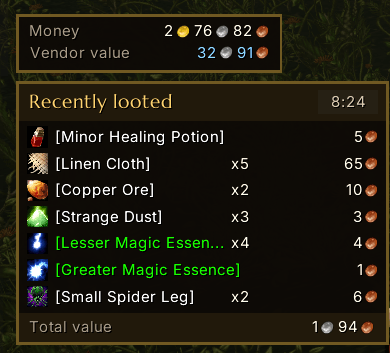
💰 Money
Small frame with your current money and the vendor value of all items in your bags. The tooltip lists the money of all your characters (once each has been played). Position and colors in Edit Mode.
🎒 My loot
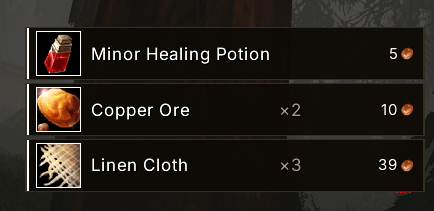
Perfect while leveling: a small list of your latest finds.
- 🧵 Stacking: linen cloth, ore and the like are added up ("x5").
- 💵 Value per entry: the vendor value is shown next to every item, for the whole stack on stacked items.
- 💰 Vendor value of the whole list in gold, silver and copper, in a footer.
- 📊 Tooltip over the title band: duration, number and value of the session's loot, the most valuable item plus value and items per hour.
- ⏱️ Session time as a badge in the title band (since login or the last time the list was cleared).
- ❗ Quest items carry a yellow exclamation mark on the icon.
- ⬇️ Growth direction: the list grows upward or, by setting, downward.
- 🔢 3 to 10 entries, everything can be turned off.
🛠️ Everything adjustable in Edit Mode
Open Edit Mode, click a SexyLoot window and adjust it. SexyLoot uses the EditModeExpanded library for this.
Every one of the eight windows offers:
| Option | Effect |
|---|---|
| 📍 Position | Drag freely, clamped to the screen edge |
| 🔍 Scale | 50 to 200 % |
| 👁️ Hide | Window permanently off |
| ⚔️ Hide in combat | Only visible outside of combat |
| 🖱️ Hide until mouseover | Appears when you move the mouse over it |
| 🧭 Coordinates | Screen position by number entry |
| 🧲 Docking | Attach to another window (change target and side) |
| 🎨 Background and border color | Both with a color picker and opacity, plus "Reset colors" (not for the loot popup) |
Plus each window's own options:
| Window | Options |
|---|---|
| 🎲 Roll window | Hide rolls on the item · Let new windows grow upward · Spacing between windows · Font size of rolls · Maximum list height · Show window after the roll (seconds) · Start test roll |
| 🎯 Free rolls | Show even for a single roller · Clear list after (seconds without a roll) · Maximum rows · Font size · Switch announce channel · Channel number · Start test rolls |
| 🏆 Winner announcement | Font size · Display time · Winners shown at once · Show test winner |
| 🎁 Loot window | Auto-loot grey items · Do not loot money automatically · Group loot label from quality · Icon size · Set or remove hotkey for "Loot all" · Open test loot |
| 📜 Group feed | Hide timestamps · Sort roll details by player order · Do not fade out messages · Fade out after (seconds) · Width · Height · Font size · Clear feed |
| ✨ Loot popup | Hide value · Display time · Number of rows · Show test loot |
| 💰 Money | Position and colors only · Reset saved characters |
| 🎒 My loot | Hide session time · Hide total value · Hide value per entry · Do not stack identical items · Switch growth direction · Number of entries · Clear list |
👀 Demo data in Edit Mode
While Edit Mode is open, every window shows sample content: two rolls, a test loot, feed lines and looted items. That way you see right away how scale, icon size and line count look. The samples disappear when you leave Edit Mode.
🌍 Languages
German and English. German clients show German, every other client shows English. Need, Greed, Pass and "Binds when picked up" come straight from the game and appear in your client's language.
🔤 Fonts
Marcellus and Inter live in media/fonts (SIL Open Font License, license texts next to them). If they cannot be loaded, or you play on a Russian, Korean or Chinese client, SexyLoot uses the game font.
📥 Installation
- Copy the
SexyLootfolder into yourInterface/AddOnsdirectory of the Forever client. - Start the game or
/reload. - Open Edit Mode and place the windows as you like.
⌨️ Commands
| Command | Effect |
|---|---|
/sexyloot test |
Test data in all windows |
/sexyloot roll |
Test roll |
/sexyloot loot |
Test loot |
/sexyloot feed |
Sample lines in the feed |
/sexyloot mine |
Samples in "My loot" |
/sexyloot toast |
Samples in the loot popup |
/sexyloot winner |
Sample winner |
/sexyloot freeroll |
Sample rolls in "Free rolls" |
/sexyloot debug |
Toggle debug output for rolls and clicks |
Short form: /sl
⚠️ Good to know
- 🧪 Early version. Roll detection reads the game's loot chat messages. If your client uses different texts, rolls will not show up on the item. In that case, get in touch with a screenshot and the chat text.
- 👑 Master Loot is not supported by the loot window.
- ⏳ The roll time is set by the game and cannot be changed.
- 🏷️ The group loot label only changes the caption in the loot window. The group leader decides from which quality items are rolled for.
- 📋 There are deliberately no drop-down lists, because addon frames using
UIDropDownMenuTemplateare blocked in the Forever client. Sliders, checkboxes and buttons are used instead.
🙏 Credits
- EditModeExpanded by Teelo (library
EditModeExpanded-1.0, embedded, author credited as its license requires) - LibStub (public domain)
- Fonts Marcellus and Inter (SIL Open Font License 1.1)
- Inspired by XLoot
Made by apnotix · Also by me: SexyQuestHelper, SexyInterrupter
SexyLoot Team