
SetShifter
- By
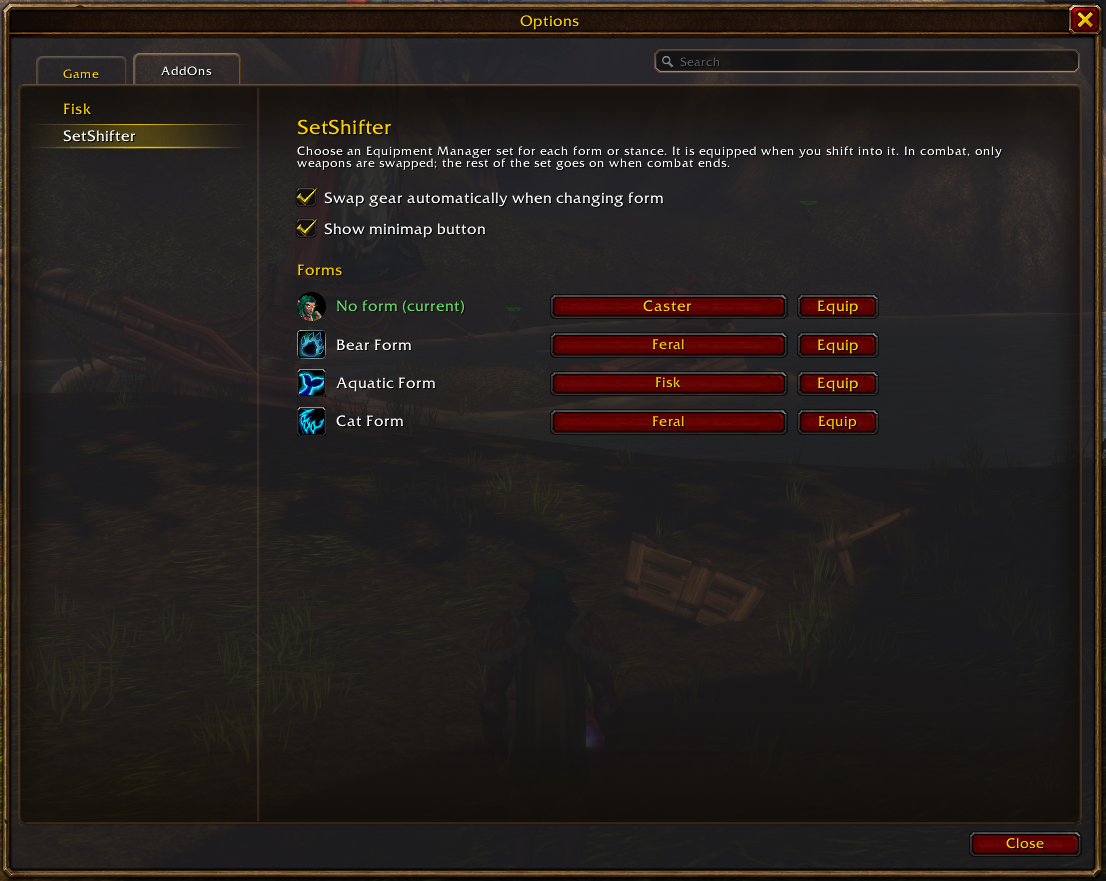
It works with any class that has a stance bar:
- Druids: switch to a feral set when you go into Cat Form and back to your healing set when you return to caster form.
- Warriors: put on a shield set when you enter Defensive Stance and a two-hander when you enter Battle or Berserker Stance.
- Priests: put on a shadow set in Shadowform and a healing set when you leave it.
- Rogues: equip a dagger for Ambush when you enter Stealth and switch back when you leave it.
- Paladins: auras are on the stance bar, so each aura can have its own set.
Hunter aspects aren't on the stance bar in Classic, so hunters can't use SetShifter.
Usage
- Create your gear sets in the Equipment Manager on the character panel.
- Open Options → AddOns → SetShifter, or type
/setshifter. - Pick a set for each form. No form counts as a form too. Map it to a set if you want your gear to switch back when you leave a form. Warriors don't see this row because they are always in a stance.
SetShifter equips the set mapped to a form whenever you shift into that form.
Mounted
The Mounted row lets you pick a set to wear while mounted, such as one with riding gloves, spurs or a Carrot on a Stick. While you're mounted it takes priority over your form's set, and your form's set goes back on when you dismount. Leave it at None to keep your gear unchanged when you mount.
Minimap button
The minimap button shows the icon of your current set. If no set is equipped, it shows your current form's icon instead.
- Click to open the settings.
- Drag to move it around the minimap edge.
- Hover to see your current form and set.
To hide it, untick Show minimap button in the settings, or type /setshifter minimap.
Notes
- Combat: armor can't be changed during combat, but weapons can. If you shift while in combat, SetShifter swaps the set's weapons right away (main hand, off hand/shield and ranged). It equips the rest of the set for your current form as soon as combat ends.
- Mapped by name: forms are mapped by their spell name, not their position on the stance bar. Your mappings keep working when talents add or remove forms, such as Moonkin Form.
- Login: logging in never swaps your gear.
- Per character: each character has its own settings.
Slash commands
/sshift works as a short alias for /setshifter.
| Command | Description |
|---|---|
/setshifter |
Open the settings panel |
/setshifter list |
Show which set is mapped to each form and to Mounted |
/setshifter equip |
Equip the set for your current form (or Mounted, if you're mounted) now |
/setshifter on / off |
Turn automatic swapping on or off |
/setshifter minimap |
Show or hide the minimap button |
SetShifter Team
