


# SetMyStatusNote
SetMyStatusNote lets you publish a short status message with up to four icons directly inside World of Warcraft tooltips. Notes are exchanged peer-to-peer over addon messages, so guildmates, raid members, and anyone you mouseover can immediately see what you want to share.
## Features
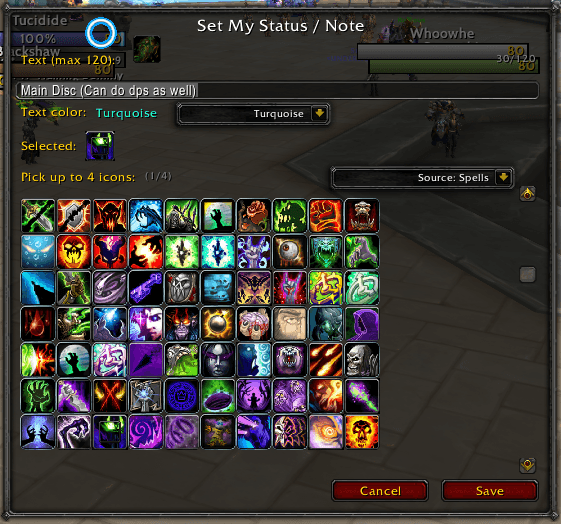
- Type a note up to 120 characters and decorate it with up to four icons from spells, items, mounts, currencies, or the full icon list.
- Choose from multiple highlight colors for your text (white, yellow, green, turquoise, or blue) to match your character or mood.
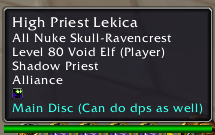
- See icons and colored text inline in unit tooltips, with automatic live updates from other players running the addon.
- Lightweight UI with keyboard shortcuts, scrollable icon grid, and improved selection highlights.
## Usage
1. Open the addon via `/status` or `/smsn`.
2. Enter your note text, choose a text color, and select up to four icons.
3. Click **Save** to publish. Your current note is cached locally and automatically shared when other players request it.
4. Mouseover other players running the addon to see their shared notes and icons.
## Saved Variables
The addon stores your note text, selected icons, text color, and a cache of recently seen player notes in the standard World of Warcraft saved variables: `SetMyStatusNoteDB` and `SMSN_Live`.
## NOTE: MAY NOT LOOK GOOD WITH ELVUI, BUT THE FUNCTIONALITY IS UNTOUCHED

SetMyStatusNote Team
