SeqARK
- By
One-button sequences for World of Warcraft Retail (Midnight): every press of a key casts the next step.
Description
SeqARK
One-button sequences for World of Warcraft Retail (Midnight): every press of a key casts the next step.
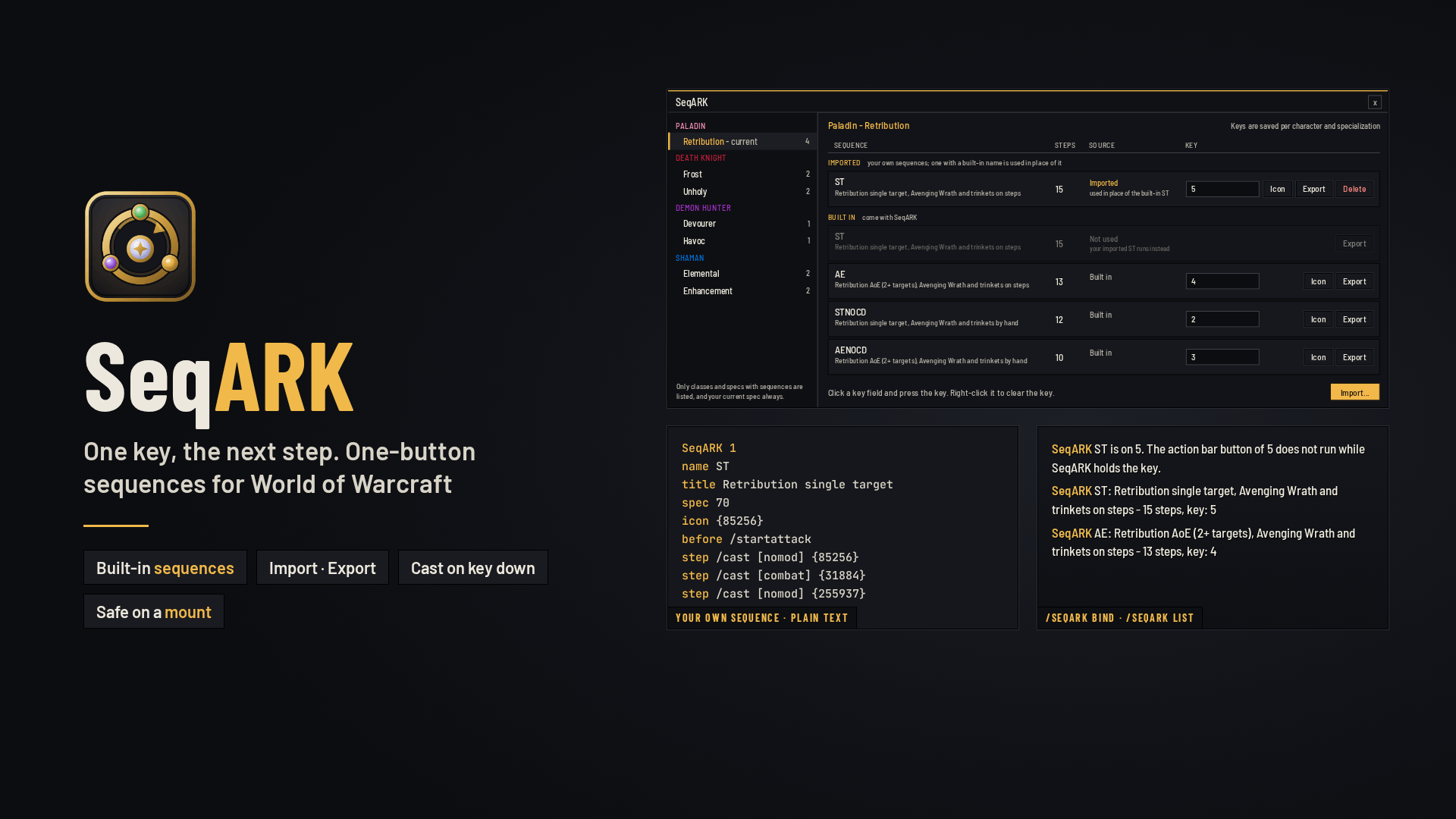
SeqARK puts a rotation on one key. A sequence is a list of steps, and every step is a whole macro line of its own, with conditions like [nomod] or [combat]. Each press runs the next step; after the last step it starts over, and after combat every sequence starts from step 1 again.
It comes with built-in sequences for several specializations, and you can write, import and export your own in a short text format.
Highlights
- One key, the next step: bind a sequence to any key in the SeqARK window. While SeqARK holds the key it wins over the action bar button of that key; clear it and the key belongs to the action bar again
- Cast on key down: with the game's "cast on key down" setting on, the step goes out when you press the key; with it off, when you release it
- Built-in sequences for Retribution Paladin, Unholy and Frost Death Knight, Havoc and Devourer Demon Hunter, Enhancement and Elemental Shaman. Built-in sequences for the other classes and specializations are under development
- Your own sequences: import them as text, export any sequence to share it, delete the ones you no longer need. An imported sequence with the name of a built-in one is used in its place, and the built-in one gets its key back when you delete the import
- Icon button: makes a macro that shows the sequence's spell, to put on the action bar slot of the same key
- Safe on a mount: on a mount, in a vehicle or with an override bar (skyriding, quest vehicles) SeqARK lets go of its keys, so their own buttons work; the keys come back when you get off, also in combat
- Any client language: spells are written by ID, and SeqARK puts the spell's name in your game's language into the macro
The window
/seqark, the game's addon menu or the minimap button opens it (the minimap button shows when another addon has loaded LibDBIcon).
- Class and specialization on the left: the classes and specs that have sequences, and your current spec always
- The chosen spec's sequences on the right in two groups, IMPORTED and BUILT IN, with the number of steps, the source and the key
- Click a key field and press a key to bind it; right-click it to clear it. Keys are saved per character and specialization, and you can set them for the other specs of your class too
- Icon and Export buttons on every sequence, Delete on the imported ones, and an Import window that tells you why a text could not be imported
Built-in sequences
- Paladin, Retribution: ST (single target) and AE (2+ targets) with Avenging Wrath and trinkets on the steps; STNOCD and AENOCD leave Avenging Wrath and the trinkets to you. Hold CTRL for Word of Glory on the ally under your mouse (Intercession on a dead one), or on yourself
- Death Knight, Unholy (San'layn): ST for 1-2 targets, AE for 3+ targets with Epidemic
- Death Knight, Frost (Deathbringer): ST for 1-2 targets with Obliterate, AE for 3+ targets with Frostscythe and Glacial Advance
- Demon Hunter, Havoc (Aldrachi Reaver): one order for single target and AoE; Reaver's Glaive goes out first whenever it is up
- Demon Hunter, Devourer (Annihilator): one order for single target and AoE; it waits while Void Ray channels, so a key press does not cut the channel short
- Shaman, Enhancement (Stormbringer): ST for 1-2 targets, AE for 3+ targets
- Shaman, Elemental (Farseer): ST for one target, AE for 2+ targets with Earthquake at the mouse cursor
The Death Knight, Demon Hunter and Shaman orders are measured on the talent builds the top Mythic+ players use. With other talents some steps do nothing.
Coming: built-in sequences for the other classes and specializations are under development.
Writing your own
A sequence is plain text:
SeqARK 1
name ST
title Retribution single target
spec 70
icon {85256}
before /startattack
step /cast [nomod] {85256}
step /cast [nomod] {255937}
step /cast [nomod] {184575}
SeqARK 1is the first line, the format versionname: letters, digits and_; one sequence of a name per specializationtitle: the text shown in the windowspec: the specialization ID the sequence is for (70 is Retribution)icon: optional, the spell the icon macro shows; without it the first step's spellbefore: a macro line put in front of every step (any number of them)step: one step, one macro line (any number of steps){12345}becomes the name of that spell in your game's language; lines starting with#are notes
A step with its before lines and the spell names filled in can be at most 255 characters, the length the game reads; SeqARK tells you when one is longer.
Commands
/seqarkopens the window/seqark listlists the sequences of your current spec/seqark bind NAME KEYand/seqark unbind NAME/seqark icon NAMEputs the icon macro on your cursor/seqark import,/seqark export NAME,/seqark delete NAME/seqark rebuildbuilds the sequences again
Good to know
- Every press moves on one step, whether that step's spell went out or not
- In combat keys cannot be set, and sequences cannot be imported or deleted
- SeqARK keeps its keys itself and sets them at every login; the game's own key bindings are not changed
SeqARK Team