Senti Gearscore Forever
- By
Displays your character's Item Level and GearScore, as well as those of other players, directly in-game.
Bildschirmfoto vom 2026-11-26 14-49-52.png
Bildschirmfoto vom 2026-11-26 14-50-16.png
Description
SentiGearScoreForever
SentiGearScoreForever (formerly RLGearscore) is a World of Warcraft addon that runs on every client — Classic Era, TBC, Wrath, Cata, Mists Classic, Retail and WoW Forever / Camelot — thanks to per-flavor TOCs and guarded API fallbacks throughout. It provides a lightweight GearScore and Item Level display plus a shared, silently-synced player database.
Features
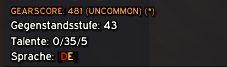
- GearScore Calculation: Calculates and displays a GearScore value based on item rarity, item level, and slot weights. The quality bracket auto-detects from your own gear level.
- Item Level: Displays the average item level of inspected players.
- Talents & Level: Shows the talent distribution (
x/y/zgroup points viaC_Traitson Forever, spec names on Retail, talent tabs on Classic) and the character level of inspected players. - Auto Inspect: Automatically inspects players when you hover over them (can be toggled).
- No range spam: "Too far away" / "out of range" messages caused by hovering distant players are fully suppressed — in the red UI error text as well as in system chat.
- Shared database (SentiGear): Every player you scan (GS, iLvl, class, talents, level, client language) goes into a persistent, account-wide database that is silently synced with other SentiGearScoreForever users over the hidden
SentiGearchannel. The channel is joined temporarily only after the default channels claimed their slots — it always lands on the last channel number, never touches 1-5, and nothing ever shows in chat. - Database window:
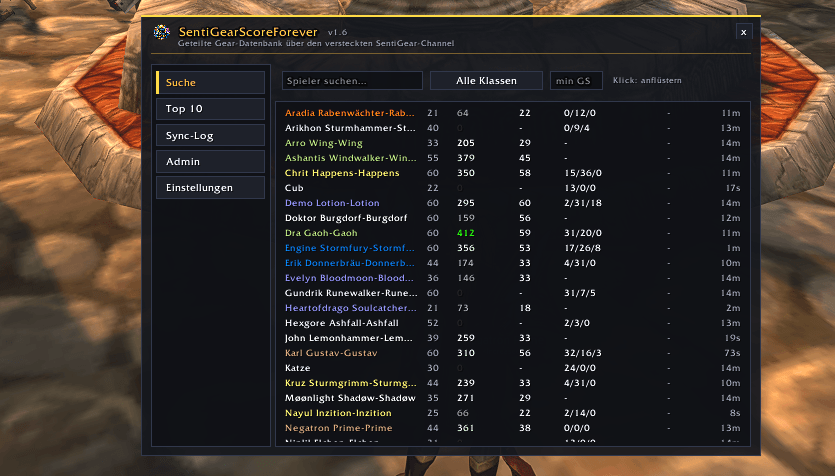
/gsfor a left click on the minimap button opens a My-Social-style window:- Search — name search with class filter and minimum-GS filter; click a row to whisper that player.
- Top 10 — live leaderboard of the highest gear scores (ranks 1-3 in gold/silver/bronze); recalculated on every data change.
- Sync log — live peers and traffic. Normal users only see join/error info; full scan/traffic detail requires debug mode.
- Admin — extra admin characters, channel toggles, debug mode, send/clear database (admin chars only: Xenshi Lucas, Raziel Lucas + extras).
- Settings — all addon options plus the about page, integrated in the window.
- Tooltip fallback: Hovering a player you (or a peer) scanned before still shows their values — including talents — even when they are out of inspect range.
- Client language sharing: each player's real client language travels with the sync (hello packet + database field), so the tooltip language line is real data, not a realm guess.
- Localization: Fully localized in English, German, and Russian; other client languages fall back to English.
- Minimap Button: Left click opens the database window, right click opens the settings page.
Installation
- Download the addon.
- Extract the
SentiGearScoreForeverfolder into your WoW AddOns directory:\Interface\AddOns\ - (Re)start World of Warcraft.
Usage
- Hover over a player to see their GearScore and Item Level in the tooltip.
- Left-Click the minimap button (or
/gsf) to open the window; right-click for settings. - In the Search page, type a name and/or pick a class and a minimum GS — click a row to whisper that player.
- The Top 10 page always shows the current best gear scores in the shared database.
Settings
- Show GearScore: Toggle the GS display in tooltips.
- Show Item Level: Toggle the average item level display.
- Show Talents: Toggle the talent summary.
- Auto Inspect: Enable/Disable automatic inspection on hover.
- Show iLvl on Icons: Toggle the item level overlay on bag/character icons.
- Language: Manually select your preferred language or let it auto-detect (click to cycle).
Credits & Copyright
Author: (Robin Oliver) Lucas Schwarzbach 148 42277 Wuppertal Deutschland
Contact: E-Mail: info@xrl-dev.de Support: xrl-dev.de · CurseForge · Discord Bugtracker: https://dev.xrl-dev.de/
Special Thanks:
- ZamestoTV (Hubbotu) for providing translations. Hubbotu's source: https://github.com/Hubbotu/Gearscore/blob/main/ruRU.lua
Senti Gearscore Forever Team

Owner