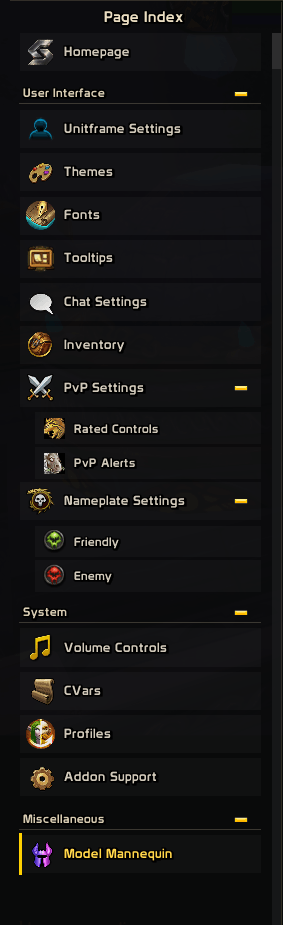
Available Page Features
Description
Selective is a modular based customizatable addon that brings visual styling, UI management, PvP tools, chat improvements, inventory utilities, profiles, and more..
Use only what you want: individual pages and areas can be enabled or disabled through the Control Panel, while supported features restore their normal Blizzard appearance or behavior when turned off.
Screenshots & Short Videos are now available.
BRIEF OVERVIEW
- Customize unitframes, nameplates, fonts, textures, tooltips, icons, and interface colors.
- Hide, resize, restyle, or reposition supported parts of the Blizzard UI.
- Improve chat, inventory management, PvP information, alerts, and rating tracking.
- Browse supported artwork through the Art Library.
- Position supported modules visually through the Layout Manager.
- Create, copy, import, export, and switch between complete profiles.
- Use the included Selective Custom Skins extension for additional high-resolution media.
Continue below for a more detailed feature breakdown.
CORE TOOLS
CONTROL PANEL
A central control point for managing page and area availability, layout mode, page zoom, and other presentation settings without leaving the current page.
ART LIBRARY
A searchable visual browser for supported textures, icons, artwork, and replacement media. Includes previews, filtering, pagination, direct selection, and optional Selective Custom Skins content.
LAYOUT MANAGER
A visual positioning workspace for supported frames, indicators, and overlays. Includes live previews, assisted dragging, saved positions, attachment controls, and module-specific configuration.
PROFILES
Create, copy, rename, reset, delete, import, and export complete Selective profiles. Includes the Candyhigh preset, page presets, previews, and version validation for imported profile strings.
INTERFACE CUSTOMIZATION
HOMEPAGE
Contains Selective’s primary presentation settings, welcome and played-time options, interface imagery, navigation shortcuts, checkbox artwork, spacing controls, and access to changelogs and extension media.
STYLING SETTINGS
Controls supported HUD presentation, action-bar text, interface elements, character-panel information, Ability Icon Replacement, and the interactive Model Mannequin used for equipment, appearance, animation, emote, and source previews.
UNITFRAME SETTINGS
Controls supported Player, Target, Focus, Party, Raid, and Arena frame elements. Includes visibility options, party indicators, frame-related utilities, and selectable health and power textures from Blizzard, LibSharedMedia, and optional extension sources.
THEMES
Applies lightweight color styling across supported Blizzard windows and interface elements. Includes manual or class-based colors, shade controls, exclusions, and restoration of native colors when disabled.
FONTS
A virtualized font catalog containing supported client, LibSharedMedia, and Selective Custom Skins fonts. Includes previews, favorites, media sorting, exclusions, and live application while retaining existing size, outline, and shadow behavior.
TOOLTIPS
Adds configurable IDs and native header icons to supported spell, item, unit, quest, achievement, currency, mount, talent, trait, transmogrification, and other tooltip types.
NAMEPLATE SETTINGS
Separate Friendly and Enemy controls for names, identities, arena and battleground text, guilds, titles, class and specialization information, status icons, crowd control, healers, roles, targets, borders, reticles, and other supported nameplate elements.
CHAT, INVENTORY, AND GAMEPLAY
CHAT SETTINGS
Includes Copy Chat, URL copying, timestamps, fading controls, unread indicators, notification sounds, Focused Chat, per-tab handling, and an extended searchable mature-language filter.
INVENTORY
Provides bag and reagent-bag scaling, automatic repairs, junk selling, configurable chat reports, and searchable tracking for stackable items and profession materials.
PVP SETTINGS
Includes rated bracket controls, rating history and statistics, movable Rating Metrics, Solo Shuffle round tracking, and configurable crowd-control alerts for the player, healer, and party members.
VOLUME CONTROLS
Provides visual master-volume feedback and optional control through selectable animated overlays, appearance palettes, display styles, and interactive dragging.
CVARS
A searchable and editable catalog of supported client CVars with categorized browsing, favorites, validation, and safer access to commonly used game settings.
ADDON SUPPORT
Contains command references, feature guidance, keybinding information, troubleshooting details, credits, documentation, and direct support links.
Selective continues to expand with additional interface controls, customization options, artwork, and Layout Manager support.
SELECTIVE CUSTOM SKINS
Included when installing Selective
Selective Custom Skins is an optional media extension that adds high-resolution interface imagery, additional fonts, unitframe textures, indicator styles, reticles, healer icons, artwork, and expanded icon-replacement choices.
Each media family is independently controlled from Selective’s Homepage. Disabling the extension or an individual media family removes those entries from active selectors without affecting Selective’s core features.
Selective Team