Seelenbund Gilde
- By
Celebrate your level-ups with an epic fanfare and an animated Soulbound logo, replacing Blizzard’s level-up effect, with adjustable frequency and optional guild chat announcements.
Description
Seelenbund
Celebrate your level-ups in style.
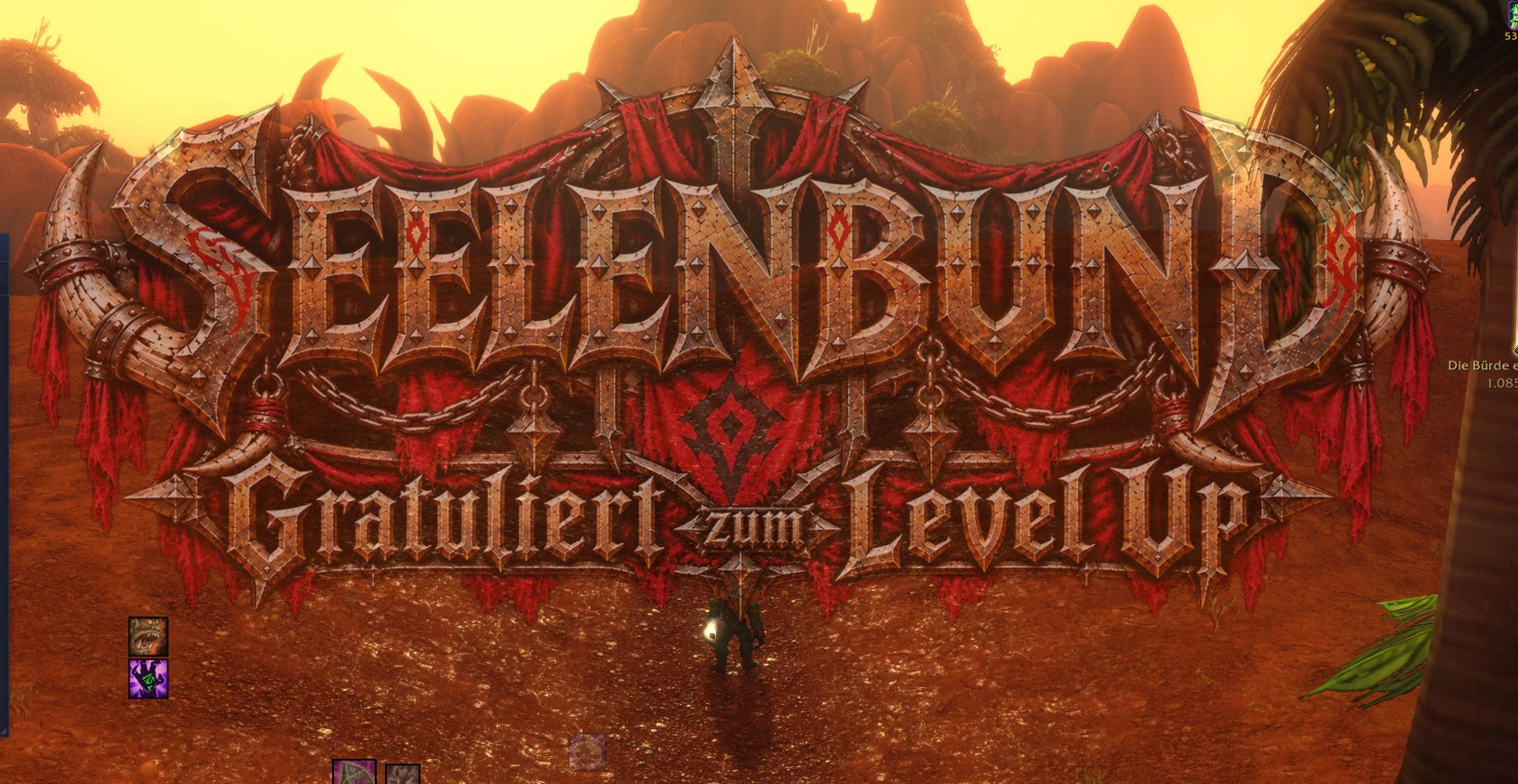
Seelenbund replaces the plain level-up moment with an epic orc battle cry and the Seelenbund logo ("Gratuliert zum Level Up"), zooming gently in and out over your screen while the sound plays.
Features
- Epic level-up sound. An orc battle cry of about 8 seconds plays when you level up.
- Animated logo overlay. The Seelenbund logo appears in the upper part of the screen and gently zooms in and out with the sound. Mouse clicks pass straight through it, so it never gets in your way, even in combat.
- Adjustable visibility. A slider sets how visible the logo is, from 0 (invisible) to 100 (fully visible). The default is 50.
- Scales with your resolution. The logo is sized relative to your screen, so it looks the same at 1080p, 1440p, 4K and on ultrawide monitors.
- Choose how often. Play the sound and logo on every level, every 5 levels or every 10 levels.
- Replaces Blizzard's level-up effect. While the sound is enabled, Blizzard's level-up sound and the "Congratulations, you have reached level X" banner are suppressed. Turn the sound off and Blizzard's effect plays as usual.
- Guild announcement. Seelenbund posts a short message in guild chat every 10 levels (10, 20, 30 …). Nothing is sent if you are not in a guild.
- Seelenbund icon in the AddOn list and, on Retail, in the AddOn menu next to the minimap.
- Lightweight. It needs no libraries and only reacts when you level up.
Usage
| Command | What it does |
|---|---|
/seelenbund |
Opens the settings window |
/seelenbund test |
Plays the sound and logo so you can preview them |
On Retail you can also open the settings from the AddOn menu next to the minimap.
Settings window
- Sound anhören: button to preview the sound and logo at any time
- Logo visibility: slider from 0 to 100
- How often should it be shown? Sound and logo: every level, every 5 or every 10 levels (default: every level)
- Play sound on level-up: turns the sound and logo on or off, together with the suppression of Blizzard's level-up sound and banner
Compatibility
- World of Warcraft Forever (Classic)
- Classic Era
- Retail
Notes
- The sound uses the Master sound channel, so you hear it even when sound effects are turned down.
- The settings window and the guild chat message are in German.
- Formerly known as Soulbound.
- See the changelog for what is new in each version.
Feedback
Found a bug or have an idea? Leave a comment or open an issue. Feedback is always welcome!
Seelenbund Gilde Team