Search Minerals
- By
Automatically toggles tracking for ores, herbs, and fish on a customizable timer.
Search Minerals.png
Description

Search Minerals
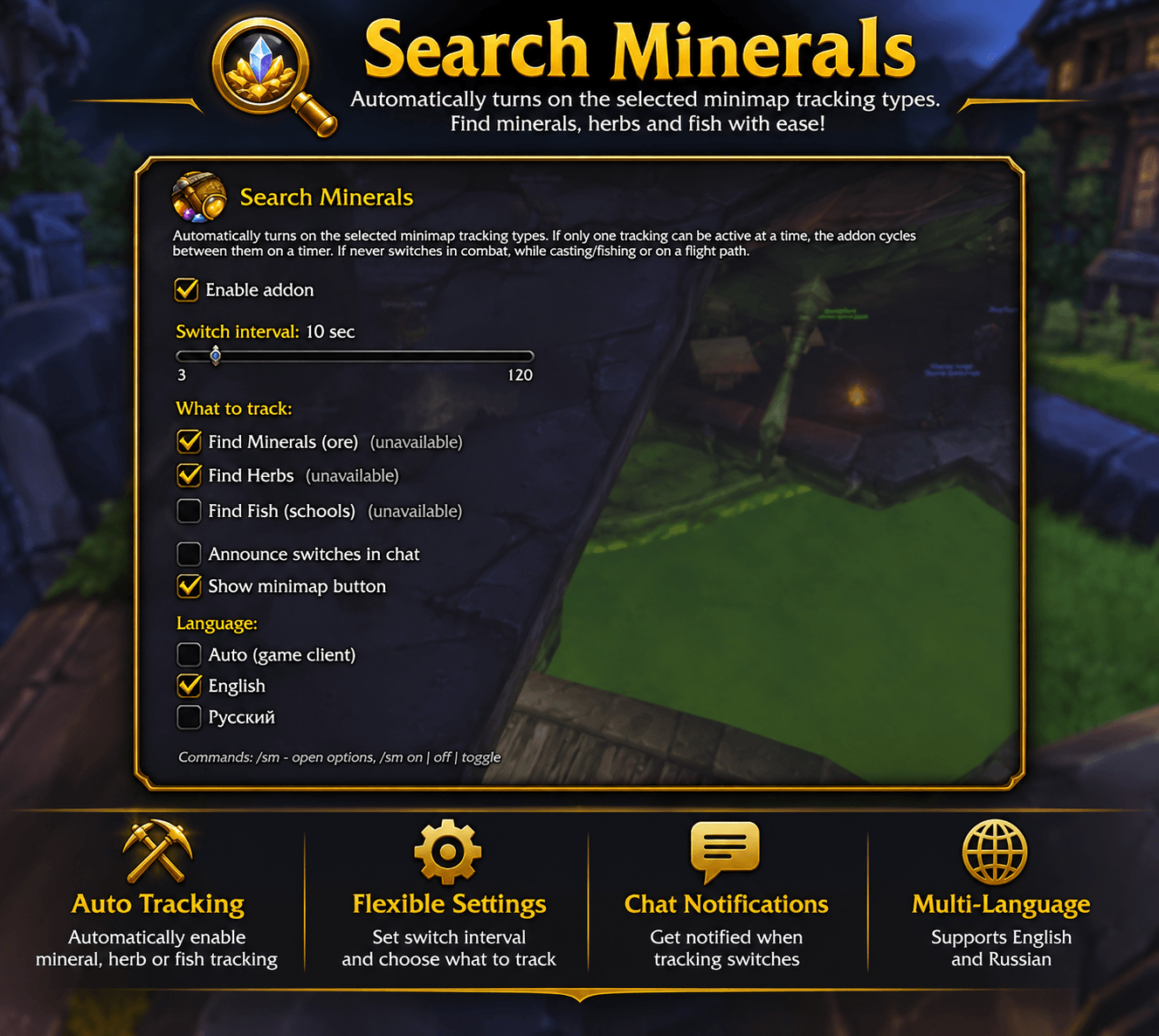
Automatic minimap tracking for gatherers in World of Warcraft: Forever. Keeps Find Minerals, Find Herbs and Find Fish (fish schools) turned on for you and, when the game only allows one tracking at a time, cycles between them on a configurable timer.

Features
- Auto-tracking on the minimap: ore, herbs and fishing pools.
- Rotation timer: if only one tracking can be active at once, the addon switches between the selected types every N seconds (3–120 s, default 10 s).
- Smart behaviour: if the client allows several trackings at once, the addon turns them all on once and then stays idle.
- Safe switching: never switches
- in combat (it retries right after combat ends),
- while casting or channeling, so it won't interrupt your fishing cast,
- while on a flight path,
- while dead or a ghost,
- during the global cooldown.
- Profession aware: tracking types your character doesn't have (profession not learned) are skipped automatically and marked (unavailable) in the options.
- Minimap button: left-click opens the options, right-click turns the addon on/off, drag to move it around the minimap. The icon is greyed out while the addon is disabled.
- Full in-game options panel, no config files to edit.
- English and Russian interface: follows the game client language by default, switchable in the options.
- Lightweight: no libraries, no dependencies, one small timer.
Options
Open with Esc → Options → AddOns → Search Minerals, the minimap button, or /sm.
| Option | Description |
|---|---|
| Enable addon | Turns the automatic switching on or off |
| Switch interval | Seconds between switches (3–120) |
| Find Minerals (ore) | Include ore tracking in the rotation |
| Find Herbs | Include herb tracking in the rotation |
| Find Fish (schools) | Include fishing pool tracking in the rotation |
| Announce in chat | Print a chat message each time tracking is switched |
| Show minimap button | Show or hide the minimap button |
| Language | Auto (game client language), English or Русский |
Slash commands
| Command | Action |
|---|---|
/sm or /searchminerals |
Open the options panel |
/sm on |
Enable |
/sm off |
Disable |
/sm toggle |
Toggle on/off |
/sm minimap |
Show/hide the minimap button |
/sm en / /sm ru / /sm auto |
Set the interface language |
Installation
- Download the latest release (or install with the CurseForge app).
- Extract the
SearchMineralsfolder intoWorld of Warcraft/_forever_/Interface/AddOns/ - Restart the game or type
/reload.
Compatibility
- World of Warcraft: Forever (Interface
16001). - Uses the modern
C_Minimaptracking API, with fallbacks to the older global tracking functions. - Settings are saved per account in
SearchMineralsDB.
Known limitations
- The tracking spell IDs used are 2580 (Find Minerals), 2383 (Find Herbs) and 43308 (Find Fish). If a type doesn't exist for your character or in your version of the game, it's shown as (unavailable) and skipped.
- If Blizzard ever restricts tracking changes to direct player input, automatic switching won't work. Please open an issue if you see "action blocked" errors.
Feedback
Bug reports and suggestions are welcome in the GitHub issues or the CurseForge comments.
Support the project
If Search Minerals saves you time while gathering, you can support development with a donation:
Thank you! ❤
License
Search Minerals (RU)
Автоматический поиск ресурсов на миникарте для World of Warcraft: Forever. Аддон сам включает Поиск минералов, Поиск трав и Поиск рыбы (косяки рыбы). Если игра разрешает только один поиск одновременно, он переключает их по очереди по настраиваемому таймеру.
Возможности
- Автопоиск на миникарте: руда, травы, косяки рыбы.
- Таймер чередования: если одновременно может быть активен только один поиск, аддон переключает выбранные типы каждые N секунд (3–120 сек., по умолчанию 10).
- Умная логика: если клиент разрешает несколько поисков сразу, аддон один раз включает все и больше ничего не трогает.
- Безопасное переключение: аддон не переключает поиск
- в бою (и пробует снова сразу после выхода из боя),
- во время каста или канала, так что заброс удочки не собьётся,
- в полёте на транспорте,
- когда персонаж мёртв или в виде призрака,
- во время глобального кулдауна.
- Учёт профессий: если у персонажа нет какого-то поиска, аддон его пропускает, а в настройках этот поиск помечается (недоступно).
- Кнопка у миникарты: ЛКМ открывает настройки, ПКМ включает и выключает аддон, кнопку можно перетаскивать по краю миникарты. Пока аддон выключен, иконка серая.
- Полноценная панель настроек в игре, редактировать файлы не нужно.
- Английский и русский интерфейс: по умолчанию язык клиента, переключается в настройках.
- Лёгкий: без библиотек и зависимостей.
Настройки
Esc → Настройки → Модификации → Search Minerals, кнопка у миникарты или команда /sm.
| Настройка | Описание |
|---|---|
| Включить аддон | Включает или выключает автоматическое переключение |
| Интервал переключения | Секунды между переключениями (3–120) |
| Поиск минералов (руда) | Искать руду |
| Поиск трав | Искать травы |
| Поиск рыбы (косяки) | Искать косяки рыбы |
| Сообщать в чат о переключении | Писать в чат при каждом переключении |
| Показывать кнопку у миникарты | Показать или скрыть кнопку |
| Язык | Авто (язык клиента), English или Русский |
Команды
| Команда | Действие |
|---|---|
/sm или /searchminerals |
Открыть настройки |
/sm on |
Включить |
/sm off |
Выключить |
/sm toggle |
Переключить вкл/выкл |
/sm minimap |
Показать/скрыть кнопку у миникарты |
/sm en / /sm ru / /sm auto |
Сменить язык интерфейса |
Установка
- Скачайте последний релиз или установите аддон через приложение CurseForge.
- Распакуйте папку
SearchMineralsвWorld of Warcraft/_forever_/Interface/AddOns/ - Перезапустите игру или введите
/reload.
Поддержать проект
Если аддон экономит вам время при сборе ресурсов, вы можете поддержать разработку донатом:
Спасибо! ❤
Лицензия
Search Minerals Team