SC Item Quality Marks
- By
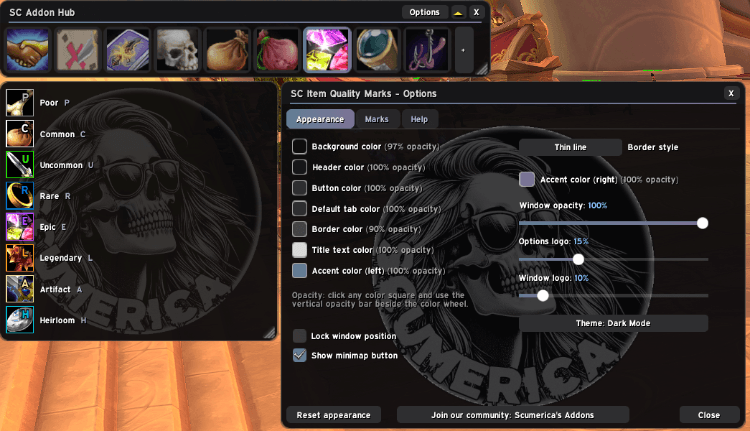
Colorblind help: a small letter in the corner of item icons showing the item's quality (P, U, R, E, L...).
Quality Marks 1.png
Description
SC Item Quality Marks
Item quality in the game is shown by color alone. This addon adds a letter, so you can tell an Epic from a Rare without relying on the border color.
Features
- A letter on every item icon. P Poor, U Uncommon, R Rare, E Epic, L Legendary, A Artifact, H Heirloom. Common items are left unmarked unless you turn them on.
- Works where items are shown. Bags, bank, character sheet, vendors, loot, quest rewards, mail and trade, plus EllesmereUI Bags.
- Make it yours. Change the letters, the corner, the size and the colors, and choose which qualities get a mark.
- Preview window. An example icon for every quality, marked exactly as your real icons are.
Getting started
Install it and open your bags. /sc iqm shows the preview window, /sc iqm config opens the options.
Part of the SC addon family. Every SC addon shares the same look and the same Options layout, and each one can be docked as a tab in the optional SC Addon Hub.
Feedback and ideas: join the in-game community Scumerica's Addons (the Join our community button in any SC addon's Options posts the invite link).
SC Item Quality Marks Team