SC Addon Hub
- By
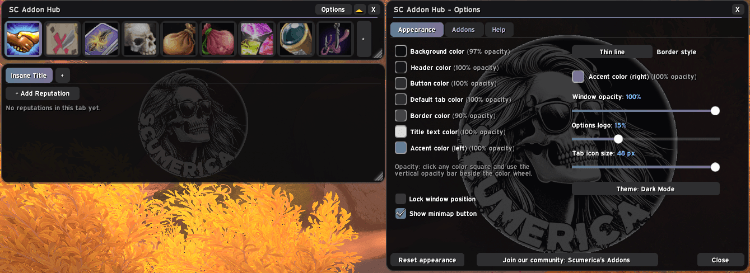
Optional. One collapsible window that holds your other SC addons as tabs. Drag them in, drag them out.
Addon Hub 1.png
Description
SC Addon Hub
Running several SC addons? The hub puts them all in one tidy window instead of several, one tab each.
Features
- One window, one tab per addon. Click a tab to switch addon.
- Drag in, drag out. Drag an addon's title bar onto the hub to dock it. Drag its tab out to give it its own window again.
- Collapsible. One click shrinks the hub and everything in it to a title bar.
- Nothing to set up. Installed SC addons appear on their own, and new ones are picked up as you add them.
- Options in one place. The hub's Options button opens the options of every docked addon.
- Fully optional. Every SC addon works exactly the same without it.
Works with
SC Reputation Goals, SC Pickpocket Goals, SC Quest Turn In, SC Kill Goals, SC Farming Paths, SC Nearby Enemies, SC Fishing, SC Loot Log, SC Item Quality Marks and SC Nameplate Class Icons.
Getting started
Install it next to any SC addon and log in. /sc hub shows or hides the hub, /sc hub help lists every command.
Part of the SC addon family. Every SC addon shares the same look and the same Options layout, and each one can be docked as a tab in the optional SC Addon Hub.
Feedback and ideas: join the in-game community Scumerica's Addons (the Join our community button in any SC addon's Options posts the invite link).
SC Addon Hub Team