SayKarma
- By
Say around you, you’ve been hit by touch of karma, silenced, stunned, and some other things.

say arround you that you've been touched by touch of karma

say arround you that you've been hexed

Announce for Wind Shear

say arround you that you've been cycloned
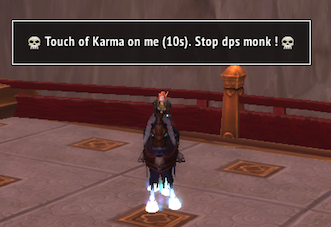
ex 1
Description
SayKarma
Say around you, you've been hit by touch of karma, silenced, stunned, and some other things.
Legacy
At the beginning, this addon used to only announce that you've been touched by touch of karma. Since I do a lot of random battlegrounds or arenas without Skype, I decided to add more announces.
Even if you stop hitting the monk, all your mates must also stop dps this monk. Otherwise you'll be dead, because 50% (Edit: was 100%) of the damages are redirected on you during 10s. That's the reason I made this add-on.
Touch of Karma -> All damage you take is redirected to the enemy target as Nature damage over 6 sec instead of you. Damage cannot exceed your total health. Last 10 sec.
The original idea came from the addon "say sapped" of bitbyte.
AutoSetting Tab key
Now you can enable an option for auto set your tab key based on your current zone.
- pve mode will set the tab key to the nearest enemy and Shift+tab for the nearest enemy player.
- pvp mode will set the tab key to the nearest enemy player and Shift+tab for the nearest enemy.
Of course, if you are in combat, it won't work.
Commands
- /sk ui - open UI options, or Esc key than Interface/Addons.
- /sk help - show you some slash commands.
- /sk reset - will reset SayKarma
- /sk legacy - use SayKarma as it was at the beginning. In another word: announce only Touch of Karma and nothing else.
- /sk default - get back to the default mode.
- /sk tab check - display how your tab key is set.
- /sk tab - try to set your tab key based on your current zone.
- /sk tab pve - for setting the tab key to the nearest enemy and Shift+tab for the nearest enemy player.
- /sk tab pvp - for setting the tab key to the nearest enemy player and Shift+tab for the nearest enemy.
SayKarma Team