Saved.png
Description
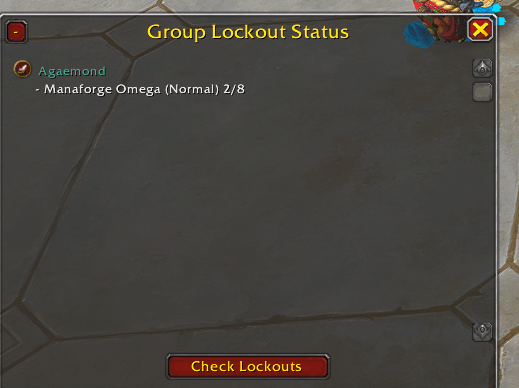
SavedCheck is a lightweight World of Warcraft addon that lets you quickly see which instances your group members are saved to.
Perfect for raid leaders, pug organizers, and anyone who wants to avoid wasted lockouts.
✨ Features
-
🗺️ Minimap Button – toggle the lockout window with a single click (movable around the minimap).
-
🖥️ Clean Scrollable UI – compact window with scroll support, works for 5-man parties up to full raid groups.
-
🛑 Close & Minimize – hide the window completely or collapse it to a small header.
-
📊 Detailed Lockouts – shows instance, difficulty, and boss progress:
Amirdrassil (Mythic) 5/9 Dawn of the Infinite (Heroic) 8/8 -
🎨 Class-Colored Names – each player’s name is colored by their class.
-
⚔️ Role Icons – Tank 🛡, Healer ✚, and DPS ⚔ icons next to each name.
-
👤 Solo Mode – works even when you’re not grouped, showing your own lockouts.
-
🔄 Slash Command –
/scheckto trigger a fresh check,/scheck showor/scheck hide.
📌 How it works
-
When you click Check Lockouts (or type
/scheck), the addon sends a request to your group. -
Each player with SavedCheck replies automatically with their lockout info.
-
The window updates in real time, showing everyone’s saved instances.
-
If someone doesn’t have the addon, they will appear with “No lockouts” or just their own visible info.
🚀 Installation
-
Download and unzip
SavedCheck. -
Place the folder into:
World of Warcraft/_retail_/Interface/AddOns/ -
Restart WoW or
/reloadin game. -
Click the minimap icon to open the lockout window.
🙌 Notes
-
Other players must also have SavedCheck installed to share their lockouts.
-
Works in both parties and raid groups.
-
Designed to be lightweight and unobtrusive.
SavedCheck Team