SaltyHolyPower
Simple, customizable Holy Power boxes for Holy Paladins, with Infusion of Light charge indicators, a Divine Purpose glow, and full Edit Mode support.

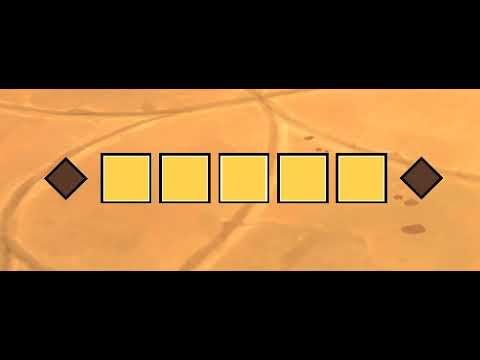
Salty Holy Power - Screengrab, Full Lights.png
Description
Salty Holy Power
A clean, minimal Holy Power tracker for Holy Paladins, built as a modern replacement for simple box-style trackers.
Features
Holy Power
- One box per Holy Power, filled or empty
- Adjustable width, height, spacing, border thickness and scale
- Custom colors for filled, empty and border
- Capped highlight: at max Holy Power the boxes brighten and gain a soft inner glow, with an optional light sweep
Infusion of Light
- A graphic on each side of the bar: left = 1st charge, right = 2nd charge
- Tracks both charges, just like the default UI
- Choose a Diamond, Circle, Square or the Spell Icon
- Adjustable size, distance from the bar and color
- Optionally show dimmed graphics when a charge isn't available
- Optionally hide Blizzard's large proc art
Divine Purpose
- A glowing border around the whole bar while Divine Purpose is active
- Optional pulse, with adjustable color, thickness and padding
- Optionally hide Blizzard's large proc art
Cast Bar (optional)
- A small cast bar attached to the tracker, styled to match it
- Above or below the bar, with adjustable height, gap and color
- Optional spell icon, spell name and cast time
- Optionally hide Blizzard's player cast bar
Edit Mode
- Move the tracker in Blizzard's Edit Mode, with a separate position for each layout
- Click it in Edit Mode to open a settings dialog
- Live preview while editing: the tracker switches between partly filled and capped, with procs showing
Visibility
- Holy spec only (optional)
- Optionally hide out of combat when you have no Holy Power, procs or cast
- Optionally hide the default Holy Power bar under the player frame
Configuration
- Edit Mode: click the tracker to change its settings
- Options → AddOns → Salty Holy Power: every setting in one list
- Minimap addon menu: click Salty Holy Power to open its settings
Commands
| Command | Description |
|---|---|
/shp |
Open settings |
/shp edit |
Open Edit Mode |
/shp reset |
Reset all settings |
/shp debug |
Print current Holy Power and proc state |
/shp iolid <id> / /shp dpid <id> |
Change the tracked Infusion of Light / Divine Purpose spell IDs |
Requirements
- World of Warcraft Retail
- Paladin. The addon does nothing on other classes.
SaltyHolyPower Team