Rush Mode
- By
Rush Mode is a World of Warcraft Classic addon designed to coordinate, track, and secure competitive rush events involving multiple players, streamers, and teams.
🌟 Rush Mode – WoW HC Addon
Rush Mode is a World of Warcraft Classic addon designed to coordinate, track, and secure competitive rush events involving multiple players, streamers, and teams.
If you are looking for an external audit and tracking system providing security and fair play for your event, you can check out Rush Mode App.
You can see a live demo of an emulated rush event here: rush-mode
Primary Goals:
- Synchronized progression tracking across characters and rerolls
- Anti-fraud mechanisms for trades and mail
- Fair play enforcement through shared trust (whitelist) and guild-based communication
- Event auditing for administrators and organizers
This addon supports both French and English.
📚 Table of Contents
- Overview
- Installation
- Initial Setup (
/rinit) - Character Tracking
- Whitelist & Synchronization (
/rconnect) - Guild Requirement & Communication Caveats
- Status Indicators
- Rules & Anti-Fraud System
- Commands Reference
- Important Warnings
- External Integration (Discord / Twitter)
- Contact & Support
1. Overview
Rush Mode allows a group of players (often streamers) to engage in a shared rush with strict rules:
- Track full leveling to 60
- Complete objectives related to professions, levels, and dungeons
- Prevent external assistance (gold and items from mail or trades)
All critical actions are tracked locally and securely shared between rush members.
2. 🛠️ Installation (if not using CurseForge)
- Download the addon
- Place it into:
World of Warcraft/_classic_era_/Interface/AddOns/Rush_Mode- Launch WoW Classic
- Ensure Rush Mode is enabled in the AddOns menu
3. 🚀 Initial Setup – /rinit
The first mandatory step is initialization.
Run the following command in-game:
/rinitThis opens an initialization window.
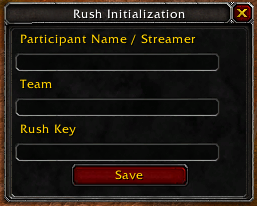
You must provide:
- Streamer / Participant Name
- Team Name
- Rush Key
🔑 Important – Rush Key
The Rush Key must remain strictly secret.
- Share it only with official rush members
- It grants access to rush participation
- Anyone with this key can potentially join the rush
Once saved, this step does not need to be repeated for this rush.
4. 🔍 Character Tracking
After initialization, you can activate tracking:
- On your current character
- On additional characters (rerolls)
Once tracking is enabled:
- It cannot be disabled
- This prevents abuse (e.g. opting out after suspicious actions)
5. 🔗 Whitelist & Synchronization
If this is your first character participating in the rush, you must connect it with another rush member.
By using the whitelist sharing button, or if you are not yet in a guild, you can also share your whitelist with other players using the same rush ID by running /rconnect.
Command:
/rconnect <playerName>This will:
- Exchange and synchronize the whitelist
- Establish trusted communication
🔄 Rerolls
After the first successful connection:
- Rerolls automatically receive the whitelist
- No additional manual connection is required
6. 🏰 Guild Requirement & Communication Caveats
⚠️ Mandatory Guild Requirement
All rush participants must be in the same guild.
Guild communication is required for:
- Tracking
- Synchronization
- Anti-fraud data exchange
⚙️ Known WoW Classic Limitation
When joining a guild, WoW Classic does not properly reinitialize addon GUILD communication channels.
⚡ Impact
- Tracking may appear partially functional
- Synchronization may be degraded
🔄 Required Action (one-time only)
After joining the guild:
- Log out
- Log back in
This fully resets the communication system.
Once done, no further action is required for this character.
7. ✅ Status Indicators
If everything is configured correctly, you should see the following state:
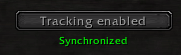
🟢 – Synchronized
- Whitelist populated
- Communication operational
🔴/🟡 – Not synchronized
- Whitelist empty or incomplete
- Tooltip explains what is missing
8. 🛡️ Rules & Anti-Fraud System
Core Rules
Participants must:
- Reach level 60
- Complete rush-defined objectives (levels, professions, dungeons…)
Anti-Fraud Enforcement
If you accept:
- Trades
- Mail (gold or items)
from non-rush participants, the action will be:
- Logged
- Shared with administrators
- Reviewed and adjudicated if necessary
This includes:
- Partial trades
- Progressive withdrawals
- Mail-based assistance
Once tracking is enabled, all actions are monitored automatically.
If you want to go further, contact me on Discord or Twitter to enable an external tracking solution.
9. 📝 Commands Reference
Identity
You can change your team at any time.
/rjoin <team>Synchronization
You can synchronize your whitelist with new players at any time.
/rconnect <playerName>Reset Addon
Use this only if the rush is finished and you want to start another one.
If others are still participating, they will continue to receive your character's data because it remains in the whitelist.
/rreset
/rinit
10. ⚠️ Important Warnings
🪦 Character Death
If your character dies:
🚫 DO NOT DELETE IT
Reason:
- The whitelist is based on character name
- If someone reuses the same name and joins the guild:
- They will be incorrectly whitelisted
- This compromises the rush integrity
Always keep dead characters intact.
11. 🔗 External Integration (Discord / Twitter)
Rush Mode can be extended to support real-time external tracking and tooling.
If you want to:
- Build live dashboards
- Moderate events externally
- Exploit rush data outside the game
Contact me via:
- Discord: zando7914
- Twitter / X: zandodev
I am open to collaboration for advanced or custom event setups,
as I did for the KTV x JL Rush Event organized by Kameto.
12. 📞 Contact & Support
If you encounter:
- Synchronization issues
- False positives
- Technical limitations
- Custom event requirements
Please reach out via Discord or Twitter.
📝 Final Notes
Rush Mode is not a casual addon.
It assumes:
- Trust between participants
- Respect for the rules
Rush Mode Team