


Ruby Slippers (Experimental)
- By
Randomly use a hearthstone from your toy collection with one click — browse, favorite, and filter all your hearthstones in a dedicated Collections Journal tab.
ruby-slippers-screenshot.png
Description
Click a button, use a random hearthstone. Each click selects a different one from your collection, so you get a different travel animation every time. The button icon always shows which hearthstone will be used next.
Left-click the floating button to hearth. Right-click to open the collection. Drag the button to reposition it. The button also shows cooldown time remaining.
Hearthstone Collection
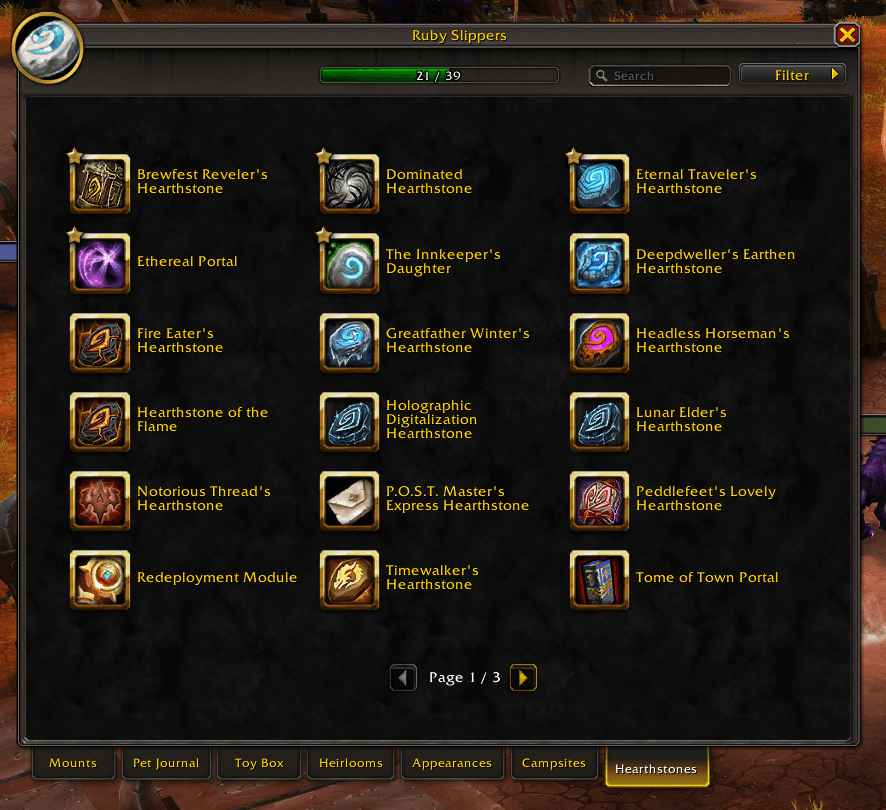
A "Hearthstones" tab is added to the Collections Journal with every hearthstone in the game displayed in a grid matching the Toy Box style. Owned hearthstones appear in full color with gold borders; unowned ones are grayed out with their source listed in the tooltip so you know where to get them. A progress bar at the top tracks how many you've collected.
Click any owned hearthstone in the grid to use it directly, or drag it to your action bar. Right-click an owned hearthstone to favorite it or exclude it from the random rotation. Filter by collected/uncollected, or search by name or source.
Favorites are shared with Blizzard's built-in toy favorites, so changes you make here show up in the Toy Box and vice versa.
Random Pool Controls
By default, the Garrison Hearthstone and Dalaran Hearthstone are excluded from the random pool because they don't go to your bound inn. The default Hearthstone (the bag item) is included. All three are controlled through settings rather than the per-item right-click menu. You can also enable a favorites-only mode that restricts the pool to just your favorited hearthstones.
Any other hearthstone can be individually excluded via right-click in the collection.
Action Bar Macro
Enable "Create Action Bar Macro" in settings to get an account-wide "HS Random" macro you can drag to your action bar. The macro icon updates automatically to show which hearthstone will be used next. You can also write your own macro with /click RubySlippersButton.
Commands and Access
Type /rs for a list of commands. /rs config opens settings, /rs collection opens the collection tab. The addon also appears in the minimap addon compartment.
Bugs and Feedback
Open an issue on GitHub if you run into problems or have a feature request.
The Ruby Slippers (Experimental) Team

