RP Distance Tracker
- By
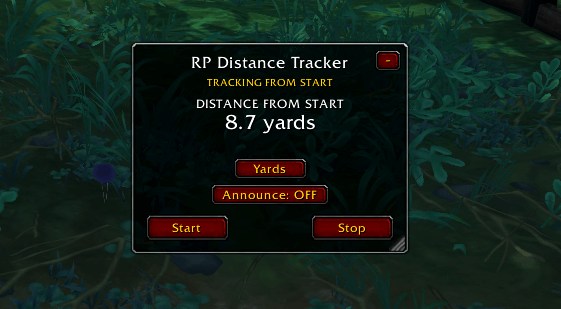
Distance tracker 2.png
Description
RP Distance Tracker
Why Was This Addon Made?
RP Distance Tracker was created out of a simple need for roleplay combat and movement.
My friend and I come from a Dungeons & Dragons background, where distance and positioning are an important part of combat. Knowing whether someone is 5 feet away, 20 feet away, or several dozen feet away can make a meaningful difference when deciding what a character can realistically do during their turn.
When bringing that style of roleplay into World of Warcraft, we wanted something similar: a simple way to keep track of how far a character has moved during their turn.
RP Distance Tracker is designed specifically for roleplayers who want a quick, simple and unobtrusive way to track movement distance during RP.
-----
Features
Distance Tracking
Press Start to begin a movement turn.
The addon creates an anchor point at your current position and continuously measures how far you are from that starting point.
For example:
- Start: 0 yards
- Move forward: 10 yards
- Move further: 20 yards
- Walk back: 15 yards
- Return to your starting position: 0 yards
This means the addon measures your current distance from where you started, rather than simply adding together every step you take.
Automatic Reset
When you press Stop, the addon takes a final distance reading and then automatically resets itself to 0.
This makes every Start/Stop cycle function as a separate RP turn without requiring the user to manually reset the tracker.
Announce
The Announce toggle allows players to decide whether the final distance should be shared with nearby roleplayers.
When enabled, pressing Stop sends a message through normal /say:
RP Distance Tracker: Moved 17.4 yards this turn.
When disabled, the distance remains private to the user and nothing is sent to chat.
Yards & Meters
The addon supports both yards and meters.
Players can switch between the two at any time depending on which measurement system they prefer for their roleplay.
Movable Interface
The tracker window can be moved anywhere on the screen.
This allows players to position it somewhere convenient without interfering with their normal UI.
Minimize / Restore
The tracker can be minimized into a small button when it isn't needed.
Clicking the button restores the full tracker.
This keeps the addon from taking up valuable screen space during normal gameplay.
Resizable
The window can be resized to suit the player's UI and preferences.
UI Scaling
The tracker can also be scaled, allowing players with different UI layouts and resolutions to find a comfortable size.
RP Distance Tracker Team