
Rotation Pilot
- By
RotationPilot-01-rotation-hud.png
RotationPilot-02-alerts.png
RotationPilot-03-buff-a-friend.png
RotationPilot-04-group-grid.png
RotationPilot-05-every-class.png
Description
RotationPilot
RotationPilot is a rotation helper for all classes that shows your next spell and the key you have it bound to, and tells you when the abilities outside your rotation are ready: interrupts, defensives, cooldowns, trinkets and items.
It recommends, you cast. RotationPilot never presses a key for you, never rebinds anything and never chooses a target. It also includes Buff a Friend, a party and raid grid with click-casting, a damage meter built on the game's own counting, personal records, a grudge list, a rare spotter, a fishing helper and a stats window.
Every class supported
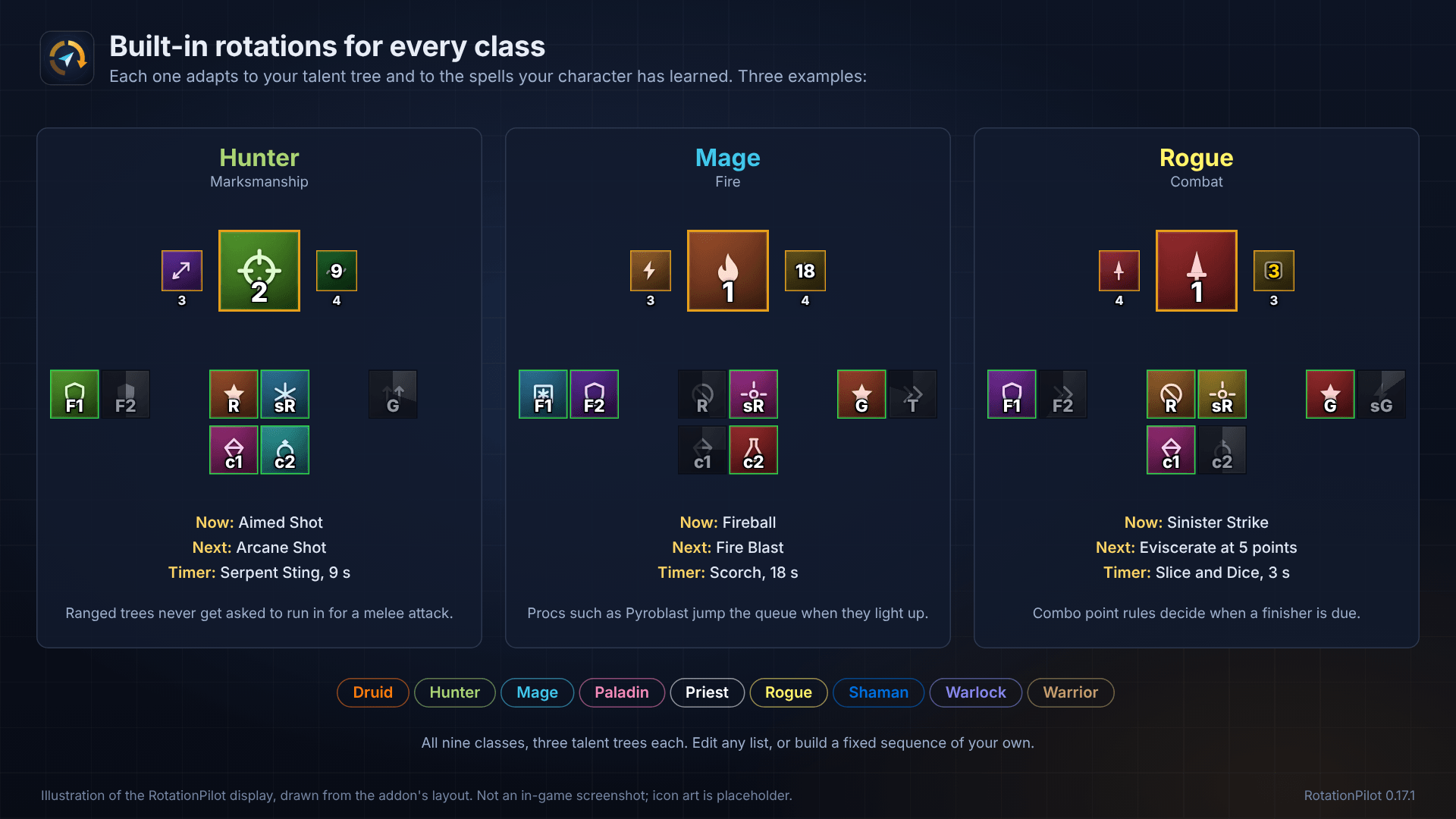
- Built-in rotations for all nine classes: Druid, Hunter, Mage, Paladin, Priest, Rogue, Shaman, Warlock and Warrior.
- Each rotation adapts to your talent tree, so a Fire mage and a Frost mage get different recommendations.
- Ready icons, alerts and Buff a Friend are built from the spells your own character knows, so they work for every class without setup.
- Class-specific rules are included where they matter, such as combo points for rogues and druids, Seals and blessings for paladins, Judgement after your own stun for Seal of Command paladins, and ranged attack speed for hunters.
Features
Rotation
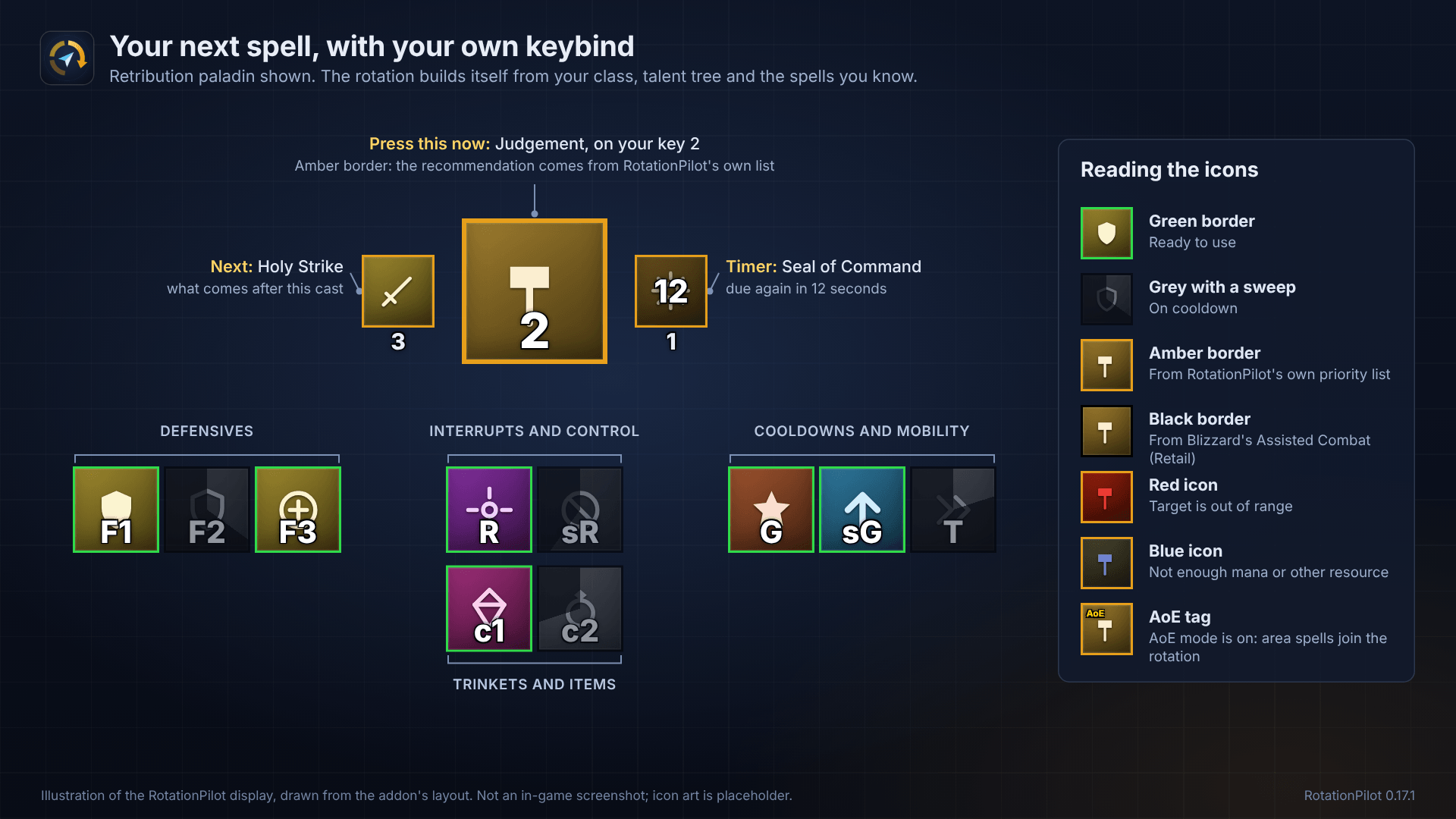
- A main icon shows the next spell to press, with your own keybind on it.
- A second icon shows the spell after that, with a timer icon beside it for the Seal, shout or debuff that falls due next.
- The rotation builds itself from your class, your talent tree and the spells you know, and updates when you learn a spell or change talents.
- Spells that are on cooldown, unusable, out of range or already being cast are skipped.
- The icon turns red when you are out of range and blue when you lack the resource.
- Rules for timers, AoE mode, combo points, creature types, haste windows and proc spells.
- A buff that is dispelled or used up before its timer runs out is asked for again at once.
- Edit the priority list yourself, or switch to a fixed sequence if you prefer a set order.
Ready icons
- Four groups under the main icon: interrupts and crowd control, defensives, cooldowns and mobility, trinkets and items.
- Built automatically from the spells you know, plus both trinket slots.
- Green border when ready, grey with a sweep while on cooldown, and your keybind on each icon.
- Show everything or only what is ready, and add your own spells and items.
Alerts
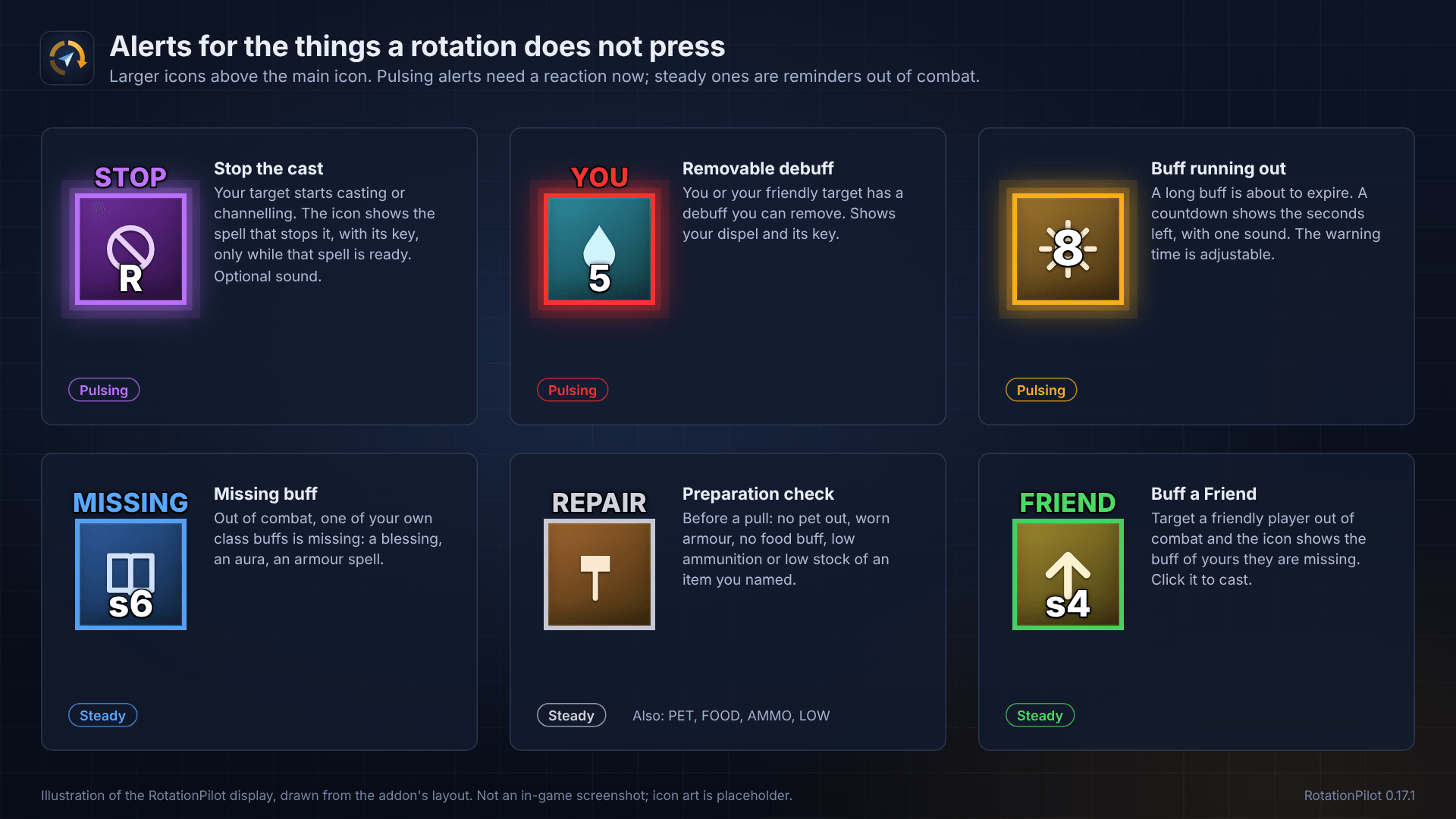
- Stop the cast: a pulsing icon and a sound when your target starts a cast you can interrupt, showing which spell to use.
- Removable debuff: an icon when you or your friendly target has a debuff you can remove.
- Buff running out: a countdown when a long buff is about to expire.
- Missing buff: a reminder out of combat when one of your own class buffs is missing.
- Grudge and rare: a red icon when a player who attacked you before is near, a gold one when a rare comes into view.
Buff a Friend
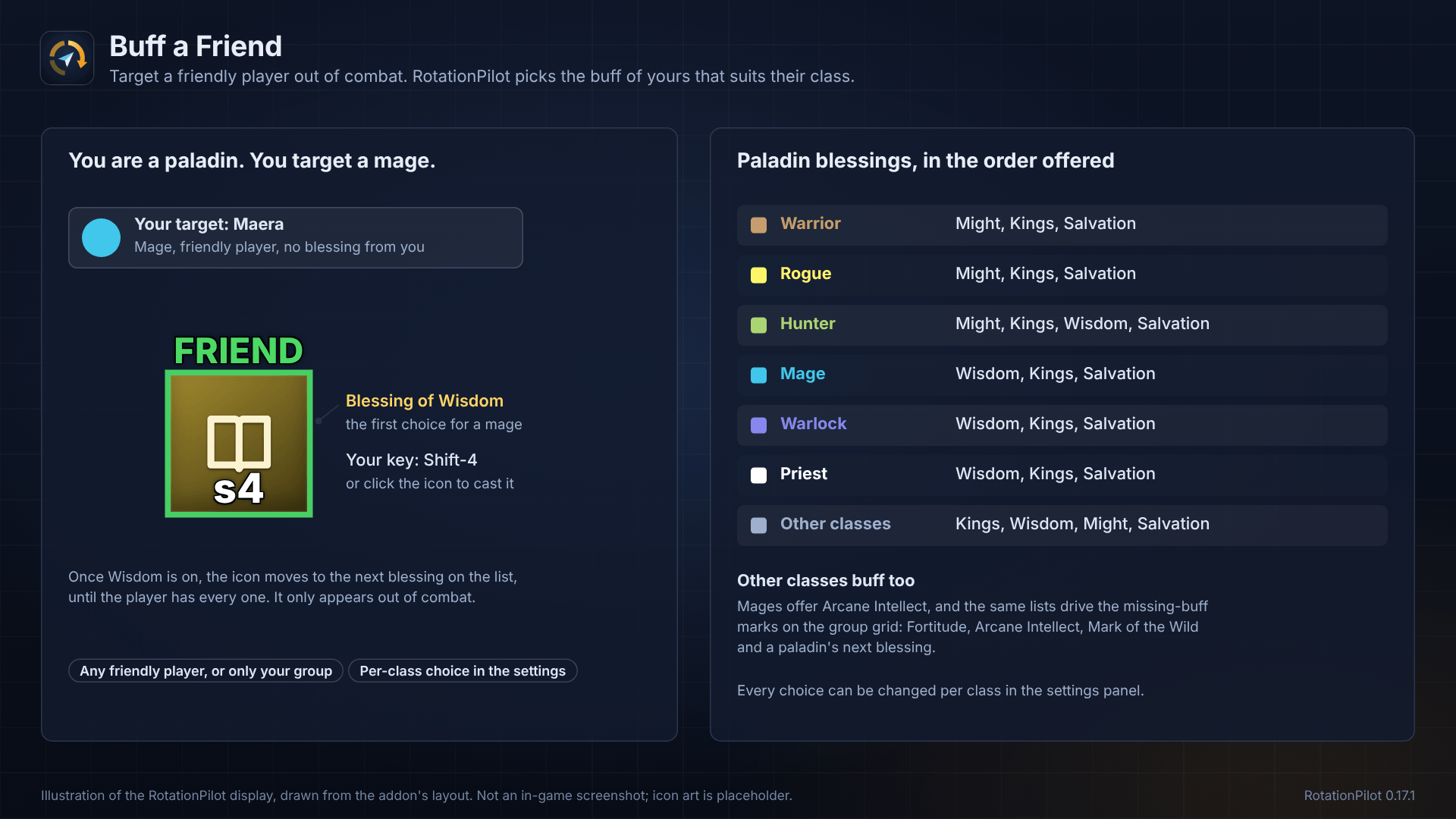
- Target a friendly player and RotationPilot shows which of your buffs they are missing.
- Click the icon to cast it.
- Class-aware logic, including choosing the right paladin blessing for the target, one after the other.
Group grid
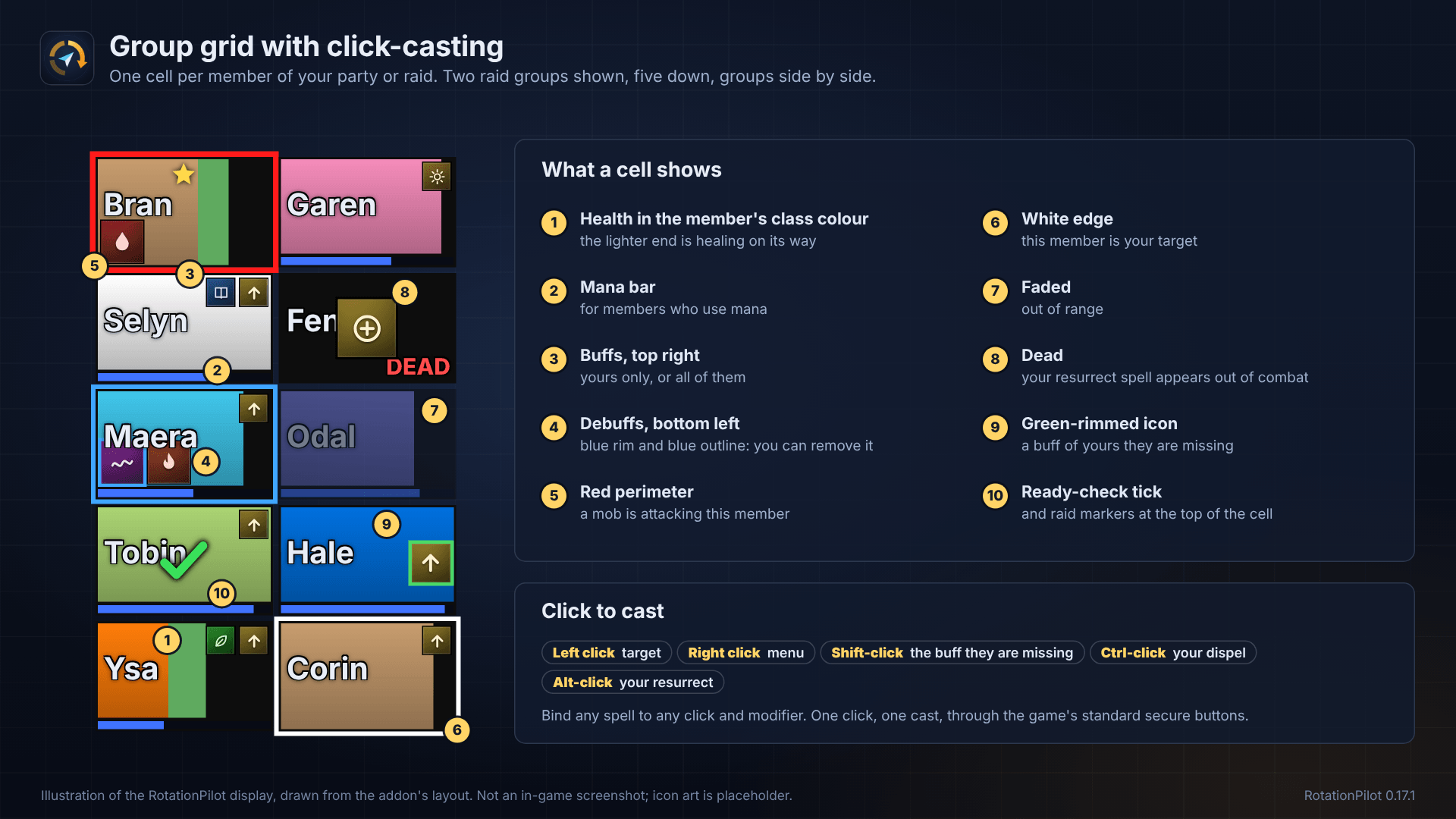
- Compact party and raid frames with health, mana, incoming heals, pets, buffs and debuffs.
- Aggro, raid markers, ready-check status, missing-buff marks and resurrect marks.
- Click-casting: bind your heals, buffs and dispels to mouse clicks on a player's cell.
Damage meter
- Bars from the game's own counting, in the layout of the game's meter window: a metric menu with damage done, DPS, damage taken, avoidable and enemy damage taken, healing done, HPS, absorbs, interrupts, dispels and deaths.
- Current segment or overall, and any earlier fight the game still holds.
- Click a bar for a window with that player's spells; click a death for the game's death recap.
- Up to four windows, each with its own metric; bar height, text size, spacing, non-interactive mode and auto reset on entering an instance.
- A chat line with what killed you.
Records and stats
- Personal bests per character: best DPS and HPS, most damage or healing in a fight, most by one spell, most by plain attacks, most interrupts, longest fight. Kept for the session, the week, the month and all time, with a chat line when an all-time record falls.
- Session summary: time played, gold in and out, experience, fights, deaths, honourable kills, quests, fish, nodes and rares, with one line about your last session at login.
- An RP button on the minimap: hover for the session, click for the stats window with a tab for everything above.
Out in the world
- Grudge list: players seen attacking you are remembered across your characters, with kills against your name and your own notes. When one of them is near again you get an icon, a chat line and a sound.
- Rare spotter: a rare, rare elite or world boss in view gets an icon, a chat line with its level and location, a sound and a skull marker. Every rare seen is remembered.
- Node memory: where you mined, herbed, skinned and fished, per zone with map coordinates.
- Fishing: one key to cast and catch, fishing loot taken at once, a lure icon when the pole has none, gear swap to and from your weapons, and a tally of what you caught.
Preparation check
- A quick check before you pull: pet, repairs, food, ammunition, full bags, quests to turn in and the items you want to keep in stock.
- At a vendor: repair cost and bag space. At a quest giver: which of your completed quests they take.
- On a ready check: a chat summary, plus a sweep of the group naming who lacks food or a buff of yours.
Keybinds
- Read from all Blizzard action bars, the stance bar and the pet bar.
- Read from Bartender4, ElvUI and Dominos.
- Short labels such as
s3for Shift-3, and you can set a label by hand.
Customisation
Everything works out of the box, and almost all of it can be changed in the settings panel: /rp config
- Rotation: add, remove and reorder spells, set timers and conditions on each one, import the order from your action bar, or replace the priority list with a fixed sequence.
- Talent tree: detected automatically, or pick it by hand.
- Ready icons: add your own spells, trinkets and items, show the groups separately or as one row, and show everything or only what is ready.
- Alerts: switch each alert on or off, adjust the warning time and sounds, and choose which spell is offered first for interrupts, for example a racial.
- Group grid: choose what each cell shows and set your own click-casting bindings.
- Damage meter: metric, segment, when it shows, rows, look, and as many windows as you want.
- Keybind labels: shown automatically, and you can set any label by hand.
- Layout: move and resize every element, set opacity, and choose when it shows: always, in combat, or with an enemy targeted.
- Profiles: separate settings for each class, plus export and import as text so you can share a setup with other players or move it between characters. Imports are checked value by value and can be undone.
How it stays within Blizzard's rules
- RotationPilot is a display addon. It shows a recommendation and you decide whether to press the key.
- Where clicking an icon or a grid cell casts a spell, it uses Blizzard's standard secure buttons: one click from you, one cast, exactly as with the default raid frames.
- Blizzard hides some combat information from addons. RotationPilot respects that, which is why AoE mode is a manual switch, some timers run from your own casts, and the damage meter shows the game's own numbers rather than counting hits itself.
Supported game versions
- World of Warcraft: Forever
- Retail (Midnight)
- English and non-English game clients
Getting started
- Install RotationPilot and log in. The rotation and ready icons build themselves for your class.
- Type
/rp configto open the settings panel. - Hold Shift and drag the main icon to place it where you want it.
Useful commands:
/rp configopens the settings panel/rp aoeswitches AoE mode on or off/rp prio listshows your priority list/rp treeshows the talent tree the addon detected/rp metershows the damage meter settings/rp statsopens the stats window/rp fishshows the fishing helper/rp exportturns your rotation into text to share/rp resetputs the layout back to default/rp debugprints a status report
Status and feedback
RotationPilot is early release.
The built-in class rotations are still being tuned, and some classes have had more play-testing than others. The damage meter depends on the game's own meter being enabled in its options. If a recommendation, a keybind or a figure looks wrong, please leave a comment with your class and the output of /rp debug.
Good news is you can change anything yourself.
Rotation Pilot Team
