
Rotation Forge
WoWScrnShot_111626_113935.jpg
Description
Rotation Forge
See what to press next, which buffs are missing and when your cooldowns are ready, for every class in WoW: Forever.
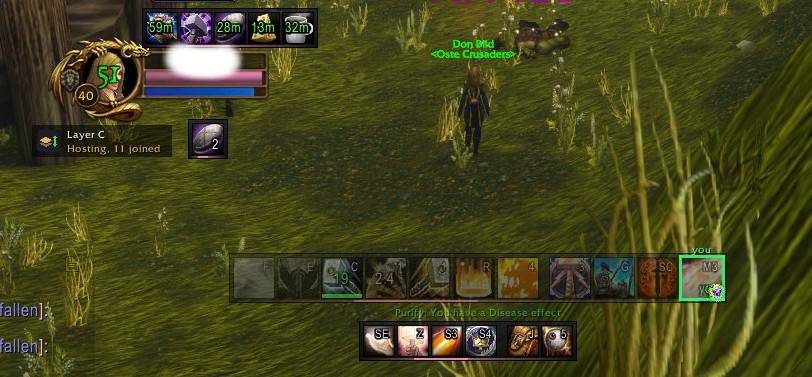
Rotation Forge shows your spells as three movable bars and lights up the one you should press next. It reads your talents to work out your spec, finds your spells on your action bars (including inside macros) and shows the keybind on each icon.
It's a display addon only: it shows a suggestion and you decide whether to press the key.
The three bars
- Rotation bar: your rotation spells and utility, plus maintained effects like seals, shields, weapon imbues and stances.
- The spell to press now glows. The next one is marked.
- Cooldowns fade back in colour as they come off cooldown.
- A clear alert shows when a seal, shield or imbue needs refreshing. Choose subtle, normal or strong.
- Buffs bar: class buffs, Well Fed, Well Rested and temporary weapon buffs (sharpening stones, weightstones, oils, spellstones).
- Missing buffs are marked.
- Buffs about to run out blink.
- Cooldowns bar: big cooldowns, defensives and any equipped trinket or item with a Use effect.
- Defensives flash when your health gets low.
There's also an optional consumables bar with the strongest potion, healthstone, bandage or weapon stone in your bags. Click it to use it.
Situational alerts
- Dispels: Cleanse, Purify, Remove Curse, Cure Poison and others glow when you or a party member has a debuff they can remove.
- Purge: glows when your enemy target has a magic buff.
- Freedom: Blessing of Freedom and other root breakers light up when you're rooted or slowed.
- Interrupts and taunts: interrupts light up when your target is casting. Taunts light up when your target attacks someone else in your group.
- Emergencies: Lay on Hands, Blessing of Protection and similar spells light up when someone is very low on health.
Supported classes and specs
All 9 classes and 27 specs: Warrior, Paladin, Hunter, Rogue, Priest, Shaman, Mage, Warlock and Druid.
- Damage and tank specs get a full rotation.
- Healing specs get the buffs bar, cooldowns, mana tracking, dispels and emergency alerts, but no rotation.
Your spec is detected automatically from your talents. You can also set it yourself with /rf spec.
Getting started
- Install it and log in. A setup screen opens where you choose what to show.
- Drag the bars where you want them, then lock them.
- Use the minimap button or type
/rfto open the settings.
Commands
| Command | What it does |
|---|---|
/rf |
Open the settings |
/rf setup |
Choose what's shown on the bars |
/rf spec auto or /rf spec <name> |
Detect your spec automatically, or choose it yourself |
/rf lock, /rf unlock |
Lock or move the bars |
/rf scale 1.2 |
Resize all bars (/rf scale big 0.8 resizes one) |
/rf hide buffs, /rf show buffs |
Hide or show a bar |
/rf alert subtle, normal or strong |
How noticeable the refresh alert is |
/rf report |
Show what the addon can see right now (useful for bug reports) |
/rf reset |
Move all bars back to the middle |
A note on combat
In combat, WoW: Forever hides a lot of information from addons, including most buff, debuff and cooldown details. Rotation Forge gets around this in a few ways:
- It learns your cooldowns and durations out of combat.
- It times things in combat from your own casts.
- For dispels and crowd control, it uses the game's own aura display.
Usually this is accurate. Occasionally a timer can be a second or two off, or the addon may not notice when a debuff is removed early.
Status and bug reports
Rotation Forge is a work in progress, and feedback is greatly appreciated. If something looks wrong or you have an idea, please leave a comment with:
- your class and spec
- the addon version
- what you expected it to suggest, and what it suggested instead
- a screenshot of
/rf reportif it's about dispels, Freedom or interrupts
Supporting the addon
Rotation Forge is free and always will be. If you'd like to support it, you can here: https://www.paypal.com/donate/?hosted_button_id=7W2CABSL8XWNN
Rotation Forge Team
