Rotation Atlas – Rotation Helper
- By
A lightweight rotation helper for WoW with real-time ability suggestions, keybinds, trinket tracking, and a clean, customizable HUD.
ra1.png
ra2.png
Description
Rotation Atlas – Rotation Helper
A clean, lightweight, and powerful rotation assistant for World of Warcraft.
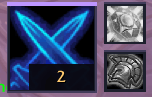
Rotation Atlas helps you stay focused on combat by displaying your next recommended ability in a compact, easy-to-read HUD.
Designed with a sleek dark fantasy interface, Rotation Atlas provides essential combat information without unnecessary windows, distracting text, or screen clutter.
Whether you're running Mythic+ dungeons, raiding, leveling, or practicing your rotation, Rotation Atlas keeps your next ability clearly visible.
Features
Smart Rotation Assistance
-
Real-time ability suggestions using Blizzard's Assisted Combat system
-
Automatic class and specialization detection
-
Support for all 13 classes and 40 specializations
-
Optional specialization-based opening ability suggestions
-
Automatic updates during combat
-
No automatic spell casting
Clean & Minimalistic HUD
-
Compact ability icon without unnecessary frames
-
Keybind displayed directly on the recommended ability
-
Visual cooldown indicators
-
Freely movable HUD
-
Adjustable interface scale
-
Position and preferences saved between sessions
Trinket Tracking
-
Optional display for both equipped trinkets
-
Cooldown visualization
-
Clickable buttons for usable trinkets
-
Individual trinket icons
Minimap Integration
-
Compact circular minimap button
-
Left-click to show or hide the HUD
-
Right-click to open settings
-
Freely movable around the minimap border
-
Option to hide the minimap button
Easy Customization
-
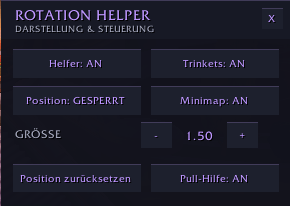
Simple settings menu
-
Enable or disable trinket tracking
-
Adjust HUD size
-
Lock or unlock HUD position
-
Enable or disable opening ability suggestions
-
Reset settings whenever needed
How It Works
Rotation Atlas uses World of Warcraft's built-in Assisted Combat recommendations to display your next suggested ability.
Outside combat, optional specialization-based opener suggestions can help you prepare your first attack.
The addon respects Blizzard's combat API restrictions and does not automatically execute spells or perform combat actions.
Note: Combat recommendations are based on Blizzard's Assisted Combat system rather than an independent rotation simulation. For the best experience, enable Assisted Combat highlighting in your World of Warcraft combat settings.
Slash Commands
| Command | Description |
|---|---|
/rhc |
Toggle the HUD |
/rhc options |
Open settings |
/rhc show |
Show the HUD |
/rhc hide |
Hide the HUD |
/rhc lock |
Lock HUD position |
/rhc unlock |
Unlock HUD position |
/rhc scale 1.0 |
Adjust HUD scale |
/rhc trinkets on |
Enable trinkets |
/rhc trinkets off |
Disable trinkets |
/rhc opener on |
Enable opener suggestions |
/rhc opener off |
Disable opener suggestions |
/rhc minimap show |
Show minimap icon |
/rhc minimap hide |
Hide minimap icon |
/rhc reset |
Reset settings |
/rhc refresh |
Refresh the display |
/rhc status |
Show current settings |
/rhc help |
Display available commands |
Installation
-
Download Rotation Atlas through CurseForge or install it manually.
-
Enable the addon in your World of Warcraft addon list.
-
Log in with your character.
-
Use
/rhc optionsor right-click the minimap icon to customize your settings. -
Move the HUD to your preferred position and start playing!
Version 1.0.0 – Initial Release
The first public release of Rotation Atlas includes:
-
Compact rotation recommendation HUD
-
Automatic specialization detection
-
Keybind and cooldown display
-
Optional opening ability suggestions
-
Interactive trinket tracking
-
Customizable minimap button
-
Movable and scalable HUD
-
Settings menu and slash commands
-
Saved user preferences
Feedback & Support
Found a bug or have an idea for a new feature?
Leave a comment on the CurseForge project page with your class, specialization, and game version.
Feedback and suggestions are always welcome!
Rotation Atlas – Stay focused. Follow your rotation. Master your combat.
Rotation Atlas – Rotation Helper Team