RollCraft
A movable replacement for loot roll windows, with item details, roll results and customisable settings. Supports Retail and WoW Forever.
Screenshot From 2026-10-22 12-16-59.png
Description
RollCraft
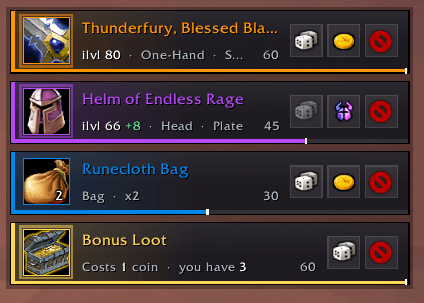
RollCraft replaces the default loot roll windows with clean, compact cards that you can move and resize. See item details, choose your roll and watch the results in one place.
Works on Retail and WoW Forever.
Features
- Need, Greed, Transmog and Pass buttons, following the game's loot rules.
- Item icons and names colored by quality.
- Item level, equipment slot, item type, stack count and Bind on Pickup details.
- Countdown bars that turn red as time runs out.
- Roll results showing your choice and roll number when reported by the game.
- Animated roll numbers and optional result sounds.
- Support for more than four simultaneous loot rolls.
- Retail bonus roll support, with coin cost, countdown and reward details.
Item tooltips
Hover over an item to view its tooltip:
- Hold Shift to compare equipment.
- Shift-click to link the item in chat.
- Ctrl-click to preview it in the dressing room.
Settings
Type /rollcraft or click RollCraft in the addon compartment menu beside the minimap to open settings.
Adjust the scale, spacing between cards, stacking direction and how long results stay visible. Toggle result sounds and show preview cards to try the layout.
Settings save automatically.
Settings
- Type
/rollcraftor select from the addon compartment.
Additional Commands
| Command | What it does |
|---|---|
/rollcraft |
Open settings |
/rollcraft unlock |
Unlock the position and show preview cards |
/rollcraft lock |
Lock the position and hide previews |
/rollcraft test |
Show preview cards |
/rollcraft clear |
Hide previews without dismissing real loot rolls |
/rollcraft scale 1.2 |
Adjust scale from 0.5 to 2 |
/rollcraft grow up |
Stack cards upwards |
/rollcraft grow down |
Stack cards downwards |
/rollcraft blizzard |
Toggle the default loot roll windows |
/rollcraft bonus |
Toggle RollCraft's Retail bonus roll cards |
/rollcraft reset |
Restore default settings and position |
/rollcraft help |
Show all commands |
Compatibility
Supports Retail and WoW Forever.
RollCraft Team