


RoleFinder Anniversary
Quickly find and invite tanks, healers, or DPS from the LFG Browse tool with one click.
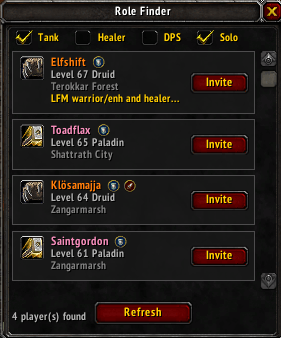
Screenshot 2026-02-11 152513.png
Description
RoleFinder
Tired of scrolling through the LFG Browse window looking for tanks? RoleFinder scans all listings and shows you exactly who's queued for the roles you need.
Features
- Filter by Role - Toggle checkboxes to find Tanks, Healers, DPS, or any combination
- Solo Filter - Option to ignore group listings and only show solo players
- One-Click Invite - Invite button for solo players, Whisper button for groups (whispers the party leader)
- Player Info - Shows class, level, location, and listing comment
- Tooltip - Hover over a listing to see the full comment
- Auto-Refresh - Automatically updates every 5 seconds while open
- Auto-Open - Opens when you open the LFG Browse window, closes when you close it
- Resizable - Drag the bottom edge to resize vertically
- Sorted by Level - Highest level players shown first
Usage
- Open the LFG tool (default: press I)
- Go to the Browse tab and search for a dungeon
- RoleFinder will open automatically and show matching players
- Click Invite to invite solo players or Whisper to message group leaders
You can also type /tf or /tankfinder to toggle the window manually.
Compatibility
- TBC Classic Anniversary (Interface 20505)
Feedback
Found a bug or have a suggestion? Leave a comment!
The RoleFinder Anniversary Team
