Rogue Arsenal - (Formerly RogueEnergyCombo)
- By
Rogue Arsenal ~ Formerly RogueEnergyCombo
Put your Arsenal to Work
Health, Energy, Combo Points, Poisons, Cooldowns,
Buff/Debuff tracking, and more, in one compact & customisable frame
Why another resource addon?
I personally don’t like Blizzard’s implementation of combo points living on the target frame whilst energy and other important information sits somewhere else entirely.
I set out to make Rogue Arsenal (Formerly RogueEnergyCombo), putting the main things a Rogue actually watches into a single display that sits wherever you want it, and how you want it.
I’m a firm believer that there should always be a way to get back to the original look. I’ve included options to visually return to the very first version if you choose - which was just a health/energy bar and a combo point counter!
There’s no need to sift through older versions to find the one you like.
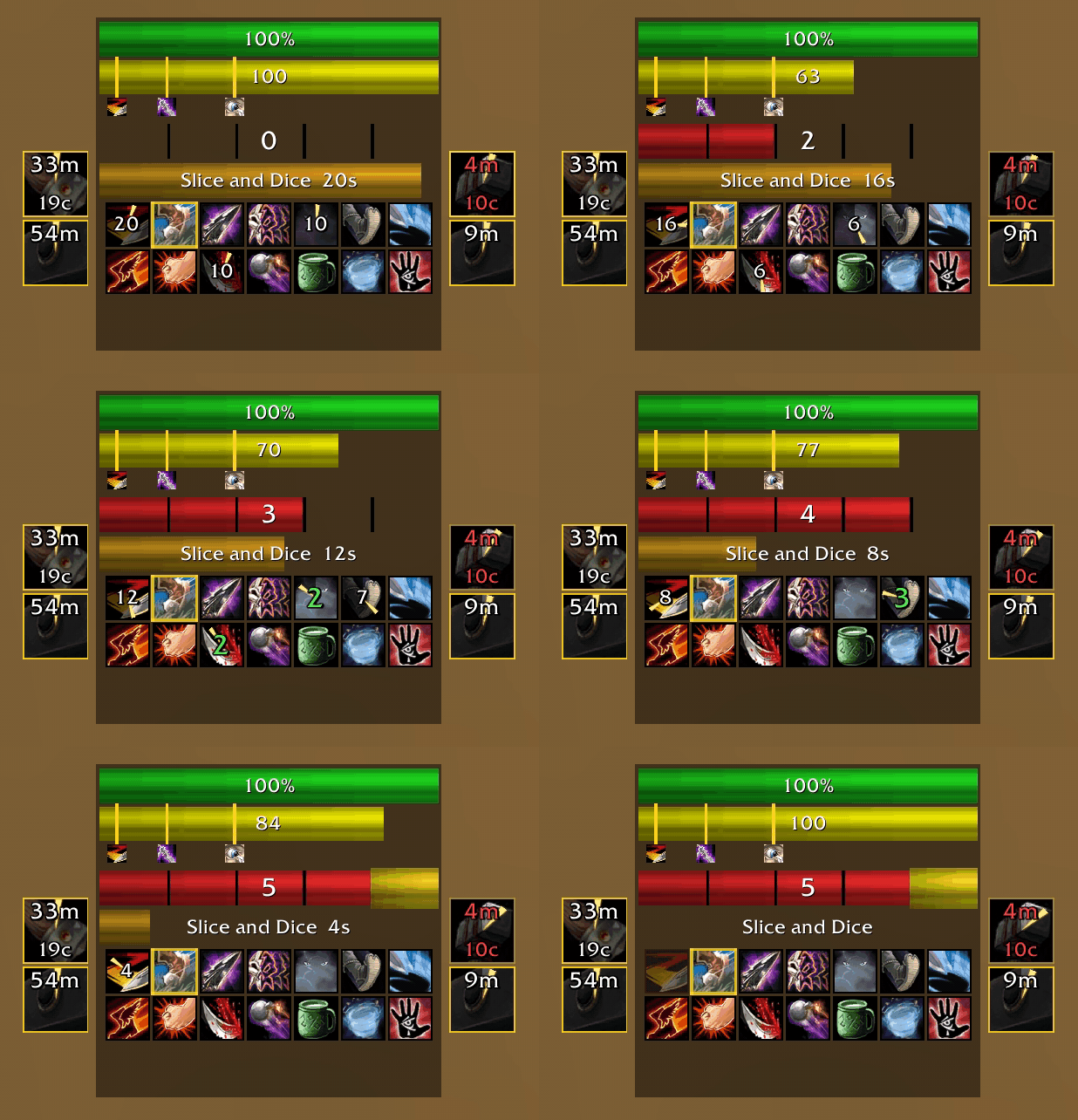
- Health, Energy, Combo Points, and a Finisher Glow ~ All essential to a Rogue's Arsenal. The bars update 20 times per second for fluid motion. The health bar alerts you when you reach 30% HP, and incoming heals can be seen at a glance. The final combo point pulses bright gold, so you never miss a full house.
- Two ways to apply and track poisons & stones ~ Want both styles at the same time? For whatever reason, that's an option you can freely choose. Simply type
/rainto your chat window to configure it your way. The poison & stone picker also shows your total poison and stone count.
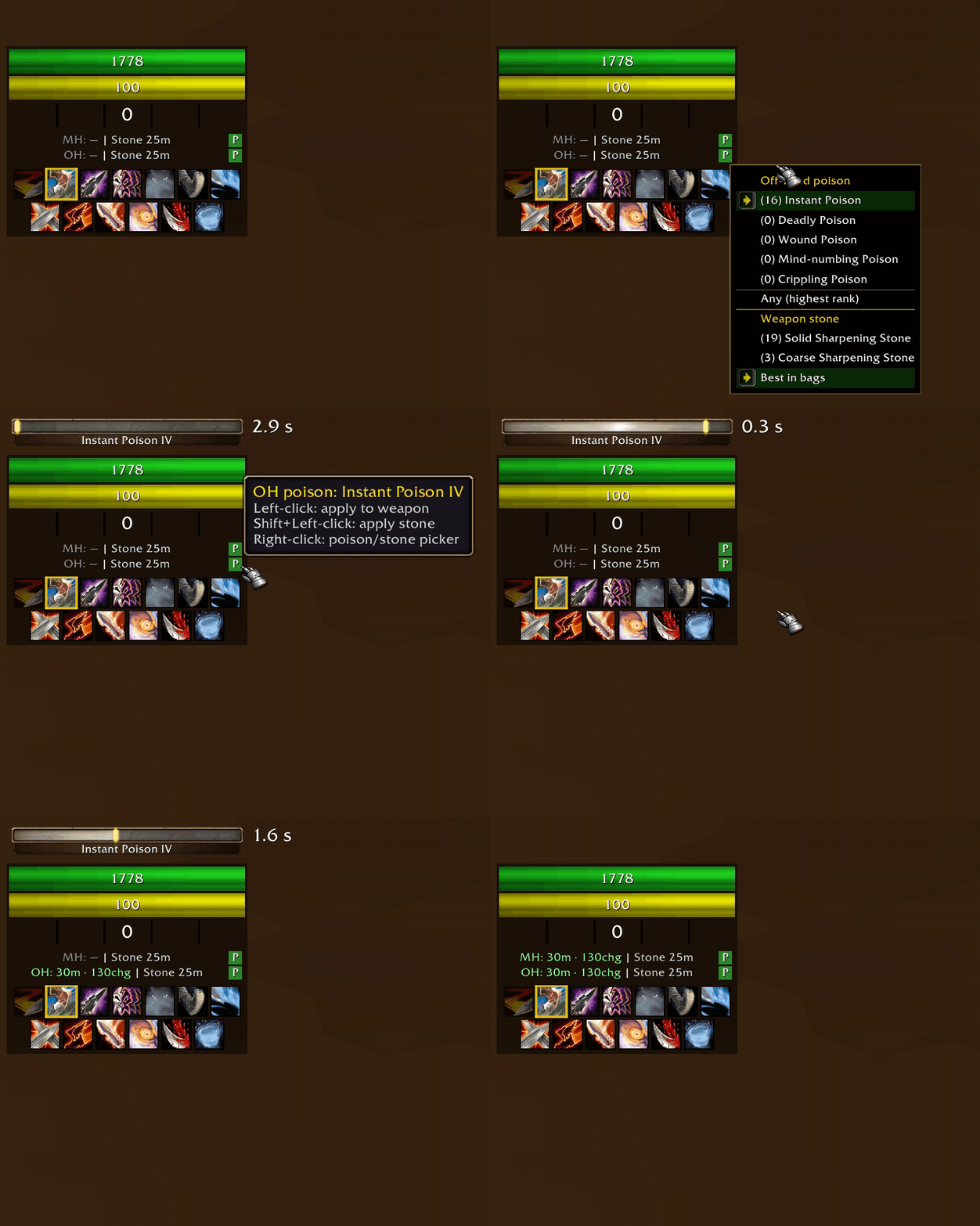
"Classic Style" shows a horizontal bar with poison timers, charges, and stone timers
Right-clicking the  icon beside a weapon opens the poison/stone picker for that weapon
Left-clicking the icon applies the selected poison to that weapon - Shift+Left-click to apply the stone
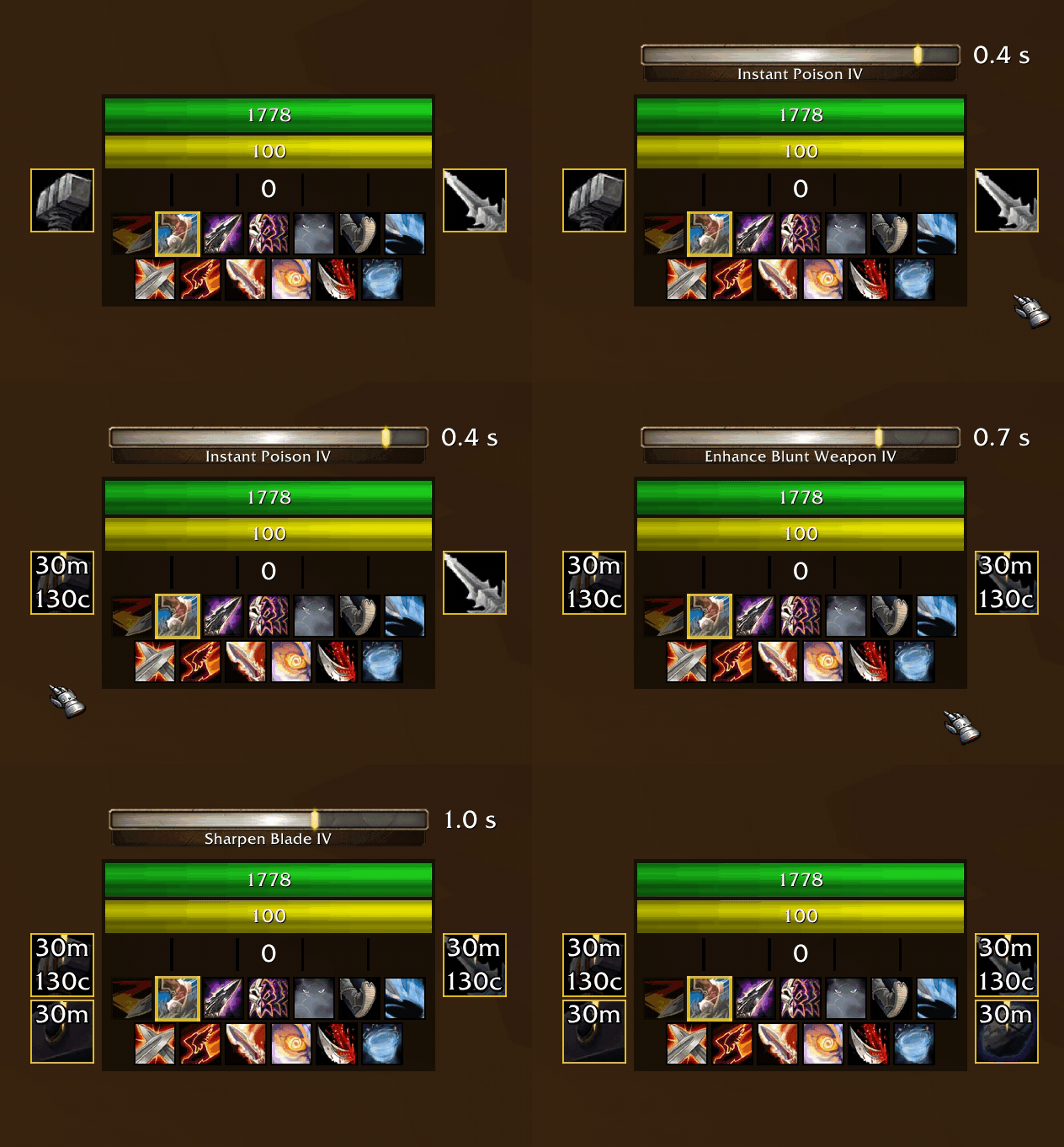
"New Style" shows each weapon as a dedicated square on either side of the frame. The same poison controls work here too. Icon sizes are adjustable under the “Bar Settings” submenu.
Right-clicking a weapon icon opens the poison/stone picker for that weapon
Left-clicking a weapon icon applies the selected poison to that weapon - Shift+Left-click to apply the stone
For either style, right-clicking opens a picker where you can choose a poison for each hand. Left-clicking applies the selected poison to that weapon, whilst Shift+Left-click applies the selected sharpening stone. RA remembers which poison was applied to each weapon, so reapplying it after expiry takes a single left-click instead of stumbling through macros or tedious menus.
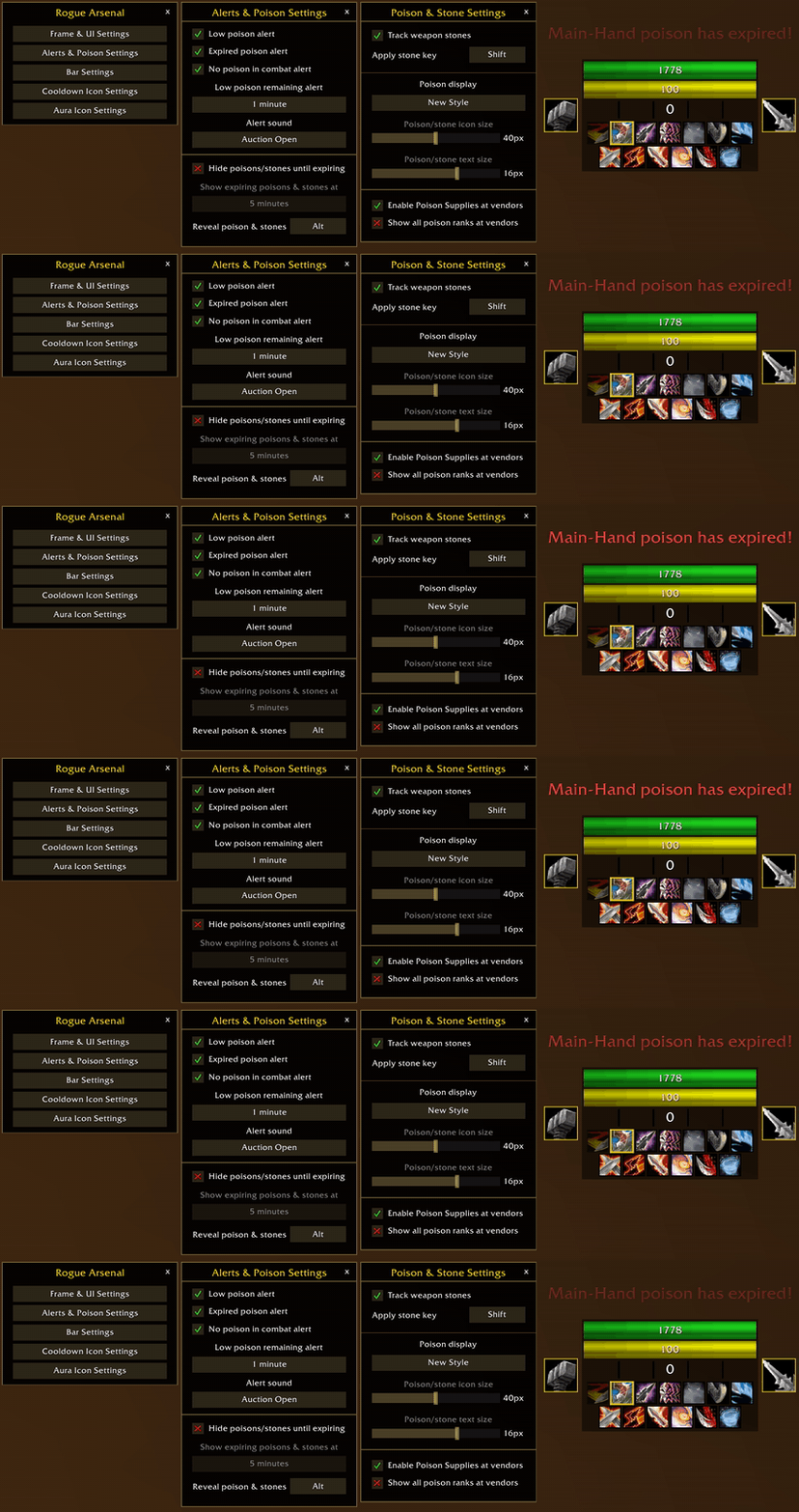
- Poison expiration alerts ~ A red warning above the frame, accompanied by an audible alert, lets you know when your poisons are expiring, have expired, or when you’re entering combat without poisons applied. The default warning is set to 1 minute and uses the “Alarm Clock (2)” sound effect. Choose from common alert sounds - or none at all - using the dropdown under “Alerts & Poison Settings.” Don’t want the alerts at all? Simply disable them with the appropriate checkboxes.
A visual and audible expiring poison alert can be used in conjunction with the in-line alerts
- Customisable bar layout ~ Don’t like the default layout or which rows are displayed? Simply type
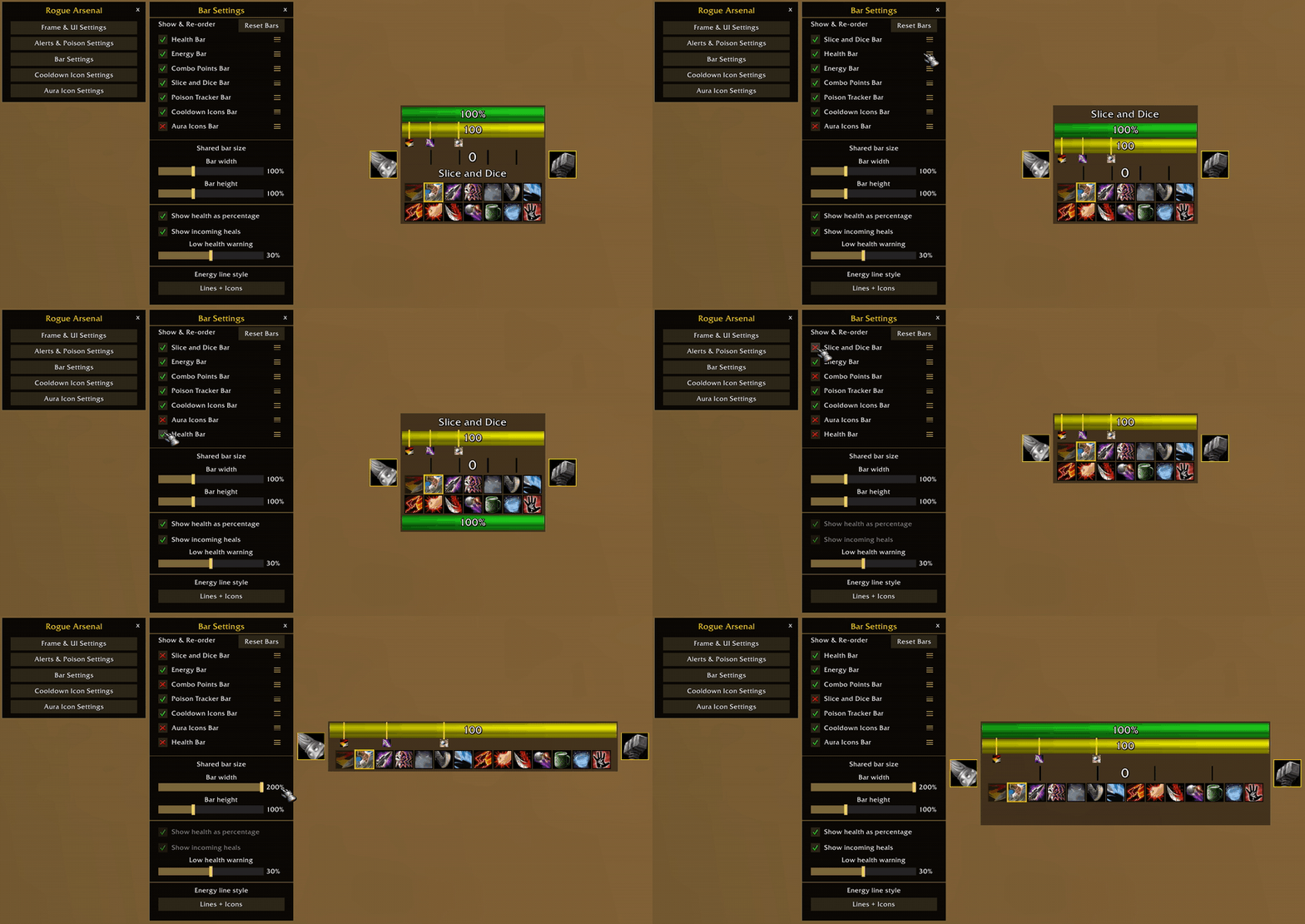
/rainto chat and select “Bar Settings” to toggle the main bars on and off. Move any row up or down by grabbing the anchor points on its right-hand side. From here, you can also change the bar width & height, as well as change the health to a percentage display rather than raw HP numbers.
Open /ra and head into Bar Settings to reorder or hide rows to suit your setup
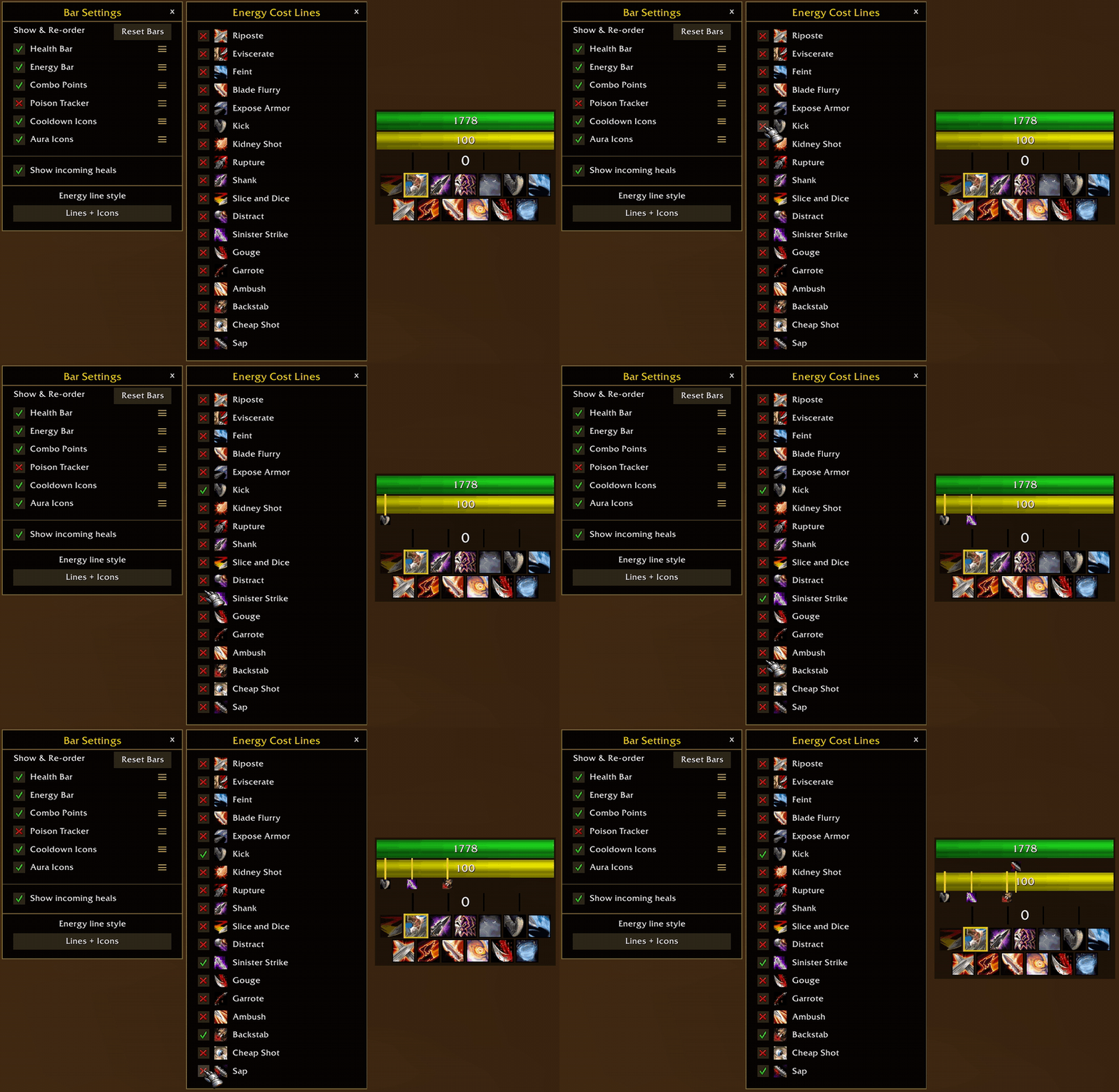
- Energy Cost Lines ~ Too busy to concentrate on how much energy you need to fire off those spells and abilities? No worries! Head over to the Energy Cost Lines under the Bar Settings tab to select what spells you want to have enabled alongside your energy bar. Enabling each spell of your choosing will show small icon marks that light up when you have enough energy, and lines to show you how much energy you need for that spell. Icons move above the energy bar only when they cannot comfortably fit below. They also update automatically when Poised reduces your next ability's energy cost!
Open /ra and head into Bar Settings to choose which spells you want enabled for the Energy Cost Lines
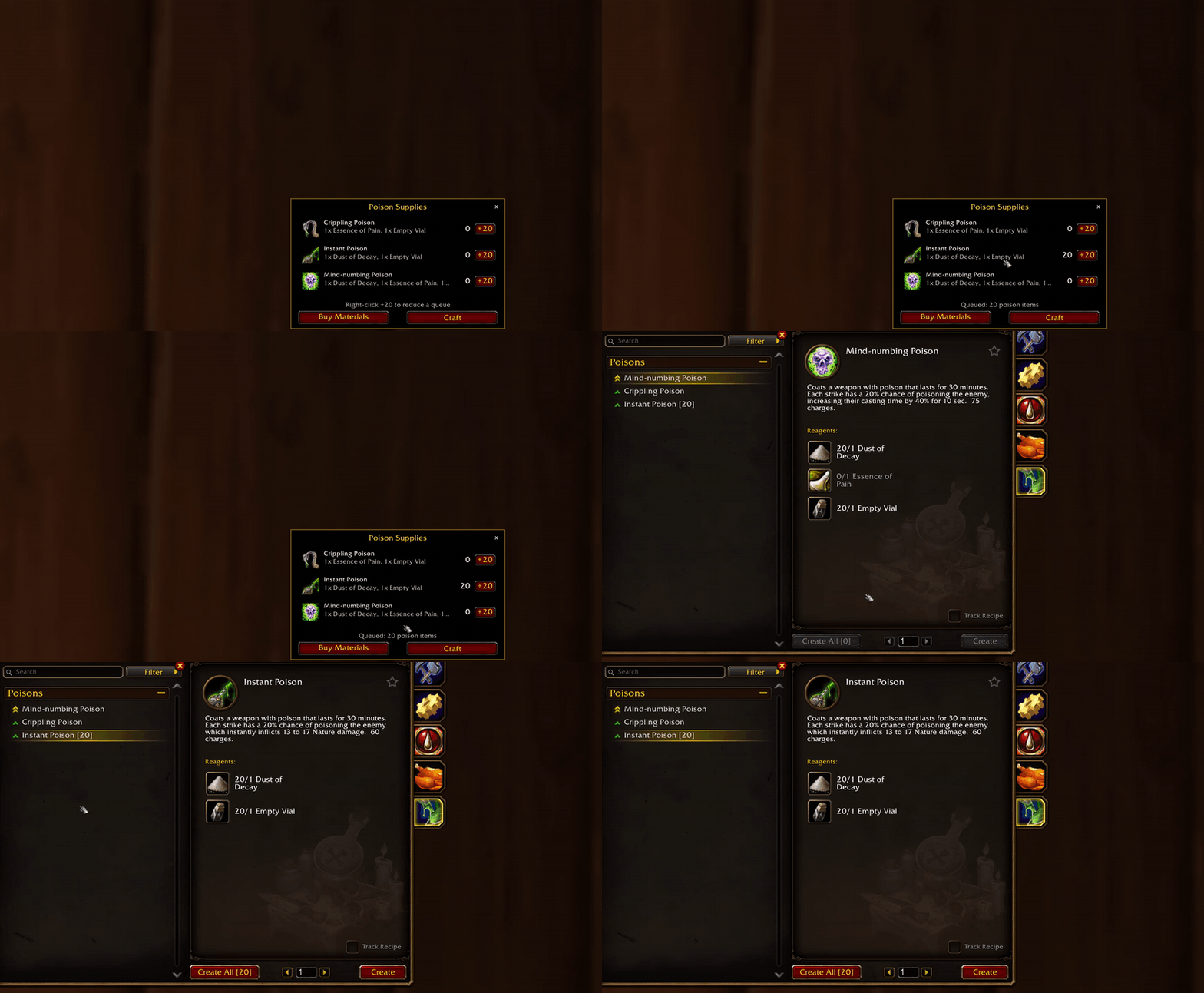
- Poison Supplies ~ Tired of trying to remember how much of each material is required to make your poisons? Visiting a merchant who stocks your poison reagents will automatically open a compact supply panel above the RA frame. Choose from your learned poison recipes, queue items in batches of 20 (or more!). Poison Supplies also includes a Flash Powder row, bag count, and purchase queue. Buy only the materials you’re missing, and then craft your queue. The panel gets out of the way when crafting begins.
Open the Poisons profession once (Default: K) so RA can learn your recipes for this feature to function correctly!
- Cooldown tracker ~ Track your Rogue abilities with a row of customisable icons. While an ability is active, its countdown turns red for the final 3 seconds to warn that the effect is ending. Its cooldown then begins, with the final 3 seconds displayed as a large green number to show that the ability is nearly ready again. Icons appear once you’ve learned the ability.
- Aura Icons ~ Track your active buffs and your debuffs on the target in two separate icon rows. Unlike Cooldown Icons, these show effects that are happening right now, rather than ability recovery. Each row can be toggled independently, with controls for icon size, icons per row, and countdown text size. Some auras may duplicate effects already covered by RA’s built-in trackers, so feel free to mix, match, or disable whichever displays suit your setup!
- Racial ability tracking ~ The cooldown row also tracks your racial abilities alongside class cooldowns. Only your own race’s abilities appear, marked “(racial)” in the "Cooldown Icon Settings" list. They can be toggled on and off and reordered just like class abilities.
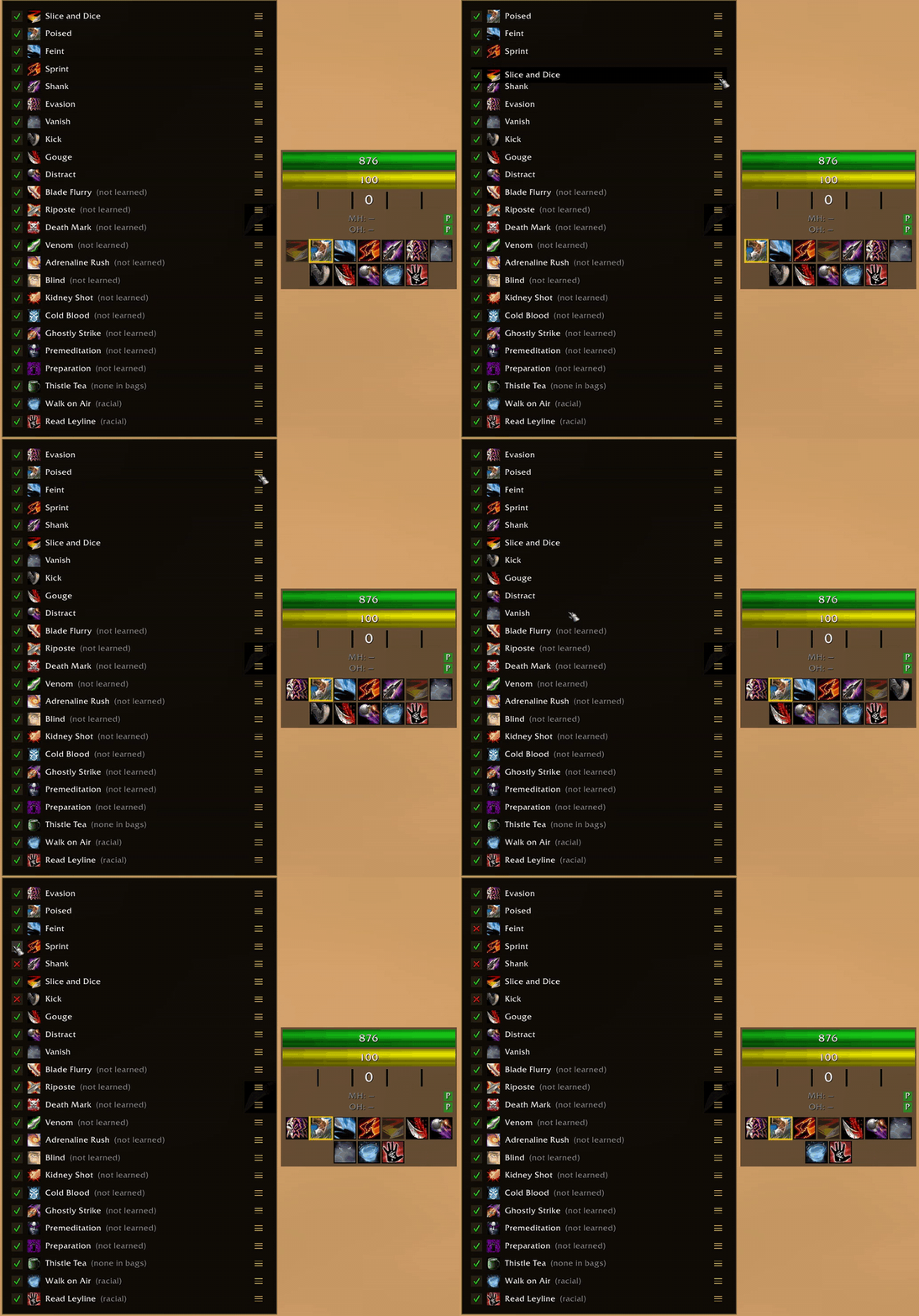
- Cooldown icon customisability ~ The “Cooldown Icon Settings” button opens a dedicated list of every tracked spell. Move any spell up or down using the grabbable anchor points on the right of each row. Hidden and unlearned spells keep their saved positions. Tick or cross individual cooldowns to keep the tracker row free of abilities you don’t use. Unlearned spells can also be hidden or reordered in advance.
- Riposte highlighting ~ Flashes and gains a pulsing gold border after a parry, including repeated parries while it remains usable.
- Show active cooldowns only ~ Keeps the cooldown row clear until an ability is active or cooling down.
- Optional insufficient-energy shading ~ Cooldown icons can turn red when you lack the required energy; disabled by default.
Use Cooldown Icon Settings to reorder spells or hide the ones you don’t want in your tracker.
- Hide Out of Combat ~ Enabled through "Frame & UI Settings", this fades the frame out shortly after you leave combat and back in when combat starts. However, that creates a knock-on effect: how do you quickly check your poisons and stones before that first dungeon pull without disabling the option entirely? My solution is a Reveal Key...
- Reveal Key ~ Hold Alt, Ctrl, or Shift - selectable in the options, with Alt as the default - to instantly reveal the frame without fading. The poison buttons remain fully clickable whilst the key is held. The reveal key can also temporarily show poison and stone icons that are hidden until expiring, even when Hide/Fade out of combat is disabled. A separate Apply stone key lets you apply your selected sharpening stone without changing your poison keybind.
- Hide poisons/stones until expiring ~ Icons can remain hidden until they reach your chosen expiry threshold.
- Adjustable out-of-combat opacity ~ The frame can fade partially rather than disappearing completely.
- International client support ~ Poisons, stones, spells, and vendor reagents are identified by ID wherever possible, keeping RA’s core features working on non-English clients.
Commands
| Command | Effect |
|---|---|
/ra |
Opens the RA settings menu. |
| /arsenal | Alternative command for opening RA settings. |
| /rec | Original command. Retained for existing users. |
Known limitations
Rogue Arsenal was written from scratch for Forever’s client, but it still has to work within certain limitations. It’s designed around the client’s “secret value” combat-data restrictions, displaying those values through the permitted API paths rather than attempting to perform arithmetic on them.
- Due to "secret value" API restrictions, many values aren't readable. Health and energy display as current values only - there's no "current / maximum" formatting available, since addons can't perform arithmetic on these values. This also won't allow us to read the SnD timer value from the WoW client, so we need to infer our own data from the combo points directly.
- Poison buttons and secure layout changes can’t be reprogrammed during combat. The poison picker therefore refuses to open mid-fight, and any affected layout changes take effect after you leave combat.
- Cooldown numbers are restricted during combat on the Forever client, so the green “cooldown finishing” tail works from learned cooldown lengths. These are seeded from base cooldowns at login and refined by real talent-adjusted readings whenever a cooldown is observed out of combat. The lengths are remembered between sessions.
- If a talent changes a cooldown after the length was learned (e.g. speccing into Elusiveness), that ability's next cooldown simply counts down white once, then self-corrects - the timer will never flash early.
I'm new to addon creation, there may be bugs or other issues I may miss during my testing.
Any questions, comments, feature requests, or problems?
Feel free to leave a comment providing constructive feedback, and I'll be happy to get back to you.
Rogue Arsenal - (Formerly RogueEnergyCombo) Team